
File Systems Analysis From ECDFP
A concise guide to file system forensics, covering FAT and NTFS structures, deleted file recovery, file carving, and practical tools like SleuthKit, Autopsy, and PhotoRec.
ON THIS PAGE / 45 SECTIONS
- File System Analysis
- Introduction
- FAT (File Allocation Table)
- The different types of the FAT file system
- what is the cluster?
- what is the cluster size?
- what is the diffrent betwen cluster and sector?
- How is the number of sectors per cluster determined?
- examble:
- How many clusters could each type of FAT file system represent?
- How is the cluster size determined in Windows?
- FAT Structures
- Reserved Area
- Boot Sector
- examble:
- FSINFO sector
- byte table from FSINFO sector
- examble:
- How do you calculate the free space?
- FAT Area
- FAT32 Entry
- FAT entry examble:
- Data Area
- Root Directory
- Short File Name Structrue
- Long File Name
- Long File Name Structure:
- File Deletion
- New Technology File System (NTFS)
- Core NTFS Features
- Journaling
- Alternate Data Streams (ADS)
- Volume shadow copy
- NTFS File Structrue
- Volume Boot Record
- Master File Table $MFT
- The reserved entries in the MFT file
- MFT entry
- MFT File Reference Number
- NTFS Attributes
- File And RAM Slack
- File Carving
- The SleuthKit Tools
- Other Tools
- Thanks for reading
File System Analysis
Introduction
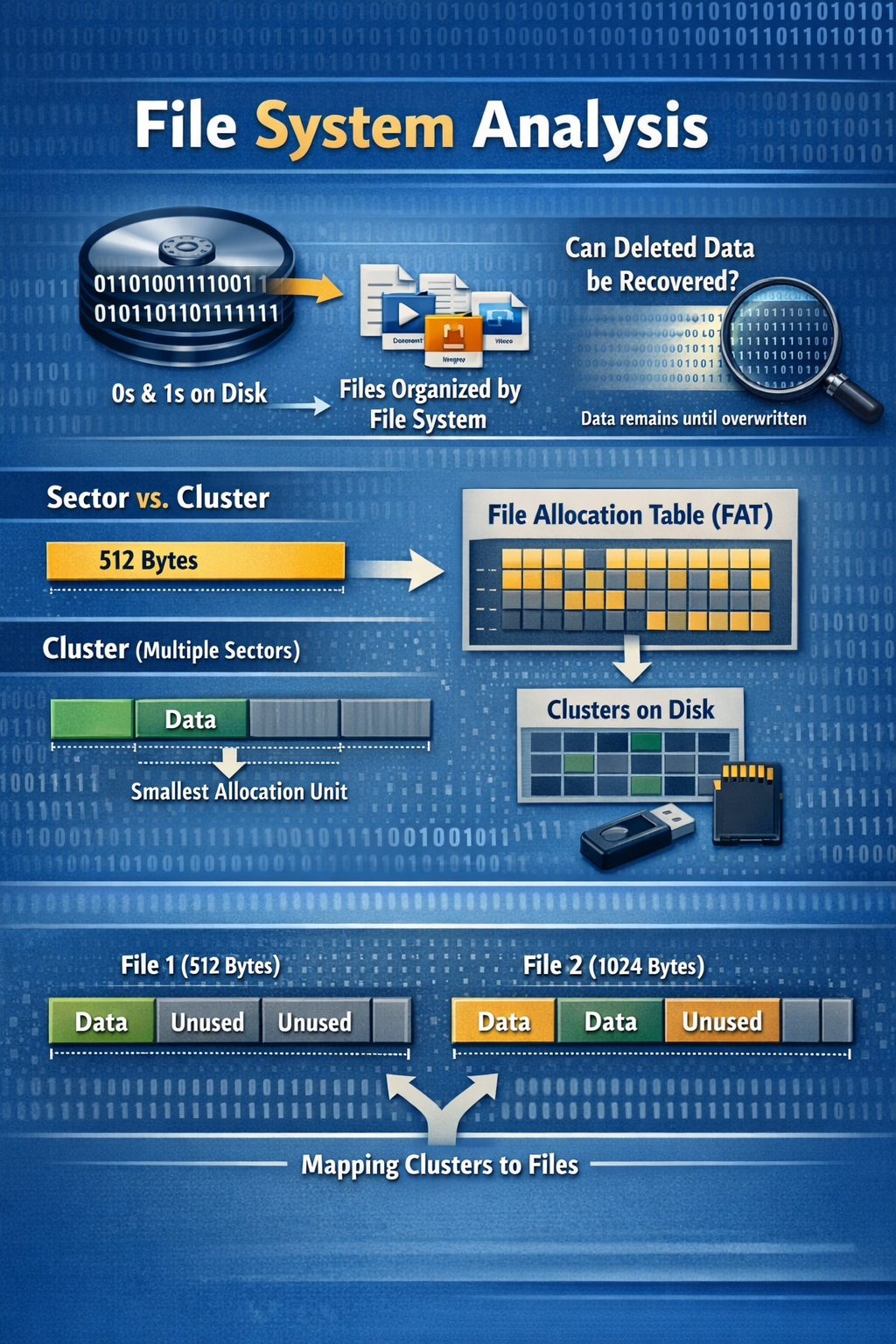
As we all know, data is stored on the disk as 0s and 1s, but in order for it to be understandable to humans, there must be a file system responsible for organizing and storing the data properly.
Regardless of the previous example, For accurate file analysis, an investigator must understand how files are represented in a file system and how to interpret raw disk data (0s and 1s) using file system structures to extract metadata and locate the file’s actual content for proper analysis.
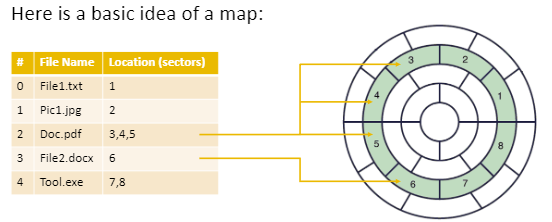
Can deleted data be recovered? When a file is deleted, most file systems typically remove or mark as deleted the metadata entries that reference the file’s data blocks and mark those blocks as free. The underlying data may remain recoverable until it is overwritten (and on SSDs, TRIM may reduce recoverability). However, there is still some ambiguity: how do we know which 0s and 1s belong to which sector, and which sector belongs to which file? We need something similar to a map to determine that.
FAT (File Allocation Table)
FAT file system is one of the oldest file systems, dating back to MS-DOS. It is essentially an allocation/index table that tracks which clusters belong to each file and which clusters are free. FAT is commonly used on removable media and has not disappeared; it is still widely used with USB drives and SD cards to this day.
The different types of the FAT file system
- FAT 12
- FAT 16
- FAt 32
- Extended file allocation table (exFAT)
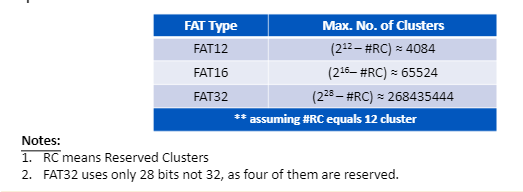
The difference between these numbers is the number of clusters that can be addressed.
what is the cluster?
A cluster is the smallest allocation unit that can be used by a file.
what is the cluster size?
minimal —> 1 sector = 512 byte
up to the limit of the file system used
what is the diffrent betwen cluster and sector?
Cluster is a logical unit but sector is a physical unit
How is the number of sectors per cluster determined?
There are two ways the number of sectors per cluster can be set:
-
Automatically (default) during formatting, based on the disk/partition size; the chosen value is stored in the boot record.
-
Manually by specifying a cluster size during formatting (if the formatting tool allows it); it is also recorded in the boot record.
Note:
If, in a file system, each cluster contains 4 sectors, the sectors within that cluster will be contiguous, which helps make reading more efficient. However, the clusters allocated to the same file are not necessarily contiguous across the disk.
examble:
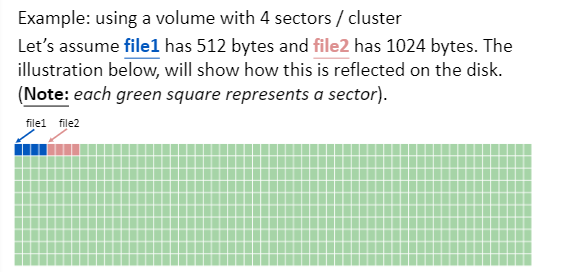
In the previous example, we see that File 1 has a size of 512 bytes and File 2 has a size of 1024 bytes. In both cases, one cluster is allocated to each file. We can see that for File 1, there are 3 unused sectors, but they are still allocated to the file. Similarly, for File 2, there are 2 unused sectors, but they are also allocated to that file.
How many clusters could each type of FAT file system represent?
How is the cluster size determined in Windows?
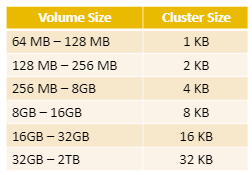
In Windows, the default cluster size is determined based on the volume size during formatting. As the volume size increases, Windows increases the cluster size to reduce overhead, limit FAT table growth, and help maintain performance, as shown in the following table.
FAT Structures
The FAT12/16/32 file system consists of three main areas: the reserved area, the FAT area, and the data area.

Reserved Area
The size of the reserved area differs from FAT 12 /16 /32, as shown in the following table.
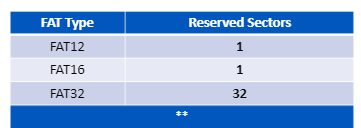
Reserved Area in FAT 12/16
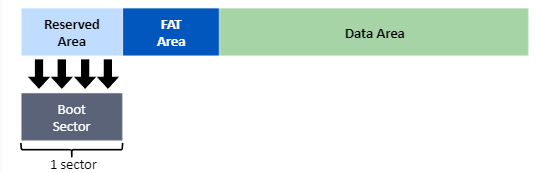
Reserved Area in FAT 32
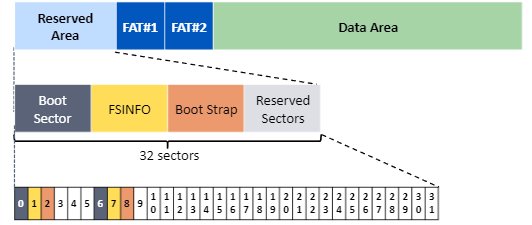
- sectro 0 & 6 are used fro volume boot sector
- sector 1 & 7 are used for file system information
- sector 2 & 8 are used for bootstrap code
- The remaining sectors are reserved for file system use and may include backups (e.g., a backup boot sector), depending on the system configuration.
Boot Sector
boot sector for FAT12/16
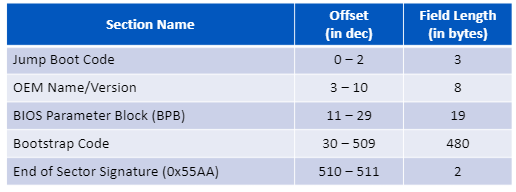
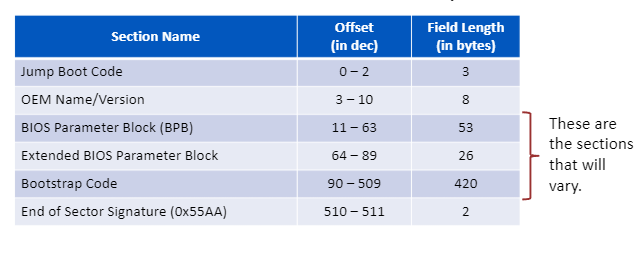
Note: the sizes for BPB & EBPB & bootstrap code varies based on the operating system and versions.
boot sector for FAT32
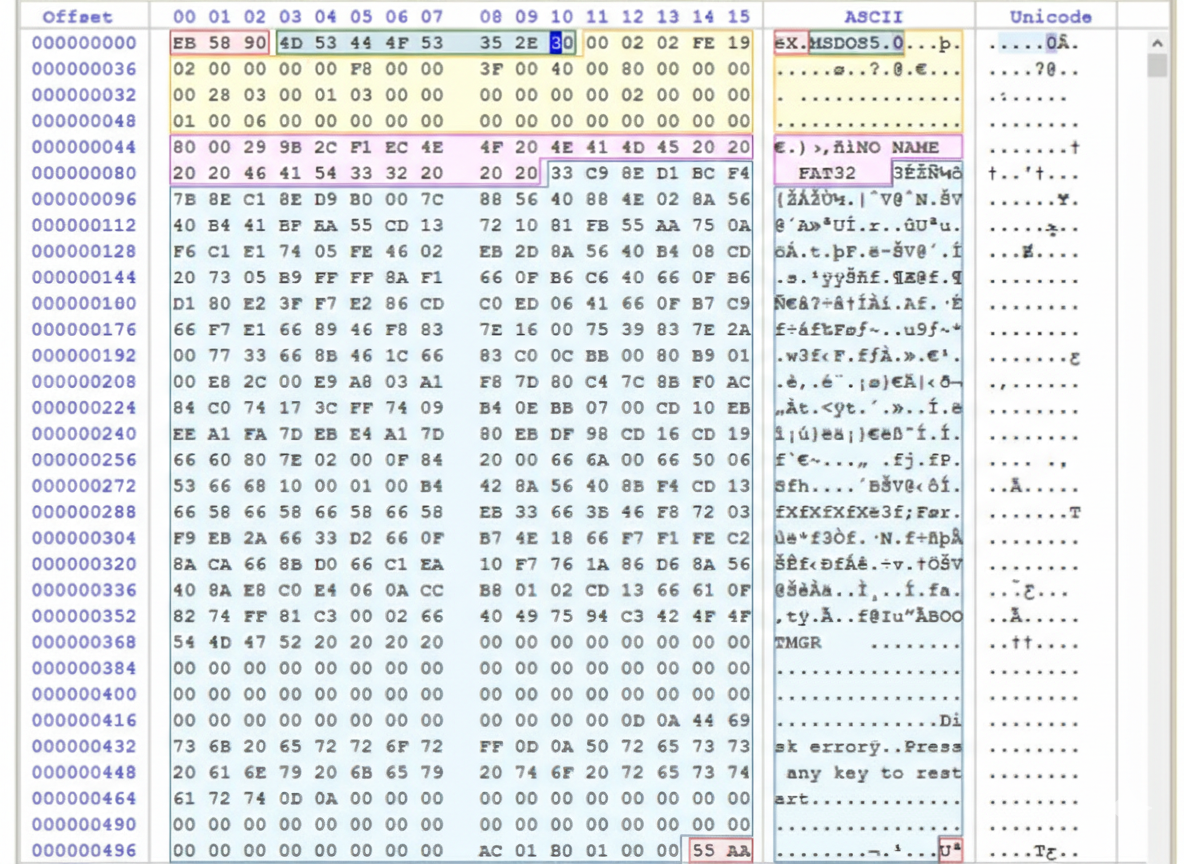
examble:
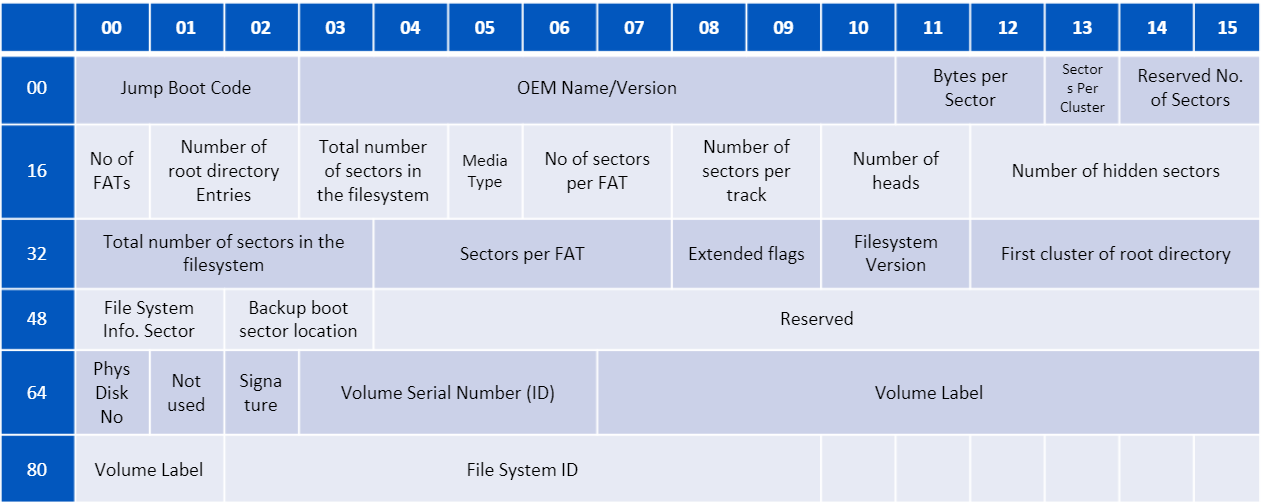
You can determine what each byte means from the following table
FSINFO sector
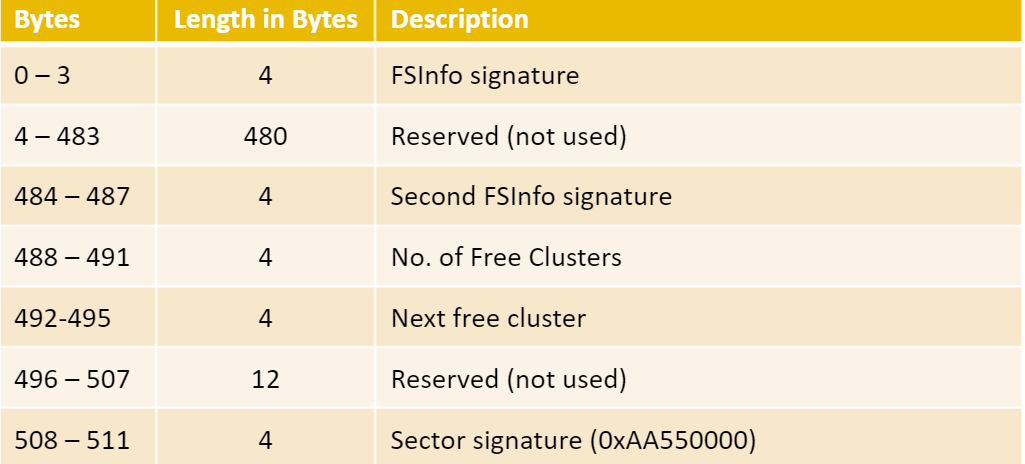
FSINFO is typically located at sector 1 (right after the boot sector), as specified in the boot sector. It contains the number of free clusters and the next free cluster, which helps speed up allocation and reduces the need to scan the entire FAT table each time.
byte table from FSINFO sector
examble:
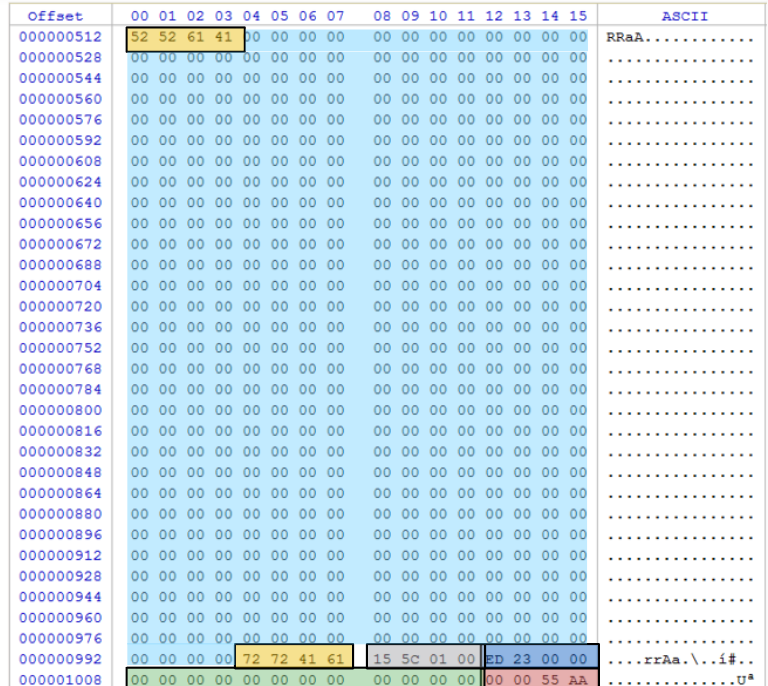
- 0-3 —> FSInfo signature =
52 52 61 64= RRaA - 4-483 —> Reserved
- 484-487 —> secound file signature =
72 72 41 61= rrAa - 488-491 —> num of free clusters =
15 5c 01 00convert to little endian and check to decimal value = 89109 - 492-495 —> next free cluster =
ED 23 00 00convert to little endian and check to decimal value = 9197 - 496-507 —> Reserved
- 508-511 —> sector signatrue =
00 00 55 AA
How do you calculate the free space?
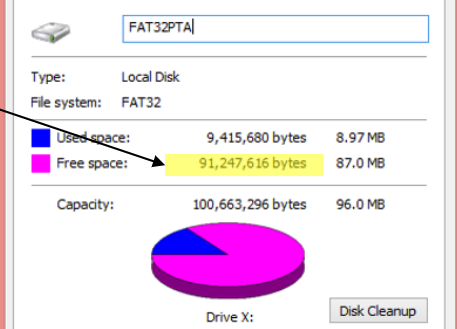
Now we know the available free clusters, and to calculate the free space we need to know how many sectors there are per cluster. From the first image , we can determine the sectors per cluster, and the calculation is as follows:
free-space = sector per cluster * num of free cluster * 512
free-space = 2 * 89109 * 512 = 91,247,616 byte
FAT Area
The FAT table is what maps clusters within the file system.
FAT32 Entry
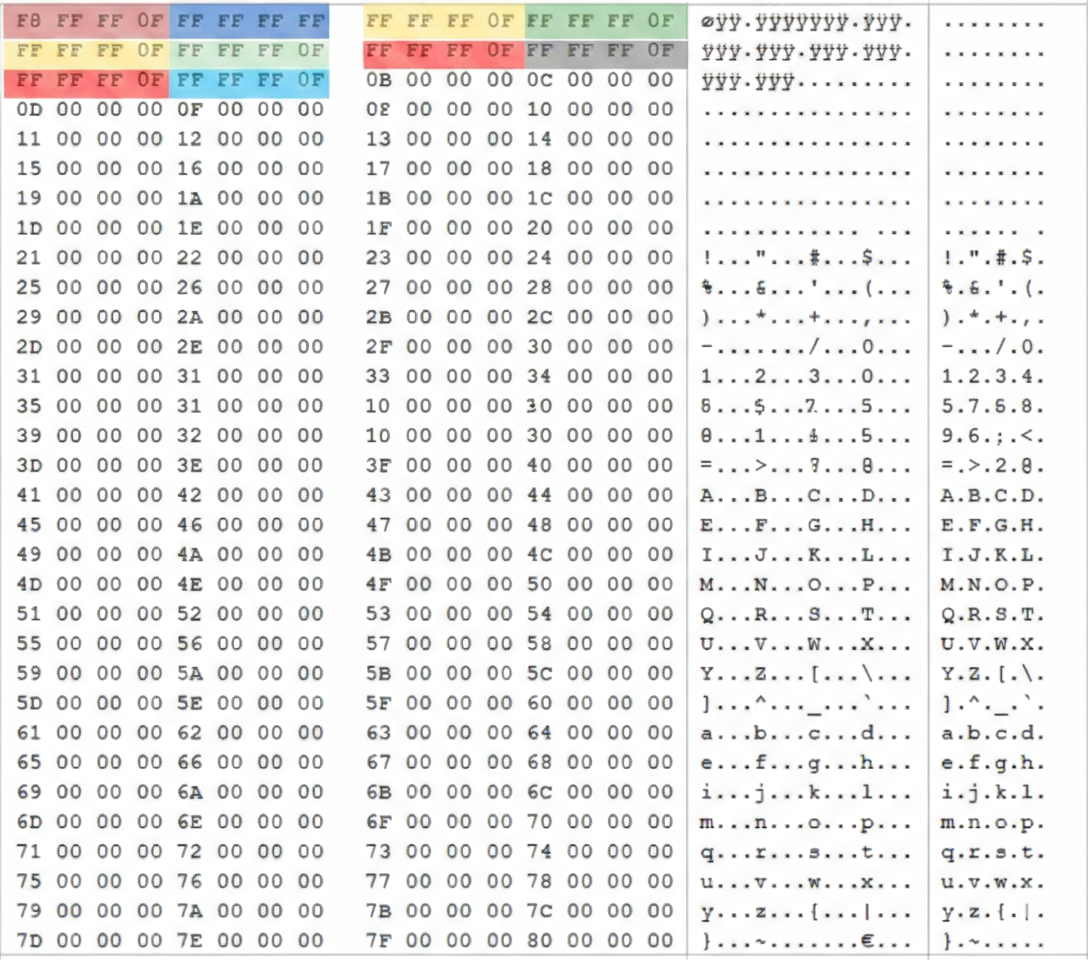
Each entry in the FAT table consists of 4 bytes, which indicate the cluster’s status as follows:
- free cluster —>
00 00 00 00 - reserved cluster —>
00 00 00 01 - chain of cluster —> from
0 00 00 02to0F FF FF EFand indicate to next cluster - reserved Values —> from
0F FF FF F0To0F FF FF F6 - bad cluster —>
0F FF FF F7 - file in 1 cluster or end of cluster chain —> from
0F FF FF F8to0F FF FF FF
Note: the first 8 byte in FAT area is reserved first 4 reserved to Media-Type and second 4 to Volume-Status
FAT entry examble:
Data Area
All of the above is part of the file system area, while the data area is the part that contains the actual file content.
How do you reach the data area location?
Data Area Location = num of reserved sector + FAT1 + FAT2
Data Area Location = 6654 + (2*769) = 8192
Root Directory
The root directory is usually located at the beginning of cluster 2, and it is also specified in the boot sector entry.
FAT32 file system have two types of directory entries
- short file name (SFN)
- long file name (LFN)
Short File Name Structrue
The SFN contains the file name in only 11 bytes: 8 bytes for the name and 3 bytes for the extension If the name is shorter than 8 characters, it is padded with spaces.
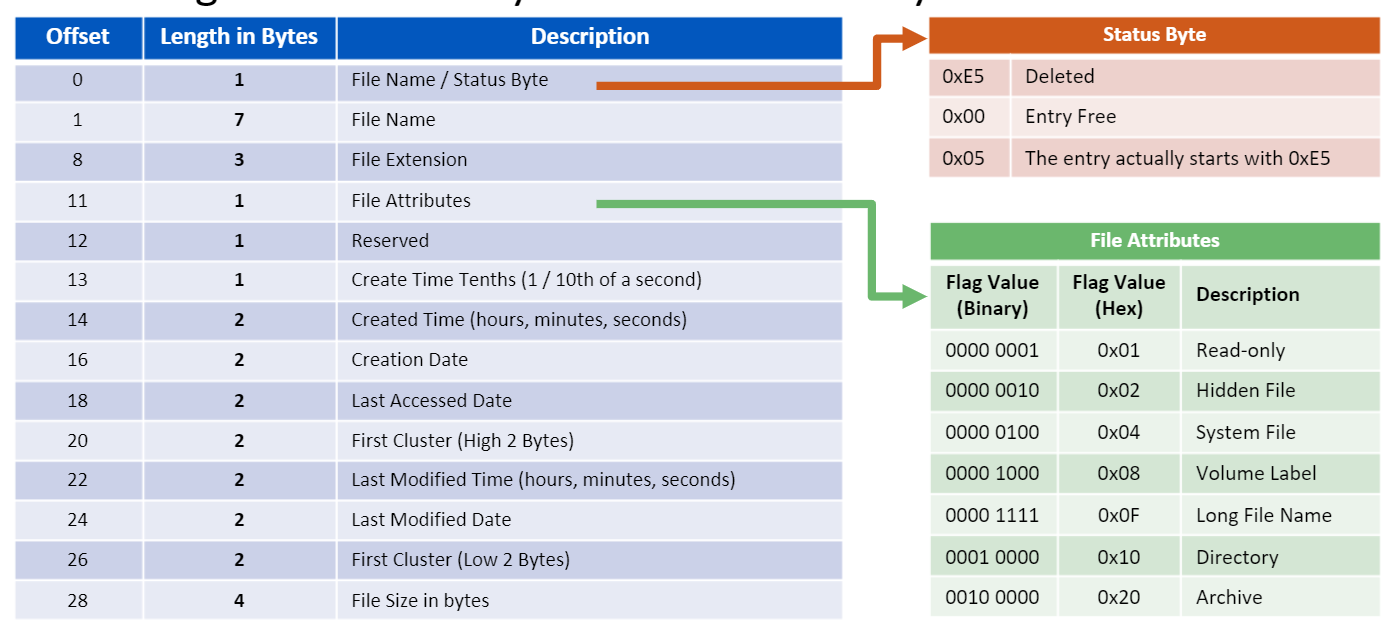
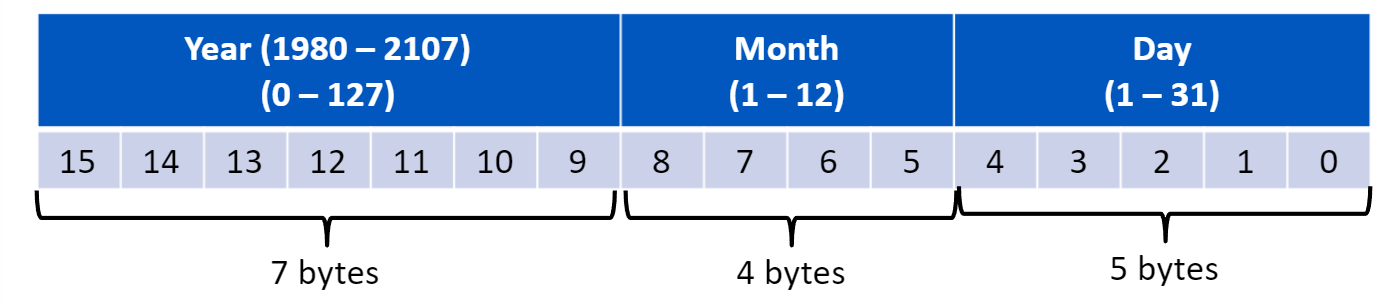
SDate byte format:

Long File Name
LFN can support a name up to 255 characters. Each character is represented by 2 bytes (Unicode), and the name is split across multiple LFN entries, where each LFN entry stores 13 characters.
However, an SFN is still required even when an LFN exists. In this case, the SFN is typically generated using part of the file name (often the first 6 characters), followed by a “~” and a number, to uniquely identify the file when multiple names would otherwise produce the same 8.3 alias.
Long File Name Structure:

File Deletion
When a file is deleted in FAT, the first byte of the SFN name is replaced with 0xE5 to mark the directory entry as deleted, and the file’s content may remain on disk until it is overwritten by new data.
New Technology File System (NTFS)
NTFS was developed to enhance file management, support large file storage beyond the 4GB limitation of FAT32, and improve data integrity by reducing the risk of file corruption during power failures. Unlike the FAT file system, which divides the disk into boot sectors, a FAT table, and a data area, NTFS treats almost everything on the disk as a file, including metadata.
Core NTFS Features
- Journaling
- Scalability
- Hard Links
- Alternate Data Streams (ADS)
- File compression
- Sparse files
- Volume shadow copy
- Transactions
- Security
- Quotas
- Reparse points
- Resizing
Journaling
$LogFile It records all operations performed on files before they are executed, so that in the event of a power outage or crash, the system can be restored to a consistent state.
Alternate Data Streams (ADS)
A feature that enables storing hidden data within a file without changing its apparent size in standard file listings.
Volume shadow copy
A feature that generates point-in-time snapshots of files and volumes, even while they are actively in use.
NTFS File Structrue
NTFS relies on several metadata files that define its fundamental structure, including $Boot, $LogFile, $MFT.
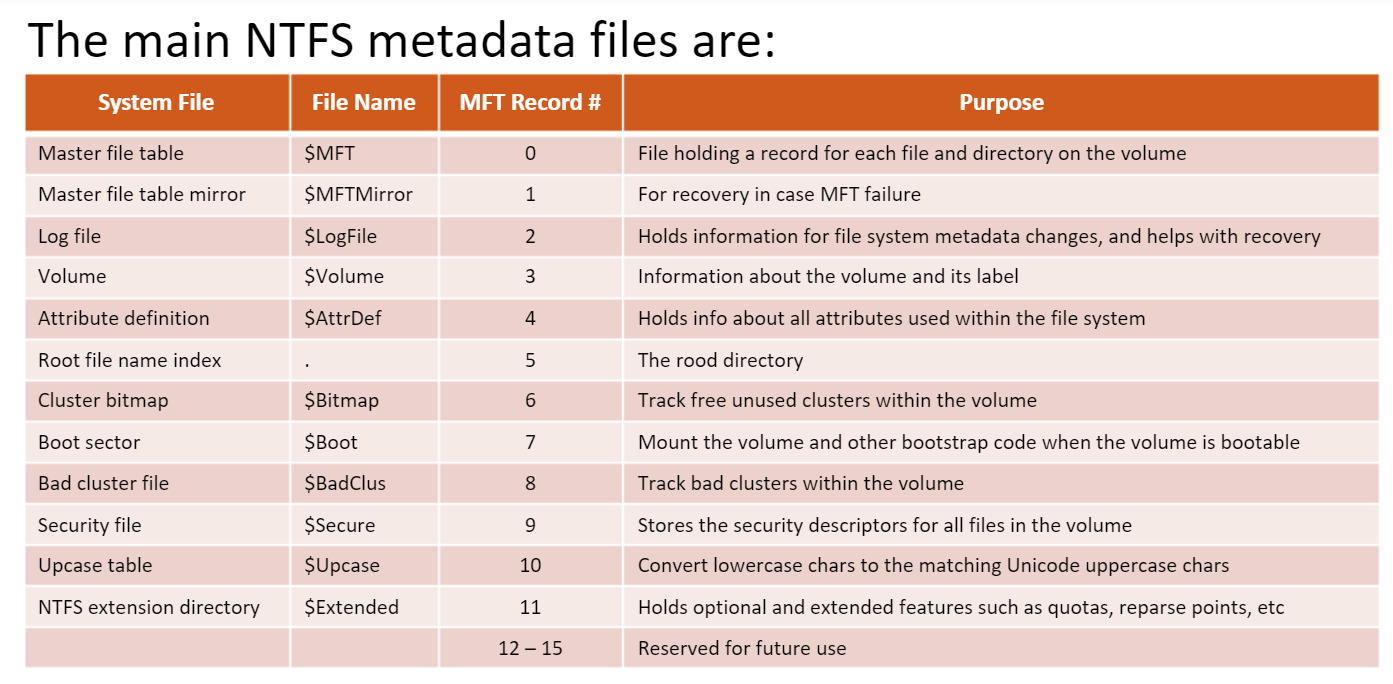
Volume Boot Record
the $Boot file holds the bootstrap code for bootable volumes, or an error message if the volume is not bootable.
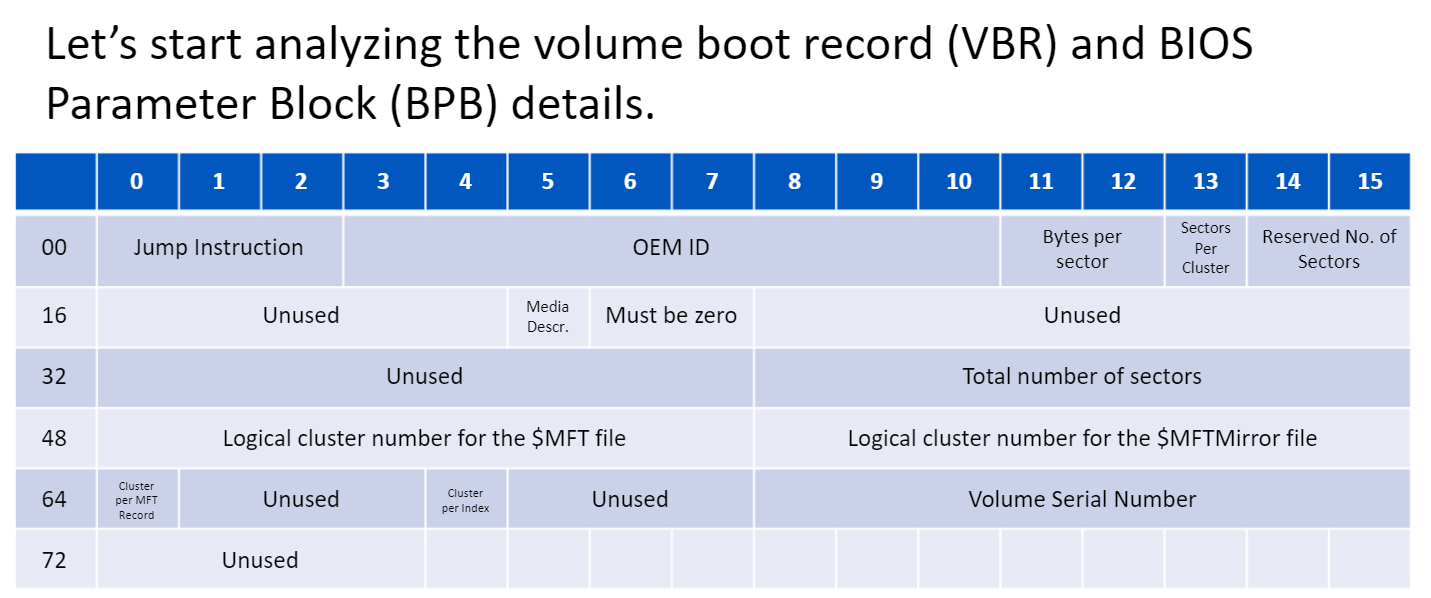
Master File Table $MFT
The Master File Table (MFT) is composed of multiple entries, where each entry stores metadata about a file on the disk, including its name, timestamps, and file path.
The reserved entries in the MFT file
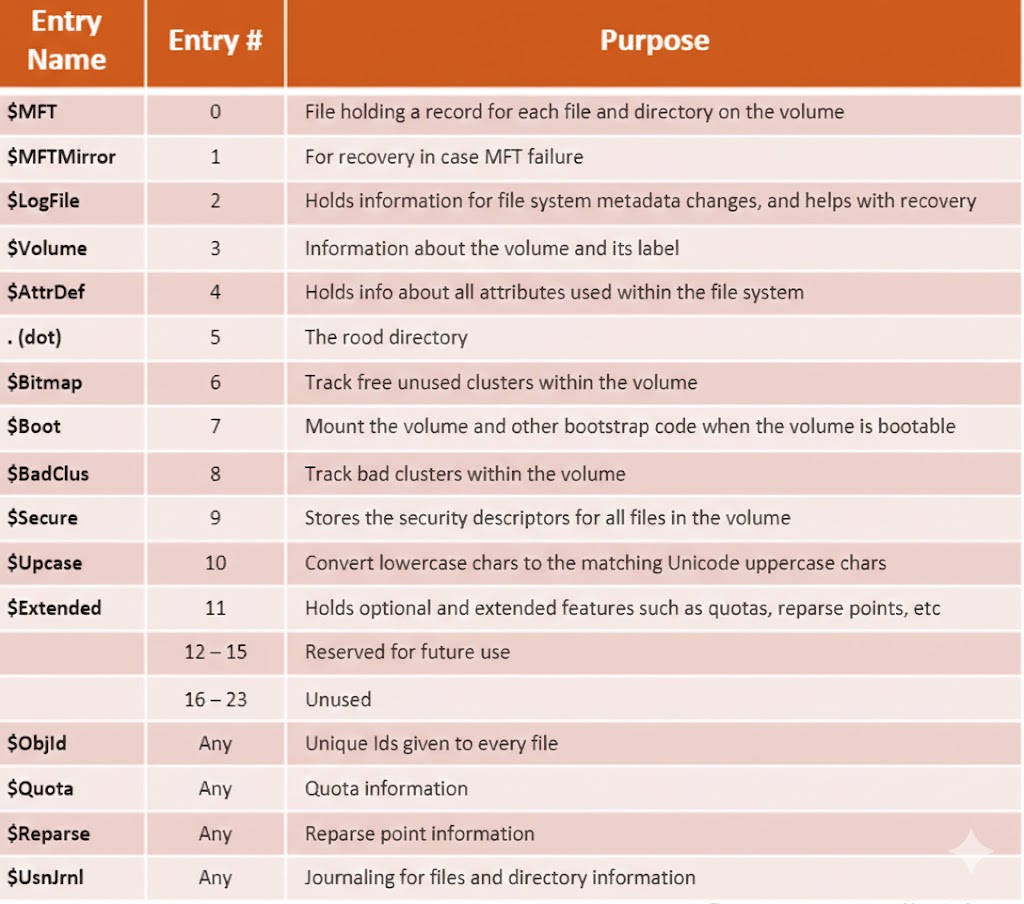
MFT entry
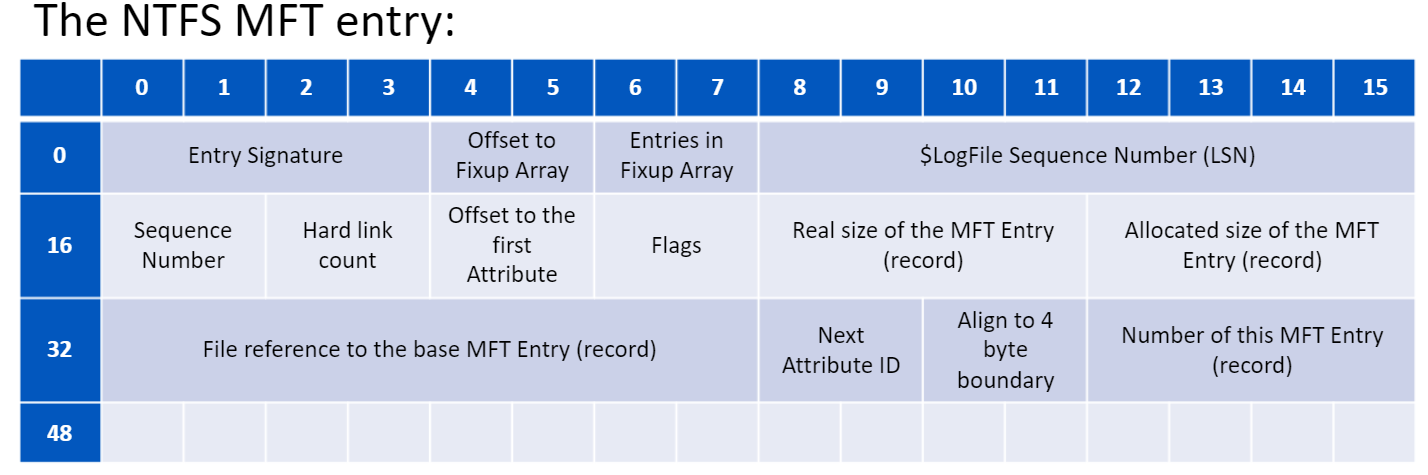
Fixup Arrays
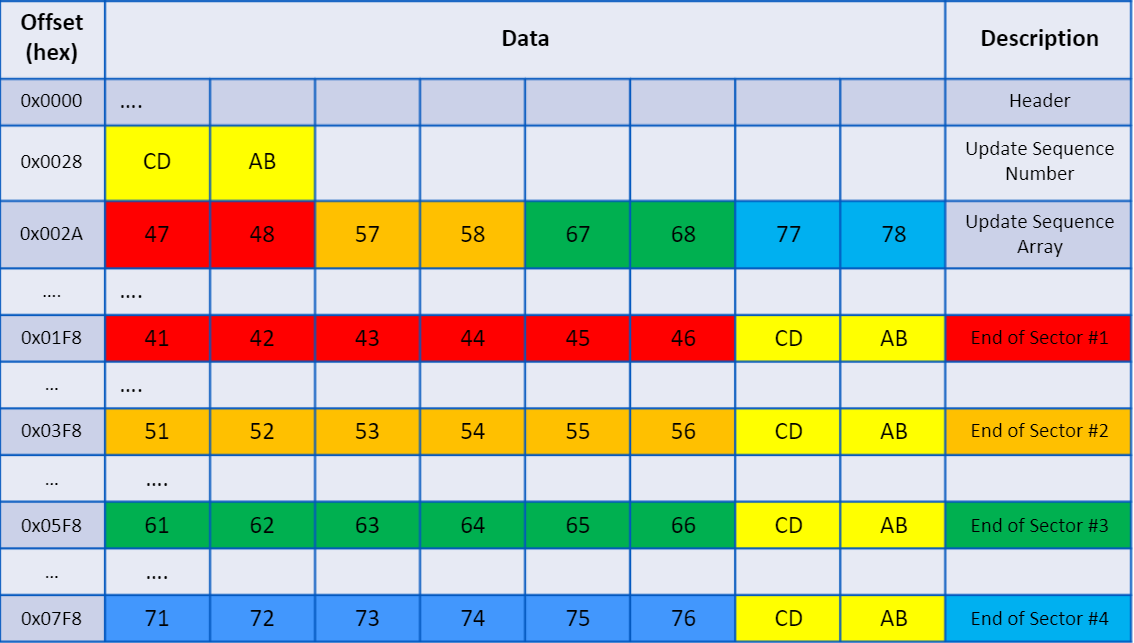
Fixup arrays are used to detect sector corruption within multi-sector structures (such as MFT records). A 2-byte Update Sequence Number (USN) is written to the end of each sector, allowing the file system to verify data integrity and identify potential corruption.
examble
MFT File Reference Number
The MFT File Reference Number is a unique value assigned to each file record, used to uniquely identify files. It is also referenced in system components such as $LogFile and the USN Journal.
NTFS Attributes
-
Resident && Non-Resident If a file is small (typically under ~700 bytes), its data is stored directly inside the MFT record as a resident attribute. For larger files, NTFS uses non-resident attributes that store run lists pointing to the clusters where the file data is physically located.
-
Standard Information Attributes
The Standard Information attribute stores essential file metadata, including timestamps (creation, modification, access), security descriptors, and other core file properties.
- File Name
The File Name attribute stores the file’s name along with a reference to its parent directory, which is used to reconstruct the file path.
File And RAM Slack
- File Slack
File slack is the unused space in the last allocated cluster of a file. For example, if the cluster size is 4 KB and the file occupies only 3 KB, the remaining 1 KB is file slack.
Note:if a deleted file is partially overwritten by a smaller file (e.g., 2 KB), only the corresponding portion of the original data is overwritten. The remaining unallocated space may still contain residual data, which can potentially be recovered during forensic analysis.
- RAM Slack
RAM slack was eliminated in modern systems because it posed a data leakage risk. Previously, unused space within a cluster could be padded with residual data from RAM, which might include sensitive information such as passwords.
File Carving
File carving is a forensic technique employed to reconstruct and recover deleted files directly from raw disk or memory data or network traffic, without relying on file system metadata.
The SleuthKit Tools
- mmls
mmls disk.img
## To gather information about the disk partitions- fsstat
fsstat -o 2048 disk.img
## To gather information about file system- fls
fls -o 2048 disk.img
## displays files and folders (including deleted)- tsk_recover
tsk_recover -o 2048 disk.img output_folder/
## to recovery all files- blkls
blkls -o 2048 disk.img > unalloc.bin
## to extract all unallocated space
Other Tools
- Autopsy
- testDisk To repair a corrupted disk
- photoRec to recover deleted file
- Fiwalk extract metadata from all files
- formost to recover deleted file
- scalpel to recover deleted file
- bluk_extractor extract important data from disk, memory, network, like enc keys, emails, ips, urls
Thanks for reading
Keep the investigation open.
Have another interpretation, a correction, or a useful trace? Reach out on Discord.
Continue on Discord