Disk forensics notes from ECDFP
ECDFP notes covering disk forensics fundamentals, CHS/LBA addressing, MBR and GPT structures, boot records, and partition analysis with practical hex examples.
ON THIS PAGE / 12 SECTIONS
- ECDFP Notes
- Disk forensics
- examble:
- The difference between Volume and partition
- Disk Partitioning
- Master Boot Record (MBR)
- GUID Partition Table (GPT)
- GPT Layout
- Partition entry
- examble:
- Hidden Protected Area (HPA) && Device Configuration Overlay (DCO)
- Thanks for reading, and stay tuned for the upcoming sections
ECDFP Notes
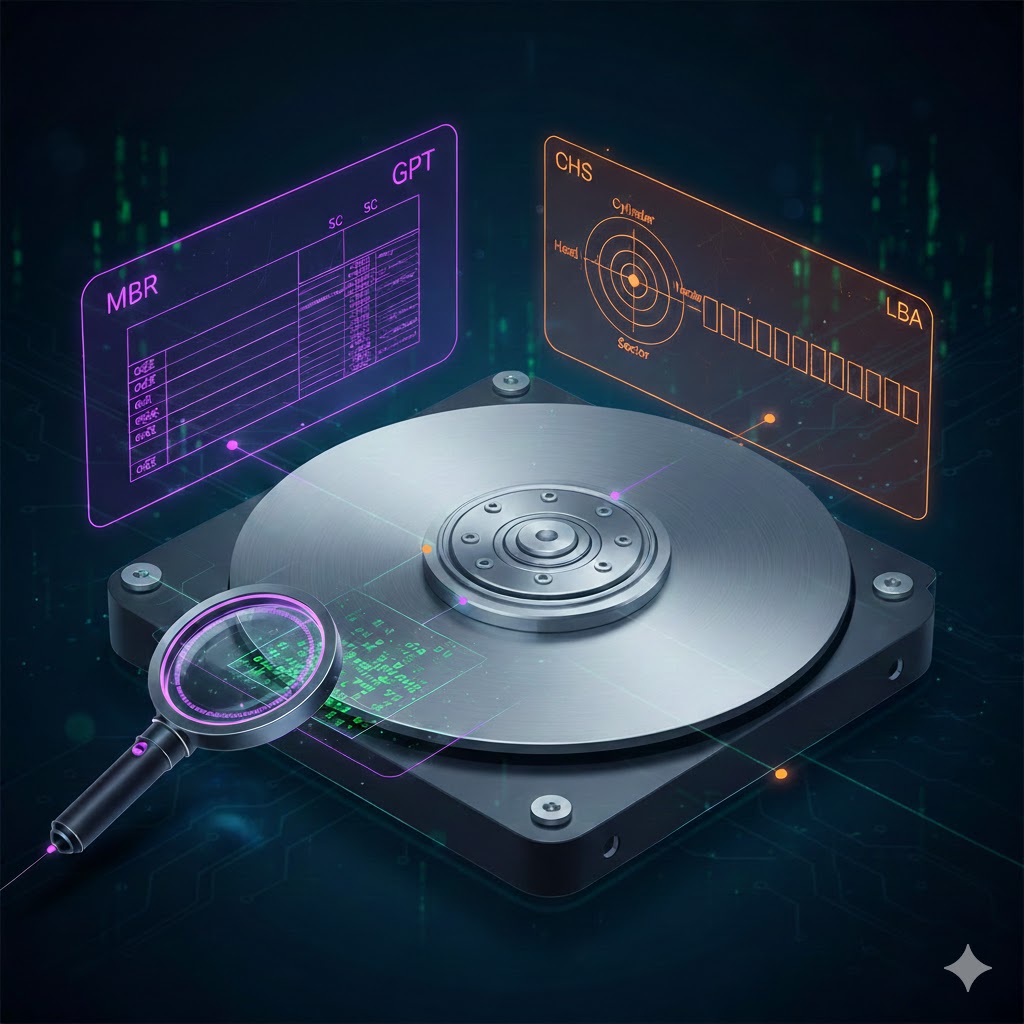
These notes are a personal study guide for ECDFP (Digital Forensics), focusing on the fundamentals of disk forensics and disk structures. They aim to explain core concepts in a clear and practical way, starting from low-level disk addressing (CHS and LBA) and moving through volumes, partitions, and boot mechanisms.
The notes cover both MBR and GPT partitioning schemes, including real-world hex examples, partition tables, headers, GUIDs, and boot-related structures such as MBR, VBR, and Protective MBR.
Disk forensics
how i can access specific sector in hard disk?
There are two disk addressing methods used to reference sectors on a disk: Cylinder-Head-Sector (CHS), which is a legacy physical-style addressing method, and Logical Block Addressing (LBA), which is a logical addressing method.
examble:
you need to access a firest sector in disk using CHS
H = 0, max is 256
S = 1, max is 63
C = 0, max is 1023
CHS addressing is that three bytes are used for addressing
C -> 10 bits
S -> 6 bits
H -> 8
examble to access first sector hex 00 01 00 binnary 0000 0000 0000 0001 0000 0000 access the end sector hex ff ff ff binnary 1111 1111 1111 1111 1111 1111
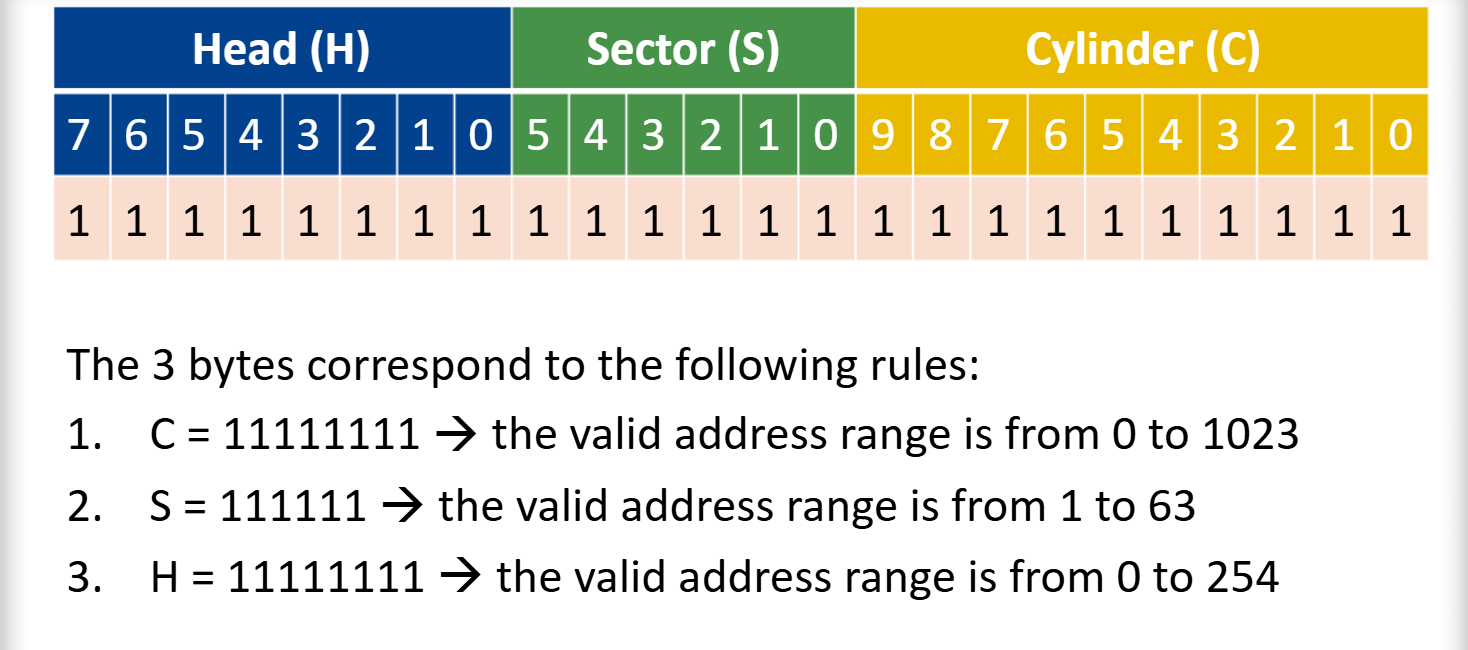
now, if we want to calculate the total hard drive space, it would be as follows:
c * s * h * sector size = capacity
1023 * 63 * 255 * 512 = 8,422,686,720 (7.8 GB)
If the disk size is larger than 8 GB, we will use LBA.
Due to the limitations of CHS, it was necessary to switch to LBA. However, some files still require CHS, so there must be a correlation between both. Note: CHS starts from index 1, while LBA starts from index 0.
LBA = (((cylinder * head per cylinder) + head) * sector per track) + sector -1
Question: consider a disk with 16 heads per cylinder and 63 sector per tracks what will the LBA address be for CHS address(2,3,4)
LBA = (((2 * 16) +3 ) * 63) + 4 -1 = 2208
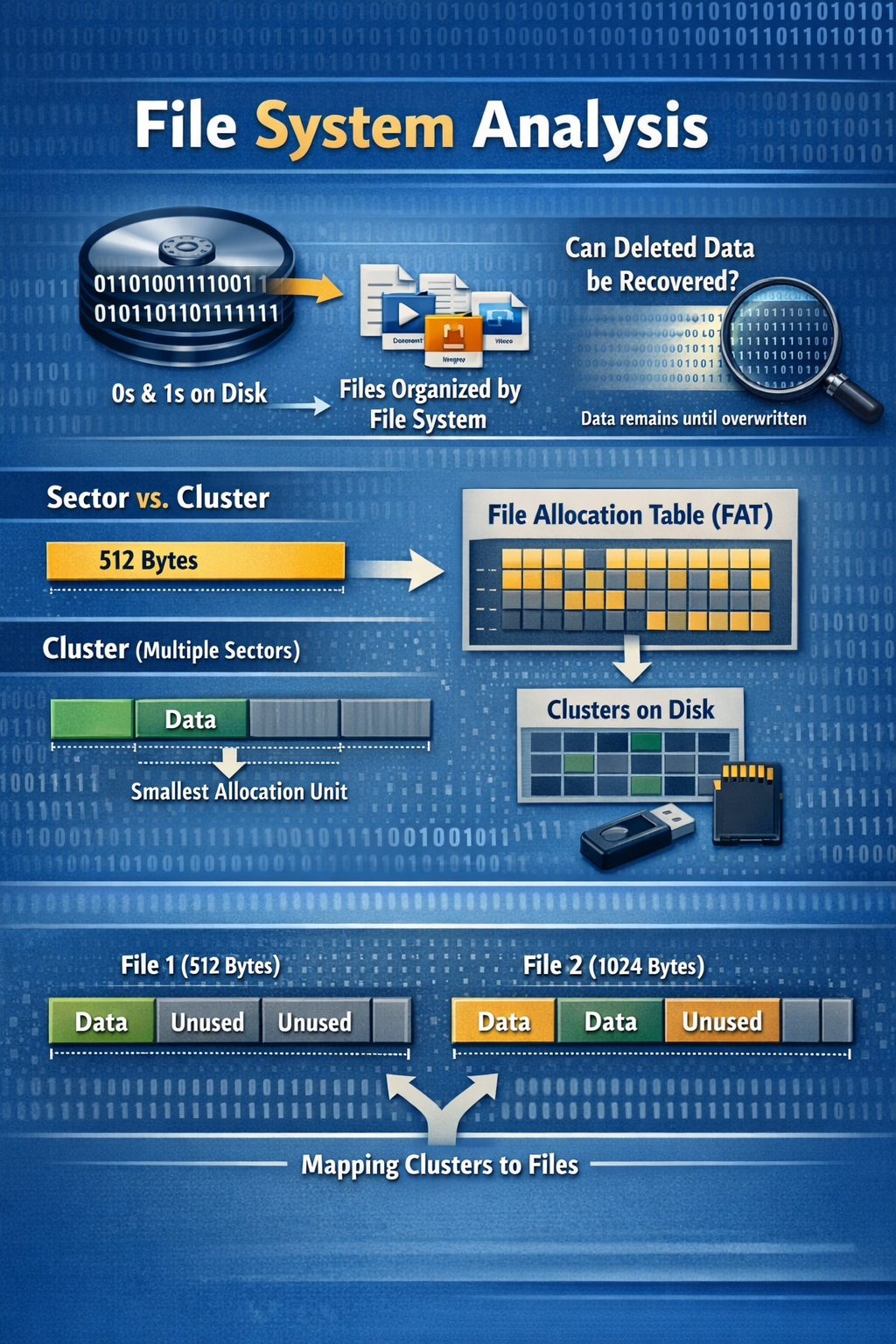
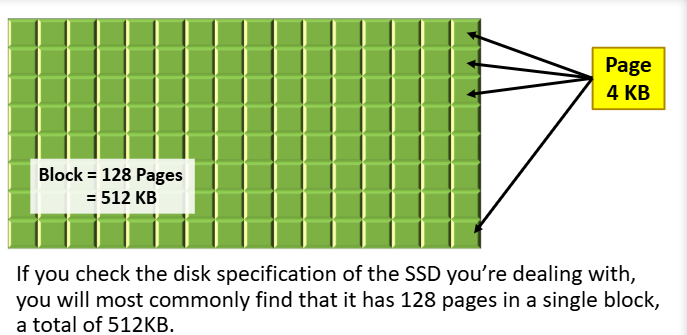
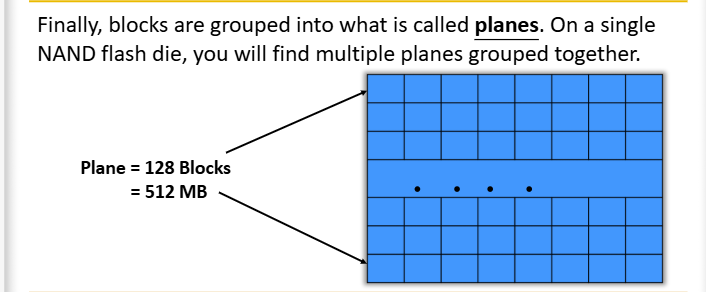
Note: A sector is the smallest unit of an HDD that can be read from or written to, and its size is 512 bits. However, in SSDs, the page is the smallest unit that can be read or written, and its size is 4096 bytes. A group of pages together is called a block, which consists of 128 pages, each with a size of 4096 bytes. Therefore, the total block size can be calculated as follows.
block = 128 * 4096 / 1024 = 512 KB
The difference between Volume and partition
volume: is a collection of sectors that don’t have to be physically consequential (contiguous), but they are logically consequential
partition: is a collection of consequential number of sectors
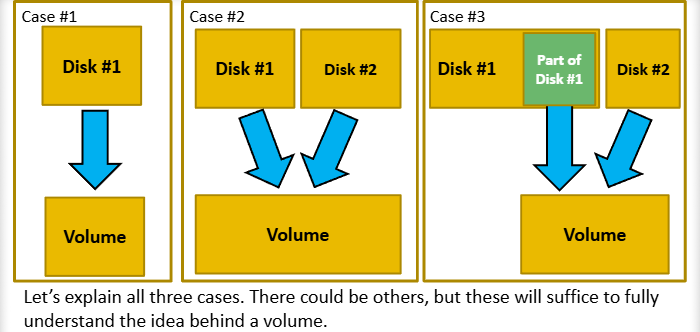
Case #1:
we have a single diskand no partitions which means we have a single volume
Case #2:
we have a two separate disk drivers but combining them together in one volumem, we created a one big drive
Case #3:
we have two disk drives, but we used only a partition from disk drive number one and the whole disk number two in order to create a drive that is the size of the partition plus the second disk
summarize: A volume is a logical storage unit that can be backed by an entire disk, a single partition, or multiple disks and partitions.
Now you must be asking: How does my system understand where each logical partition exists on the disk?
The answer is very easy: use an addressing table!
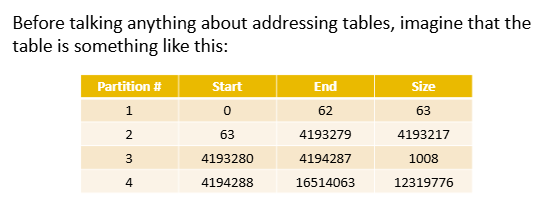
Disk Partitioning
Master Boot Record (MBR)
MBR is the first sector of a disk CHS = 0,0,1, LBA = 0, that contains boot code, a partition table for up to four primary partitions, and a signature, and it is used to initiate the boot process in BIOS-based systems.
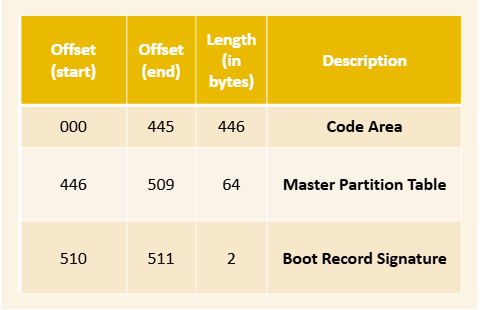
Boot code
The boot code is 446 bytes and it was previously used to start the operating system.
Modern operating systems today require booting code that could not fit the 446 bytes limit so the boot code section in the MBR today is used to locate the active partition that is marked bootable and call what is known as the Volume Boot Record (VBR).
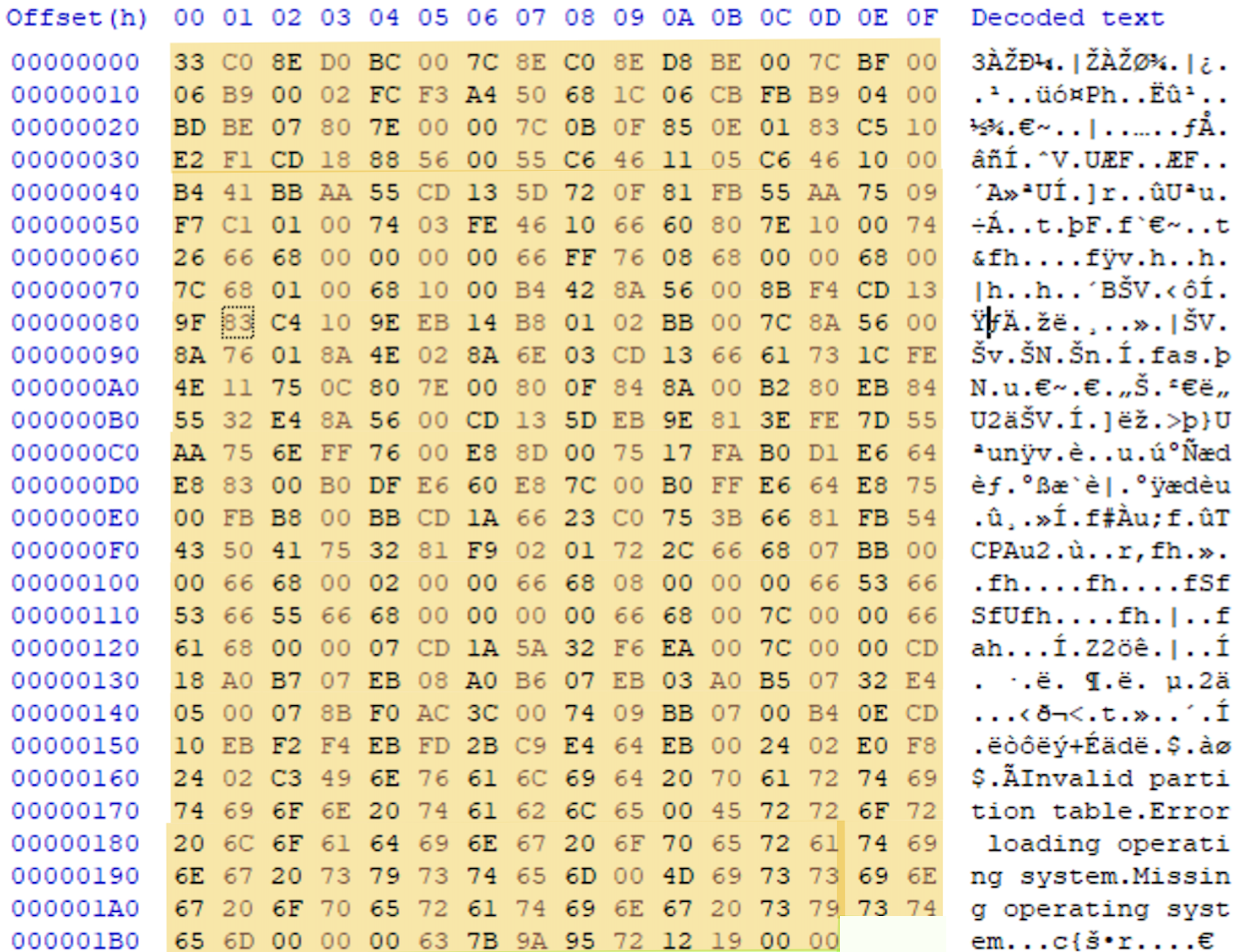
The difference between MBR and VBR
The MBR is located in the first sector of the disk and is responsible for locating the active partition, while the VBR is located at the beginning of a partition and contains file system–specific boot information used to load the operating system.
Partition Table
the HDD can be divided into only 4 primary partitions.
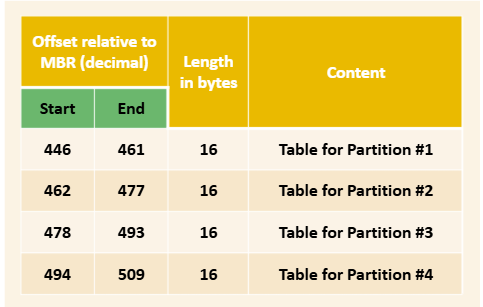
Explanation of the 16 bytes of the partition entry in the partition table:
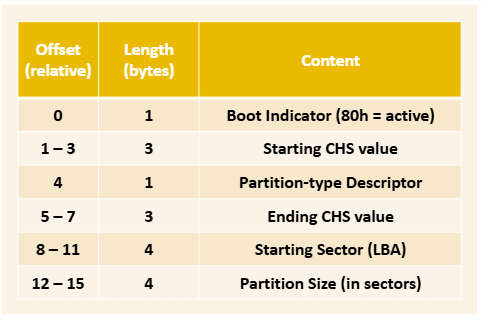

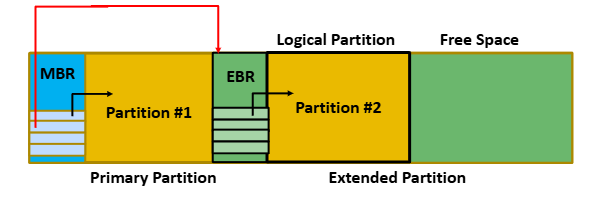
In an MBR-partitioned disk, if more than four partitions are needed, one primary partition can be designated as an extended partition, which acts as a container for multiple logical partitions, as follow
GUID Partition Table (GPT)
GPT overcomes the limitations of MBR by supporting disks larger than 2 TB and allowing up to 128 partitions. Unlike MBR, GPT does not require extended partitions. It also improves reliability by maintaining a backup copy of the partition table and header at the end sector of the disk, whereas MBR represents a single point of failure.
GPT Layout
- Protective MBR
- GPT Header
- Partition Table
- Partitions
- Backups from GPT header and partition table
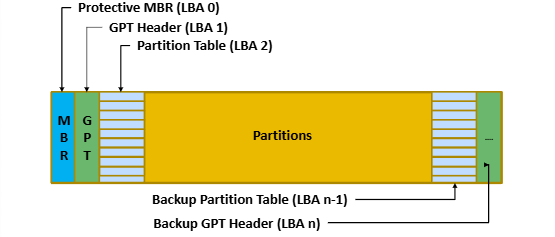
Protective MBR
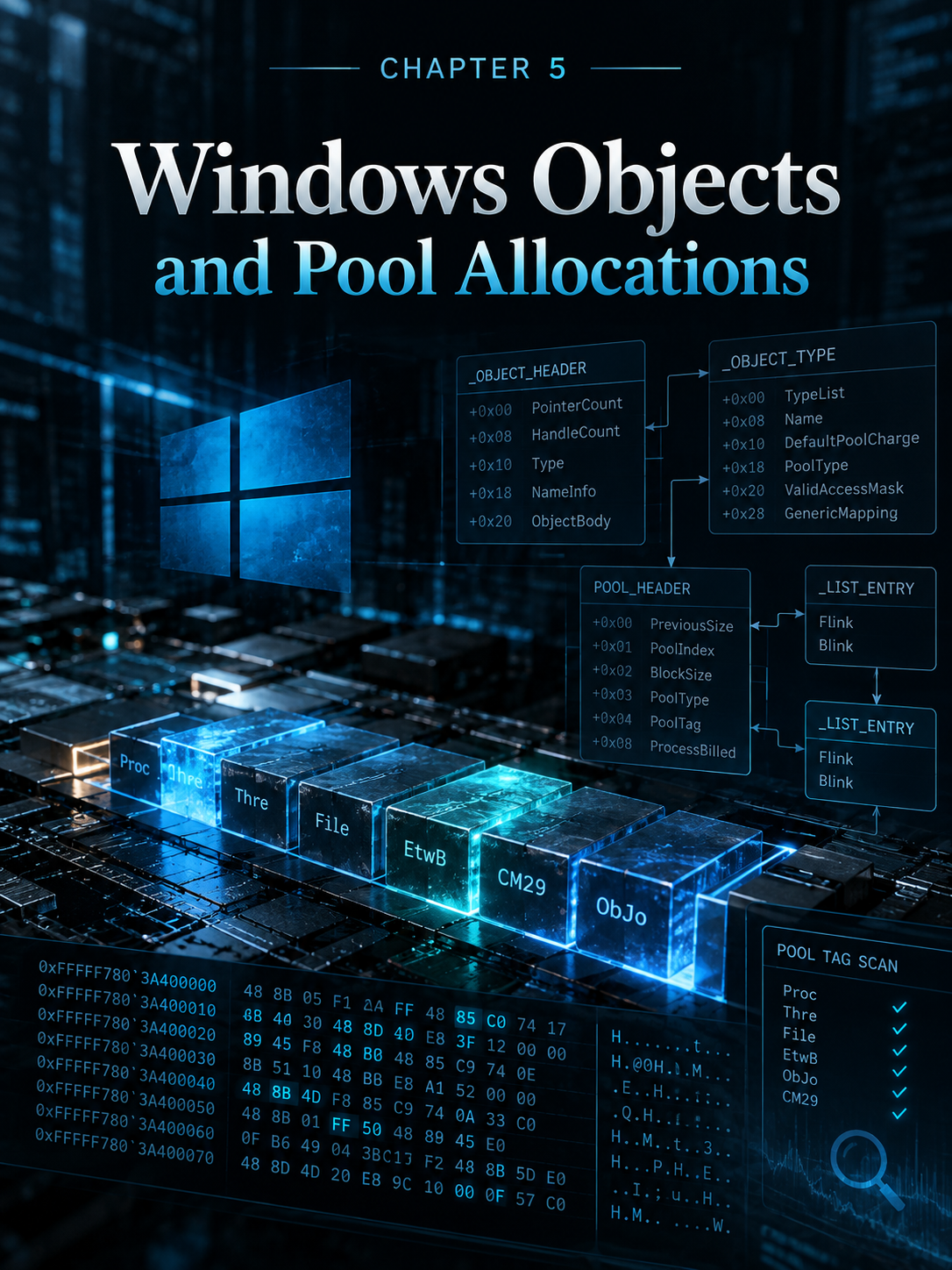
The Protective MBR is located at LBA 0. It is an MBR header that contains boot code, but it is not used in the boot process. It exists solely to prevent legacy tools that do not understand the GPT header from overwriting the disk and repartitioning it. This protection is implemented using a partition entry with type 0xEE in the MBR partition table.
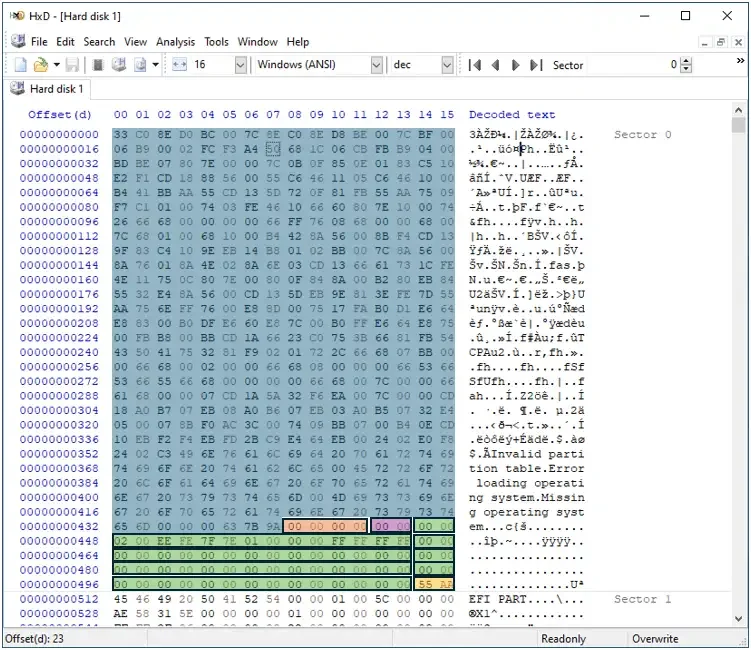
GPT Header
offset is LBA 1
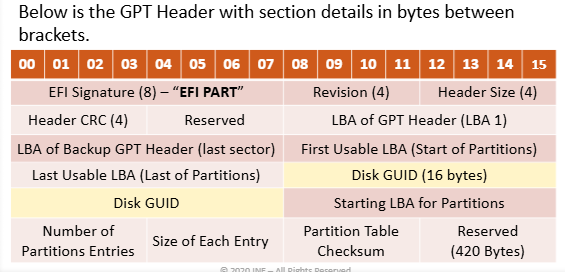
examble:
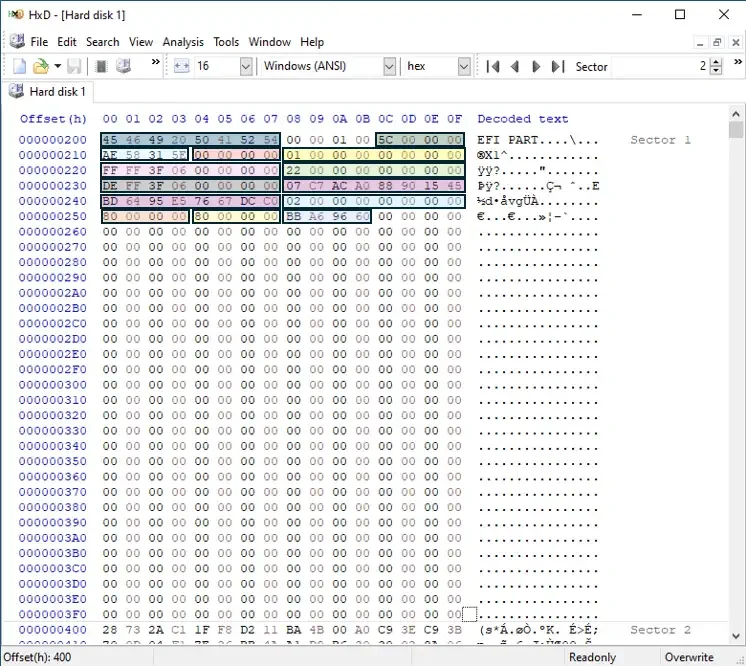
- 00-07 —> EFI Signature
EFI PART - 08-11 —> Revision
GPT Revision 1.0 - 12-15 —> Header size
5c = 92 byte - 16-19 —> CRC32 Checksum
AF58315Eto ensure the header integrity - 20-23 —> Reserved
00 00 00 00 - 24-31 —> LBA of GPT Header
01 00 00 00 00 00 00 00= LBA 1 - 32-39 —> LBA of backup GPT header
ff ff 3f 06 00 00 00 00= LBA 104,857,599 - 40-47 —> first usable LBA
22 00 00 00 00 00 00 00= LBA 34 - 48-55 —> Last usable LBA
de ff 3f 06 00 00 00 00= LBA 104,857,566 - 56-71 —> Disk GUID
07 c7 ac a0 88 90 15 45 bd 64 95 e5 76 67 dc c0note: GUIDs in GPT use a special byte order first 3 groups (4-2-2) are little-endian and last 2 groups (2-6) are big-endian. the GUID isa0acc707-9088-4515-bd64-95e57667dcc0 - 72-79 —> Start LBA for partitions
02 00 00 00 00 00 00 00= LBA 2 - 80-83 —> Number of partitions entries
80 00 00 00= 128 entries - 84-87 —> size of each entry
80 00 00 00= 128 bytes - 88-91 —> partition table checksum
bba69660CRC to ensure the partition entries integrity - 92-511 —> Reserved
Partition entry
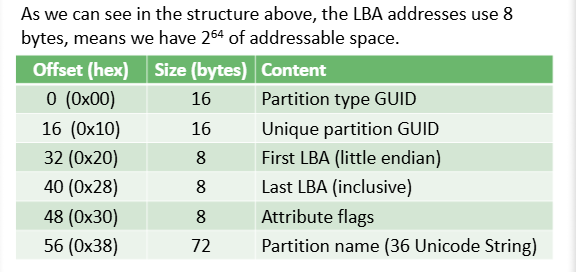
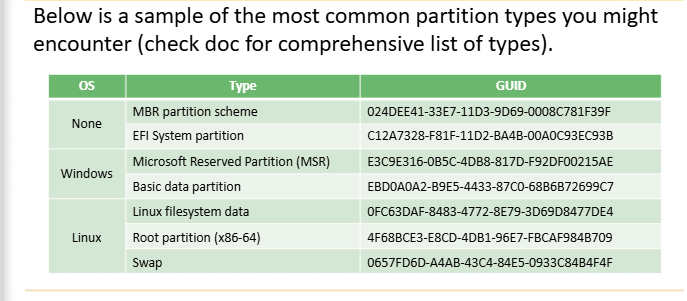
examble:
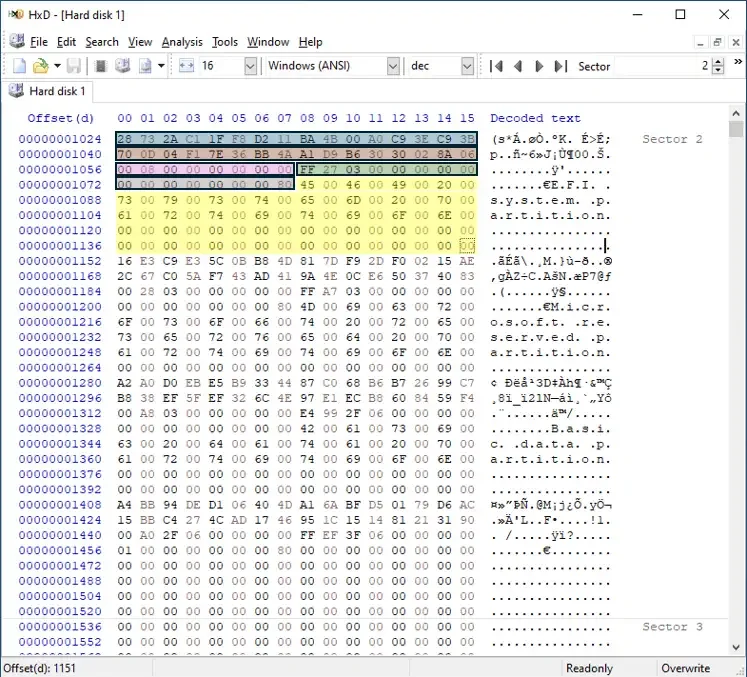
you can show the partition entry start from offset 1024
-
1024-1039 —> partition type GUID
28 73 2a c1 1f f8 d2 11 ba 4b 00 a0 c9 3e c9 3b=c12a7328-f81f-11d2-ba4d-00a0c93ec93bthis type GUID = EFI system partition -
1040-1055 —> This GUID uniquely identifies the partition on the disk =
70 0d 04 f1 7e 36 bb 4a a1 d9 b6 30 30 02 8a 06=f1040d70-367e-a14a-d9b6-3030028a06 -
1056-1063 —> = starting LBA =
0x800= 2048 -
1064-1071 —> = ending LBA =
0x327ff= 206,847 -
1072-1079 —> = flag is null
-
1080-1151 —> = partition name =
EFI System Partition
Hidden Protected Area (HPA) && Device Configuration Overlay (DCO)
In short, HPA and DCO are mechanisms used to hide portions of a hard drive. This hidden space can be used legitimately by vendors for recovery data, diagnostics, tracking software, or firmware, and it can also be abused to store malware that is inaccessible to standard software. The key difference is that HPA is implemented at the host level (OS/BIOS), while DCO is implemented at the device firmware level, making DCO more persistent and forensically significant.
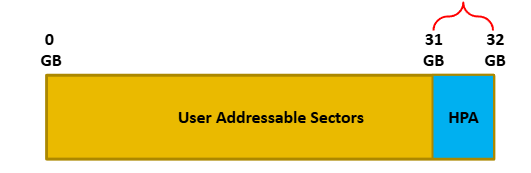
Tools to detect HPA && DCO
- hdparm
- the sleuth kit
- ATATools
- dmseg
- OSForensics
Thanks for reading, and stay tuned for the upcoming sections
Keep the investigation open.
Have another interpretation, a correction, or a useful trace? Reach out on Discord.
Continue on Discord