The Art of Memory Forensics Chapter-04
Brief notes summarizing Chapter 4 of The Art of Memory Forensics, focusing on memory acquisition methods, dump formats, virtual machine memory, memory conversion, and volatile evidence stored on disk.

ON THIS PAGE / 15 SECTIONS
- Memory Acquisition
- intero
- Acquisition Overview
- The Risk of Acquisition
- When to Acquire Memory
- How to Acquire Memory
- Tools
- Memory Dump Formats
- Raw Dump
- Windows Crash Dump
- Windows Hibernation File
- Virtual Machine Memory
- Converting Memory Dumps
- Analyzing the Page Files
- At the end of this chapter, you should understand the different memory dump formats, how to convert between them when necessary, and the different methods and tools used to acquire memory dumps.If you notice any issues in the explanation or any incorrect concepts, please feel free to contact me. Thank you.
Memory Acquisition
intero
Memory acquisition is the process of copying physical memory to persistent storage for later analysis. Because the computer is still running while the memory is being collected, the dump is not a perfect snapshot of one exact moment. Some parts of memory may change during the acquisition process, so investigators need to understand these changes and how they may affect the final analysis.
Acquisition Overview
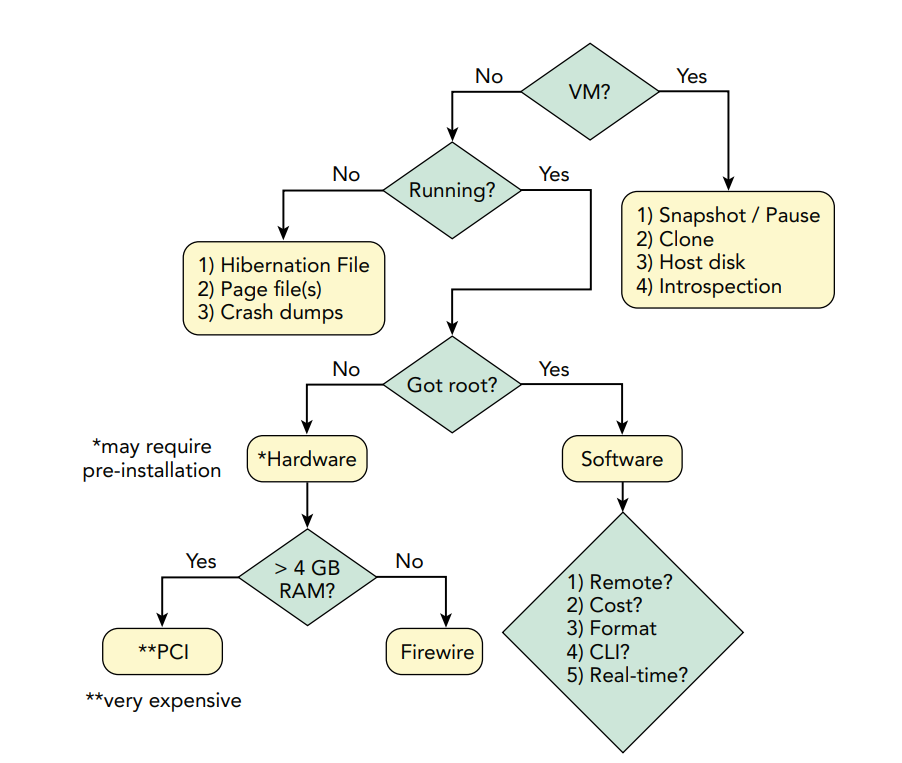
The correct memory acquisition method depends on the target environment, whether the system is virtual or physical, whether it is running, the available privileges, and the goals of the investigation. Investigators may use VM features, software tools, hardware-assisted DMA, or non-volatile sources such as hibernation and crash files, depending on the case.
A full memory acquisition creates a complete dump of physical RAM and saves it to storage for later analysis. This is useful when a detailed investigation is required.
Runtime interrogation, on the other hand, does not copy all of RAM. Instead, a tool checks selected information from the running system, such as active processes, network connections, or specific indicators. This is useful when investigators need quick answers or when checking many systems, because creating a full memory dump from every machine may be slow and impractical.
The Risk of Acquisition
Memory acquisition can be risky because the computer is still running while RAM is being collected. Memory keeps changing during the process, so the dump is not a perfect snapshot of one moment. Different pages may represent slightly different times, and structures can be captured while they are being updated.
Another risk is that not every physical address belongs to normal RAM. Some ranges are used by hardware devices, and reading them may change device state or even crash the system. Acquisition tools must also handle CPU cache settings carefully, because incorrect memory mappings can cause corruption or unstable behavior.
For these reasons, investigators should understand how the acquisition tool works and balance the value of the evidence against the risk of affecting the target system.
When to Acquire Memory
The best time to acquire memory depends on the investigation. On a suspect’s system, acquisition may be more useful while the user is logged in because active sessions, cloud access, and decrypted data may be present in memory. On a victim’s system, it may be better to acquire memory when the attacker is inactive to avoid alerting them. Memory should also be collected during a relatively stable system state, avoiding startup, shutdown, backups, antivirus scans, or other heavy activity. Investigators should minimize interaction with the system until acquisition is complete.
How to Acquire Memory
Memory acquisition can be performed in several ways, and the best method depends on the location of the target system, the available access, and the purpose of the investigation.
In a local acquisition, the investigator runs an acquisition tool directly on the target system and saves the RAM dump to removable media such as an external USB, eSATA, or FireWire drive. Saving the dump to the target’s own local disk should be avoided because writing a large memory image may overwrite useful disk evidence. Removable media should also be handled carefully so that malware is not transferred between infected systems or onto the forensic workstation.
In a remote acquisition, the acquisition tool is executed on the target over the network and the memory data is sent back to the investigator. This can be useful when physical access is not available, but it introduces risks such as exposing administrator credentials or transmitting sensitive RAM contents over the network. Encrypted communication should therefore be preferred, and integrity hashes should be calculated before and after transfer to confirm that the evidence has not changed.
Runtime interrogation is different from creating a full memory dump. Instead of copying all physical memory, the investigator checks specific information in memory, such as running processes, network connections, or known indicators. This is useful in large enterprise environments where collecting a full dump from every system would be slow and impractical.
Hardware-assisted acquisition, on the other hand, uses technologies such as DMA through FireWire or similar interfaces to access physical memory directly, sometimes without needing credentials. However, hardware methods can have limitations such as compatibility problems, memory-size limits, cost, and the risk of affecting system stability.
Tools
Memory acquisition tools can behave differently depending on the operating system, hardware, and system configuration. A reliable tool should acquire memory accurately, report errors clearly, and avoid silently missing memory pages. Therefore, investigators should test acquisition tools on systems similar to the target environment.
Note: The book mentions several older memory-acquisition tools. The following table focuses on tools that are still available or commonly used in modern DFIR workflows. Tool compatibility should always be checked against the target operating system and hardware before acquisition.
| Tool | Platform | Main Use |
|---|---|---|
| Magnet DumpIt | Windows | Fast full-memory acquisition and crash-dump generation |
| FTK Imager | Windows | RAM acquisition together with other forensic evidence |
| Belkasoft RAM Capturer | Windows | Live physical-memory acquisition |
| WinPmem | Windows | Open-source physical-memory acquisition |
| AVML | Linux | Open-source volatile-memory acquisition |
Memory Dump Formats
Raw Dump
A raw memory dump contains the contents of physical memory without headers or metadata. If some memory ranges are skipped or cannot be read, padding is usually added so that the relative physical offsets remain correct. This preserves spatial integrity and makes the dump easier to analyze.
Windows Crash Dump
A Windows crash dump contains memory data together with a structured header that stores important system information such as the OS version, kernel DTB, active process list, loaded modules, CPU information, memory runs, and crash details. For memory forensics, a complete memory dump is preferred over kernel or small dumps. Windows can be configured to create a crash dump when a system crash occurs, and some manual crash-generation methods, such as CrashOnScrollControl or NMI, require prior configuration in the registry or BIOS. but this method may miss some physical-memory regions and can be affected by malware.
Windows Hibernation File
A Windows hibernation file (hiberfil.sys) stores a compressed copy of system memory when the computer enters hibernation. It contains a header, kernel context, CPU registers such as CR3, and compressed memory blocks. Because the file is compressed and structured, analysis tools must reconstruct the memory before examining it. Converting the hibernation file to a raw memory image can make repeated analysis faster. However, the hibernation process may change network state, and some evidence may be lost before memory is written to disk.
Virtual Machine Memory
Memory from a virtual machine can be acquired either from inside the guest operating system or from the hypervisor.Hypervisor-based acquisition is often less invasive because no acquisition tool needs to run inside the guest.
VMware may store memory in .vmem, .vmsn, or .vmss files, sometimes requiring both memory and metadata files to reconstruct the guest’s physical memory.
VirtualBox and QEMU can store VM memory in ELF64 core dumps, where physical memory is represented by different segments.
Xen and KVM can also support virtual machine introspection, allowing live analysis of guest memory from the hypervisor without creating a full dump first.
Converting Memory Dumps
| Tool / Method | Input Format | Output Format | Main Use |
|---|---|---|---|
| MoonSols MWMT | Hibernation / Crash Dump / Raw | Raw or Crash Dump | Convert between Windows memory formats |
VMware vmss2core | VMware saved state / snapshot | Crash Dump | Convert VMware VM memory for WinDBG or similar tools |
Microsoft vm2dmp | Hyper-V memory files | Windows Crash Dump | Convert Hyper-V memory into a format usable by WinDBG/Volatility |
Volatility imagecopy | Crash Dump, Hibernation, VMware, VirtualBox, QEMU, LiME, EWF, etc. | Raw Memory Dump | Extract memory into a widely supported raw format |
Volatility raw2dmp | Raw Memory Dump | Windows Crash Dump | Convert raw memory for analysis with WinDBG |
Note: Raw memory is commonly used as a destination format because it is widely supported. Some cases may require more than one conversion step before the memory can be analyzed with the desired tool.
Analyzing the Page Files
Page files may contain memory pages that were moved from RAM to disk, but they are difficult to analyze because they lack the full page-table context needed to determine which process or virtual address each page belonged to. At the time described in the book, Volatility did not provide full structured pagefile analysis, so investigators mainly used techniques such as strings, antivirus scanning, and YARA rules. Tools such as page_brute could split the pagefile into page-sized blocks and scan each block for useful indicators, allowing investigators to recover artifacts such as URLs, protocol data, and keywords that might no longer exist in live RAM or normal browser history.
At the end of this chapter, you should understand the different memory dump formats, how to convert between them when necessary, and the different methods and tools used to acquire memory dumps.If you notice any issues in the explanation or any incorrect concepts, please feel free to contact me. Thank you.
Keep the investigation open.
Have another interpretation, a correction, or a useful trace? Reach out on Discord.
Continue on Discord