The Art of Memory Forensics Chapter-05
Brief notes summarizing Chapter 5 of (AMF), focusing on Windows objects, kernel pool allocations, pool tags, pool-scanning techniques, Big Page Pool analysis, and alternative methods for locating kernel objects.
ON THIS PAGE / 15 SECTIONS
- Windows Objects and Pool Allocations
- Windows Executive Objects
- Executive Objects Table
- Kernel Pool Allocations
- Allocation APIs
- Pool-Tag Scanning
- Pool Tag Sources
- Pool Tracker Tools
- Pool Scanner Algorithm
- Limitations of Pool Scanning
- Non-malicious Limitations
- Malicious Limitations OR anti-forensics
- Big Page Pool
- Big Page Pool Detection
- At the end of this chapter, we learned how Windows objects are stored in kernel memory, how pool allocations and tags are used to locate them, and how techniques such as pool scanning, Big Page Pool analysis, can help investigators find and validate forensic artifacts. If you notice any issues in the explanation or any incorrect concepts, please feel free to contact me. Thank you.
Windows Objects and Pool Allocations
All memory artifacts begin as allocations. By understanding how Windows allocates and frees memory, investigators can identify different types of data, determine whether an allocation is active or free, and recover objects that may no longer be in use. This chapter focuses on Windows executive objects, kernel pool allocations, and pool tag scanning, which can help locate processes, files, and drivers independently of normal operating system enumeration. This makes it possible to detect hidden objects and recover previously used data that has not yet been overwritten.
Windows Executive Objects
Windows Executive Objects are structures managed by the Windows Object Manager. The Object Manager adds special headers and uses them to manage information such as naming, permissions, and references. Examples include processes, threads, files, mutexes, and tokens.
Executive Objects Table
| Object Name | Structure | Description |
|---|---|---|
| File | _FILE_OBJECT | Represents an open file and a process or kernel module’s access to it, including permissions, cached file content, and the file name. |
| Process | _EPROCESS | Represents a process, including its private virtual address space, threads, and open handles to resources such as files and registry keys. |
| SymbolicLink | _OBJECT_SYMBOLIC_LINK | Represents an alias used to map paths, such as network shares or removable media, to other names such as drive letters. |
| Token | _TOKEN | Stores security context information for processes and threads, including SIDs and privileges. |
| Thread | _ETHREAD | Represents a scheduled execution entity within a process and its associated CPU context. |
| Mutant | _KMUTANT | Represents mutual exclusion and is commonly used for synchronization or controlling access to shared resources. |
| WindowStation | tagWINDOWSTATION | Represents a security boundary for processes and desktops and also contains resources such as the clipboard and atom tables. |
| Desktop | tagDESKTOP | Represents a displayable desktop surface containing user-interface objects such as windows, menus, and buttons. |
| Driver | _DRIVER_OBJECT | Represents a loaded kernel-mode driver and contains addresses of the driver’s I/O control handler functions. |
| Key | _CM_KEY_BODY | Represents an open registry key and contains information related to the key’s values and data. |
| Type | _OBJECT_TYPE | Stores metadata that describes an object type. |
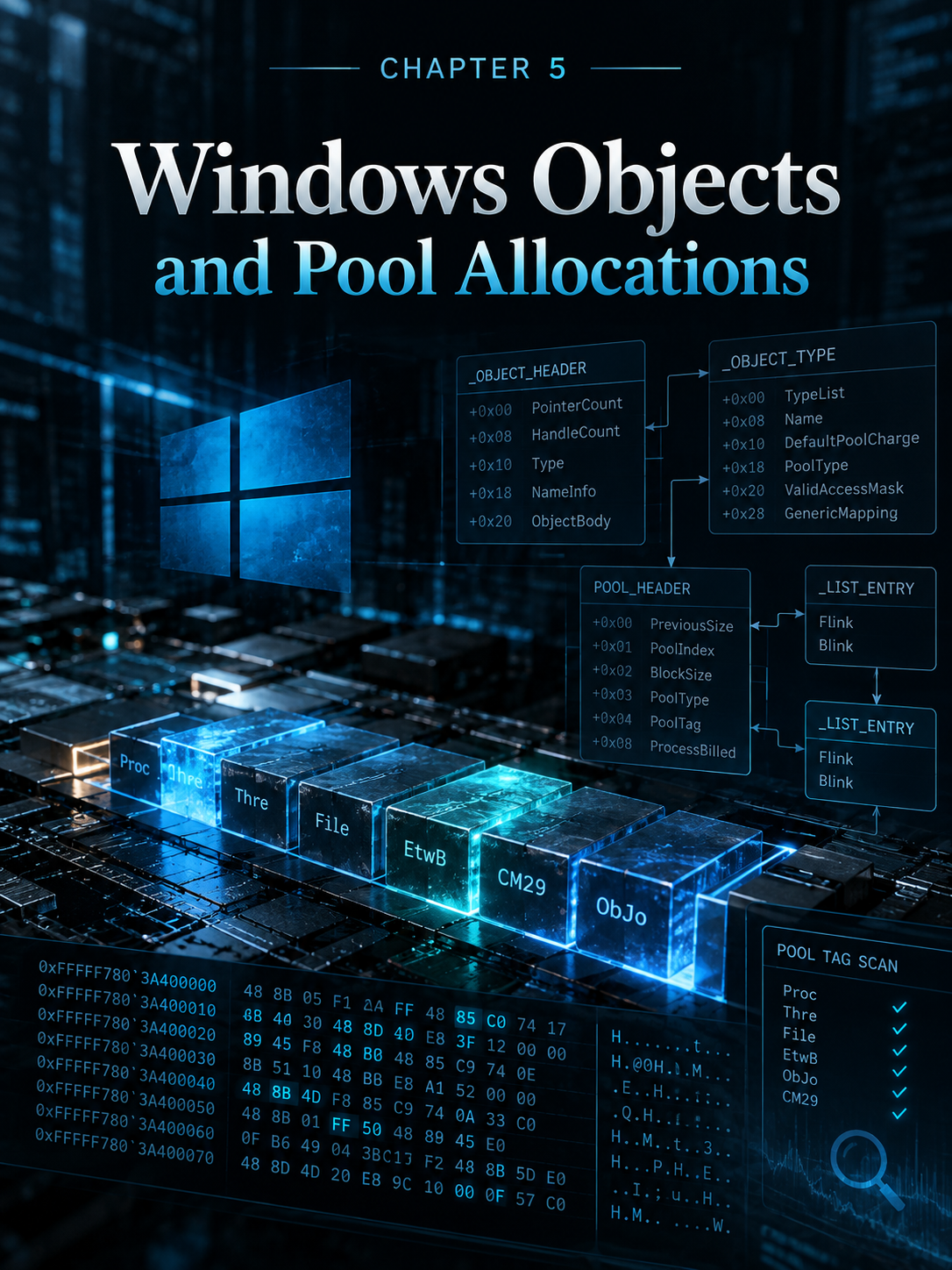
Each executive object has a TypeIndex inside its _OBJECT_HEADER. This index points to an _OBJECT_TYPE structure that identifies the object type, such as Process, File, Thread, or Token. The _OBJECT_TYPE also tells us where the object is stored, such as PagedPool or NonPagedPool, and provides a four-byte Key that can help locate similar objects in memory. For example, Process objects use the key Proc and are stored in NonPagedPool, while Token objects use Toke and may be stored in PagedPool.
You can use the objtypescan plugin to enumerate object types in the memory image.
Example:
$ python vol.py -f win7x64cmd.dd --profile=Win7SP0x64 objtypescan
Volatility Foundation Volatility Framework 2.4
Offset              nObjects    nHandles  Key           Name        PoolType
------------------ ---------- ---------- ----- -------------------- ---------
0xfffffa8001840190     0x2a       0x0    ObjT          Type        NonPaged
0xfffffa80018469f0     0x1        0x1    IoCo IoCompletionReserve  NonPaged
0xfffffa8001846b40     0x0        0x0    User UserApcReserve       NonPaged
0xfffffa8001846c90     0x1dc      0x320  Thre Thread               NonPaged
0xfffffa8001846de0     0x27       0xd6   Proc Process              NonPaged
0xfffffa8001846f30     0x2        0x2    Job Job                   NonPaged
0xfffffa800184bad0     0x2bd5     0x4b9  Toke Token                Paged
0xfffffa800184bde0     0xc2       0x5    Symb SymbolicLink         Paged
0xfffffa800184bf30     0x27       0x6f   Dire Directory            Paged
0xfffffa80018aca50     0x0        0x0    Debu DebugObject          NonPaged
0xfffffa80018b7570     0x2023     0x2421 Even Event                NonPaged
0xfffffa80018bc900     0x3f       0x3f   TpWo TpWorkerFactory      NonPaged
0xfffffa80018bca50     0xa        0x2a   Desk Desktop              NonPaged
0xfffffa80018c2900     0x0        0x0    Prof Profile              NonPaged
0xfffffa80018c2a50     0x84       0x84   Time Timer                NonPaged
0xfffffa80018c3570     0x0        0x0    Even EventPair            NonPaged
0xfffffa80018c5570     0x13a      0x17b  Muta Mutant               NonPaged
0xfffffa80018c6570     0xf        0x0    Call Callback             NonPaged
0xfffffa80018c7570     0x358      0x35a  Sema Semaphore            NonPaged
0xfffffa80018c8900     0x2        0xd    Sess Session              NonPaged
Kernel Pool Allocations
A kernel pool is a region of memory used by the Windows kernel and kernel-mode drivers to store data and structures. The pool is divided into smaller allocations, and each allocation begins with a _POOL_HEADER. This header contains information such as the allocation size, pool type, and pool tag. If the allocation contains an Executive Object, the object headers and the actual object structure follow the _POOL_HEADER.
Allocation APIs
Before an Executive Object is created, Windows allocates memory from a kernel pool using functions such as ExAllocatePoolWithTag. The allocation is defined by its pool type, size, and four-byte tag. ObCreateObject calculates the required space for the object and its headers before requesting the allocation. When the object is no longer needed, its memory block is marked as free but is not immediately erased. Therefore, old object data may remain in memory until the block is reused, allowing forensic investigators to recover evidence of previously existing objects.
Pool-Tag Scanning
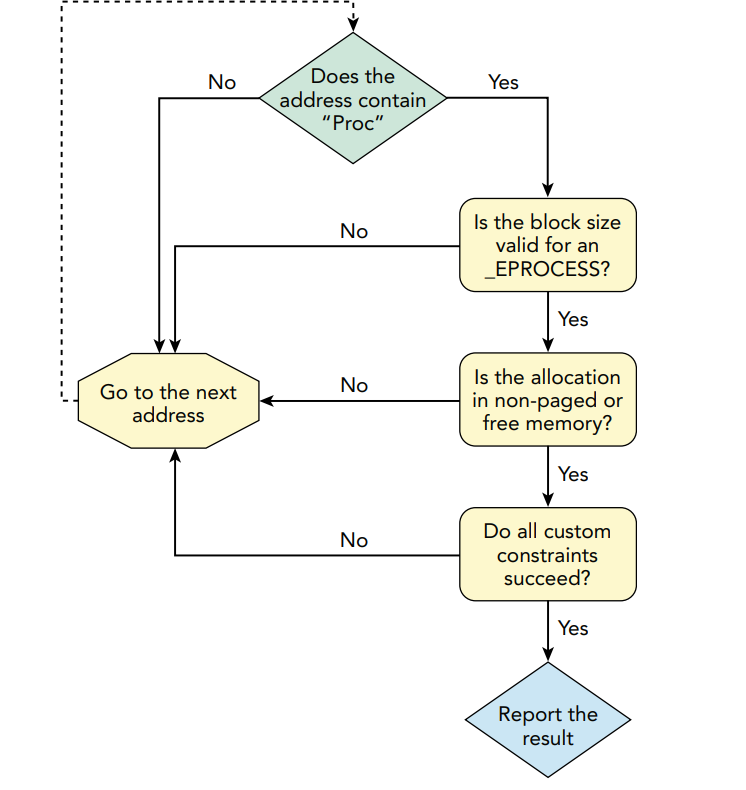
Pool-tag scanning searches memory for pool allocations using their four-byte tags, such as Proc for process objects. Unlike normal list-based enumeration, pool scanning can locate hidden or previously terminated objects. Because a pool tag alone may produce false positives, Volatility also checks properties such as allocation size, pool type, and object-specific constraints to validate the results.
Pool Tag Sources
Pool tags are four-byte identifiers that Volatility can use as part of a signature to locate objects in memory. They are not universal or fixed for every allocation, and third-party or malicious drivers can use their own custom tags. If a tag is unknown or unsupported by existing scanners, the related allocations may be missed, so investigators may need to identify the tag and build custom scanning rules. A pool tag is only a clue and should be validated with other properties such as allocation size, pool type, and structure fields.
Example: tag used by volatility to windows 7
| Object | Tag | Protected Tag | Min. Size (Win7 x64) | Memory Type | Plugin |
|---|---|---|---|---|---|
| Process | Proc | Pro\xe3 | 1304 | Nonpaged | psscan |
| Threads | Thrd | Thr\xe4 | 1248 | Nonpaged | thrdscan |
| Desktops | Desk | Des\xeb | 296 | Nonpaged | deskscan |
| Window Stations | Wind | Win\xe4 | 224 | Nonpaged | wndscan |
| Mutants | Mute | Mut\xe5 | 128 | Nonpaged | mutantscan |
| File Objects | File | Fil\xe5 | 288 | Nonpaged | filescan |
| Drivers | Driv | Dri\xf6 | 408 | Nonpaged | driverscan |
| Symbolic Links | Link | Lin\xeb | 104 | Nonpaged | symlinkscan |
Note: If you find an unknown pool tag in RAM, you can check Microsoft’s pooltag.txt file. If the tag belongs to a normal Microsoft kernel component or driver, you may find its description and owning component listed there.
Pool Tracker Tools
Live —> Poolmon.exe
Dump —> volatility pooltracker plugin
Example:
python vol.py -f win7x64.dd --profile=Win7SP0x64 pooltracker --tags=Proc,File,Driv,Thre

Volatility Foundation Volatility Framework 2.4
Tag     NpAllocs   NpFrees   NpBytes PgAllocs PgFrees   PgBytes
------ --------   --------   -------- -------- -------- --------
Thre   614895      614419    606688       0       0       0
File   75346601    75336591  3350912      0       0       0
Proc   4193        4154      51728        0       0       0
Driv   143         6         67504        0       0       0
Pool Scanner Algorithm
How does Volatility determine whether a pool tag found in a memory dump actually belongs to a real process? It validates the finding using several conditions, such as the allocation size, memory type, expected structure, and other constraints, to decide whether the data represents a valid _EPROCESS structure or is just a false positive.
Limitations of Pool Scanning
Non-malicious Limitations
- Untagged allocations: A driver can allocate memory without using a pool tag, which makes the allocation harder to identify with pool-tag scanning.
- False positives: The scanner may find bytes or patterns that look similar to a valid structure, such as
_EPROCESS, and incorrectly report them as a real process object.
Malicious Limitations OR anti-forensics
- Arbitrary tags: A malicious driver can use a common or generic tag such as Ddk to blend in with normal allocations.
- Decoy objects: A malicious driver can create fake objects that look realistic to generate noise and mislead investigators and forensic tools.
- Manipulated pool metadata: A rootkit can modify the PoolTag, BlockSize, or PoolType in the
_POOL_HEADERso the pool scanner may fail to recognize the real object.
Big Page Pool
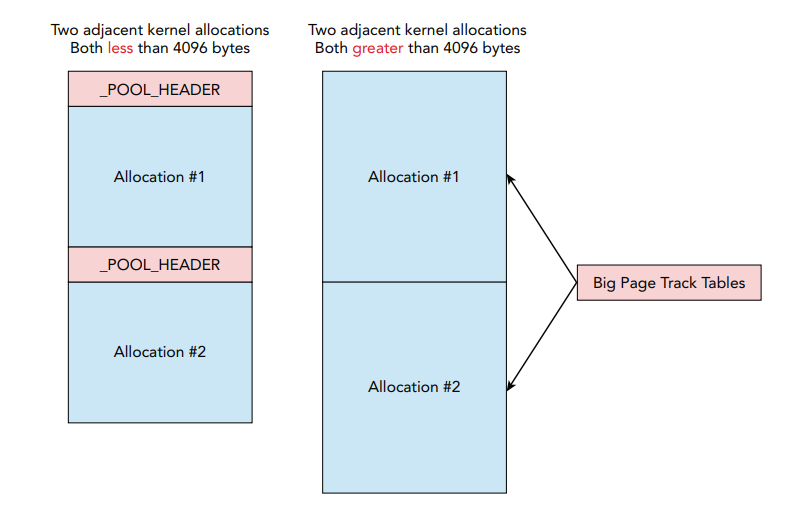
The difference between normal pool allocations and Big Page Pool allocations is that, in normal pool allocations, the scanner finds the pool tag and then the _EPROCESS structure, allowing it to identify the allocation as a process. If a kernel driver makes the allocation larger than one memory page, the scanner may no longer find the expected pool metadata next to the allocation, so the process may be missed by traditional pool scanning.
Big Page Pool Detection
To identify large kernel allocations in the Big Page Pool, use the bigpools plugin:
python vol.py -f win7x64cmd.dd --profile=Win7SP0x64 bigpools

Volatility Foundation Volatility Framework 2.4

Allocation          Tag   PoolType                NumberOfBytes
------------------  ----  ----------------------  -------------
0xfffff8a003747000  CM31  PagedPoolCacheAligned   0x1000
0xfffff8a00f9a8001  CM31  PagedPoolCacheAligned   0x1000
0xfffff8a004a4f000  CM31  PagedPoolCacheAligned   0x1000
0xfffff8a00861d001  CM31  PagedPoolCacheAligned   0x1000
0xfffffa8002fca000  Cont  NonPagedPool            0x1000
0xfffff8a00a47a001  CM53  PagedPool               0x1000
0xfffff8a00293c000  CMA?  PagedPool               0x1000
0xfffff8a00324a000  CM25  PagedPool               0x1000
Look for unusual tags or allocations with large NumberOfBytes values. Then use volshell to inspect the allocation address directly:
python vol.py -f win7x64cmd.dd --profile=Win7SP0x64 volshell

>>> db(0xfffff8a003747000, length=0x1000)

0xfffff8a003747000  ... hbin ...
0xfffff8a003747020  ... vk ...
0xfffff8a003747040  ... vk ...
0xfffff8a003747060  ... vk ...
Note: Note: If the allocation address ends in 1, it is marked as free. If it ends in 0, it is not marked as free, but its contents should still be validated.
Because the Big Page Pool may contain thousands of allocations, investigators can filter by tag or sort allocations by tag frequency. Pool tags can then be looked up in pooltag.txt to understand the owning component. Once an interesting allocation is identified, its address can be inspected directly, but interpreting the data requires knowledge of the structure used by the owning driver or kernel component.
At the end of this chapter, we learned how Windows objects are stored in kernel memory, how pool allocations and tags are used to locate them, and how techniques such as pool scanning, Big Page Pool analysis, can help investigators find and validate forensic artifacts. If you notice any issues in the explanation or any incorrect concepts, please feel free to contact me. Thank you.
Keep the investigation open.
Have another interpretation, a correction, or a useful trace? Reach out on Discord.
Continue on Discord