
Note/Splunk
Splunk Detection Rule AND Generate Alert
A practical SOC home lab guide to building Splunk detection rules and alerts for XSS, command injection, and SQL injection attacks.
ON THIS PAGE / 12 SECTIONS
Hello Everyone!
To be able to follow along with this part, you need to have done the configuration first—the one we setup in the previous post. If you’re just dropping in to follow along, I hope I can still help. Here’s the link to the [previous_post]({% post_url 2025-12-29-SOC_Home_Lab_Configruation %}) We previously set up a web app, deployed DVWA on it, and sent the logs to Splunk so we can monitor events in real time.
If you followed what we did in the previous post, you should have logs like these.
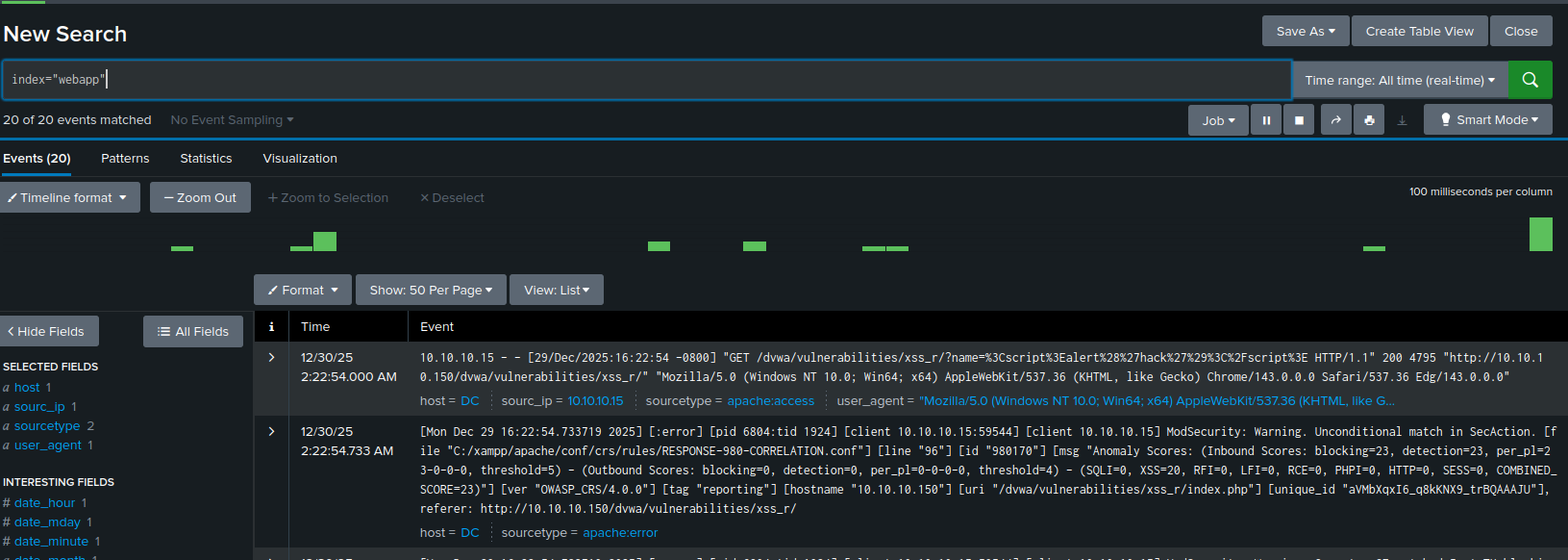
Let’s start running some attacks and creating detections for them.
Attacks In This Post
- XSS
- Command injection
- SQLI
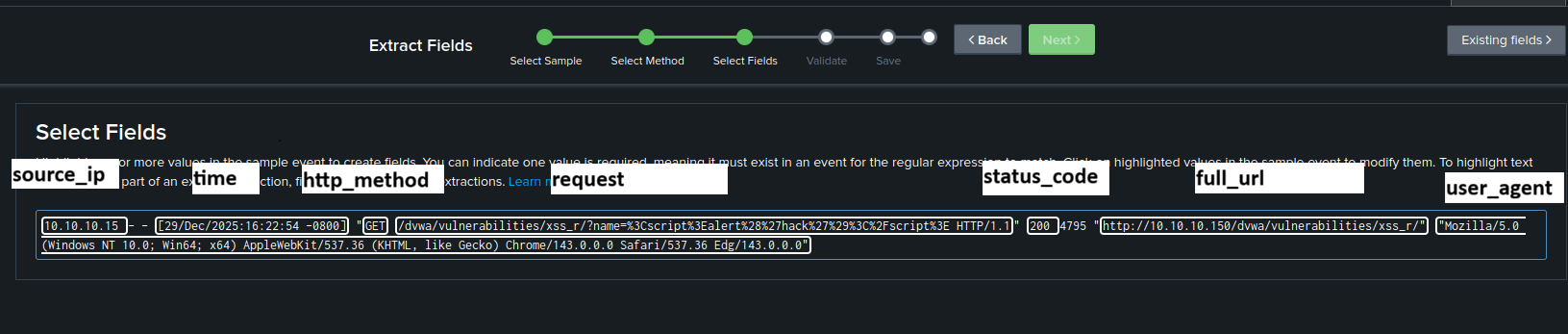
First, we’ll need to extract some fields so we can use them in the rule.
Fields Like:
- Sourc_ip
- time
- http_method
- request_method
- full_url
- user_agent
To extract the fields, from the bottom-left section you can select Extract More Fields and follow the steps. I’ll leave the field names in this image.
XSS_Attack And Detections
Now open DVWA from any device, go to DVWA Security, and set the level to Low. Don’t worry—the rule will cover all levels. After that, go to Reflected XSS so we can run the payload and see what the request looks like.
payload
<script>alert('hack')</script>Now go to Splunk—you should see logs like this.
10.10.10.15 - - [29/Dec/2025:17:04:03 -0800] "GET /dvwa/vulnerabilities/xss_r/?name=%3Cscript%3Ealert%28%27hack%27%29%3C%2Fscript%3E HTTP/1.1" 200 4795 "http://10.10.10.150/dvwa/vulnerabilities/xss_r/" "Mozilla/5.0 (Windows NT 10.0; Win64; x64) AppleWebKit/537.36 (KHTML, like Gecko) Chrome/143.0.0.0 Safari/537.36 Edg/143.0.0.0"
- Source_ip: 10.10.10.15
- http_method: GET —> Used to send data
- request:
/dvwa/vulnerabilities/xss_r/?name=%3Cscript%3Ealert%28%27hack%27%29%3C%2Fscript%3E HTTP/1.1You can see the data in the request as URL-encoded—this data includes the XSS payload. - full_url:
http://10.10.10.150/dvwa/vulnerabilities/xss_r/ - user_agent:
Mozilla/5.0 (Windows NT 10.0; Win64; x64) AppleWebKit/537.36 (KHTML, like Gecko) Chrome/143.0.0.0 Safari/537.36 Edg/143.0.0.0
To create a Splunk rule, we need to define the malicious indicators—things attackers commonly use to run exploits—such as: <script>, </script>, <img>, alert, prompt, onerror, onload, console.log, document.body, print, fetch, eval.
XSS Rule
index=webapp source="C:\\xampp\\apache\\logs\\access.log"
AND request!="*/dashboard/javascripts/*.js"
| eval decoded_field=lower(urldecode(request))
| where
(
like(decoded_field,"%<script%")
OR like(decoded_field,"%</script%")
OR like(decoded_field,"%javascript:%")
OR like(decoded_field,"%vbscript:%")
OR like(decoded_field,"%data:text/html%")
OR like(decoded_field,"%onerror=%")
OR like(decoded_field,"%onload=%")
OR like(decoded_field,"%onmouseover=%")
OR like(decoded_field,"%onfocus=%")
OR like(decoded_field,"%onmouseenter=%")
OR like(decoded_field,"%onclick=%")
OR like(decoded_field,"%onkeyup=%")
OR like(decoded_field,"%onanimationstart=%")
OR like(decoded_field,"%ontransitionend=%")
OR like(decoded_field,"%src=%")
OR like(decoded_field,"%href=%")
OR like(decoded_field,"%document.%")
OR like(decoded_field,"%window.%")
OR like(decoded_field,"%location%")
OR like(decoded_field,"%cookie%")
OR like(decoded_field,"%localstorage%")
OR like(decoded_field,"%sessionstorage%")
OR like(decoded_field,"%eval(%")
OR like(decoded_field,"%settimeout(%")
OR like(decoded_field,"%setinterval(%")
OR like(decoded_field,"%fromcharcode%")
OR like(decoded_field,"%atob(%")
OR like(decoded_field,"%confirm(%")
OR like(decoded_field,"%prompt(%")
OR like(decoded_field,"%alert(%")
OR like(decoded_field,"%<img%")
OR like(decoded_field,"%<svg%")
OR like(decoded_field,"%<iframe%")
OR like(decoded_field,"%<object%")
OR like(decoded_field,"%<embed%")
OR like(decoded_field,"%<link%")
OR like(decoded_field,"%<meta%")
OR like(decoded_field,"%expression(%") /* legacy IE */
OR like(decoded_field,"%<%script%") /* encoded <script */
OR like(decoded_field,"%<%script%") /* decimal encoded */
OR like(decoded_field,"%\\x3cscript%") /* \x3c */
)
| table _time, source_ip, decoded_field
Now add this rule to Splunk Search, make sure the time range is set to Real-time, and then add the payload in DVWA again. You will see that the detection is complete.
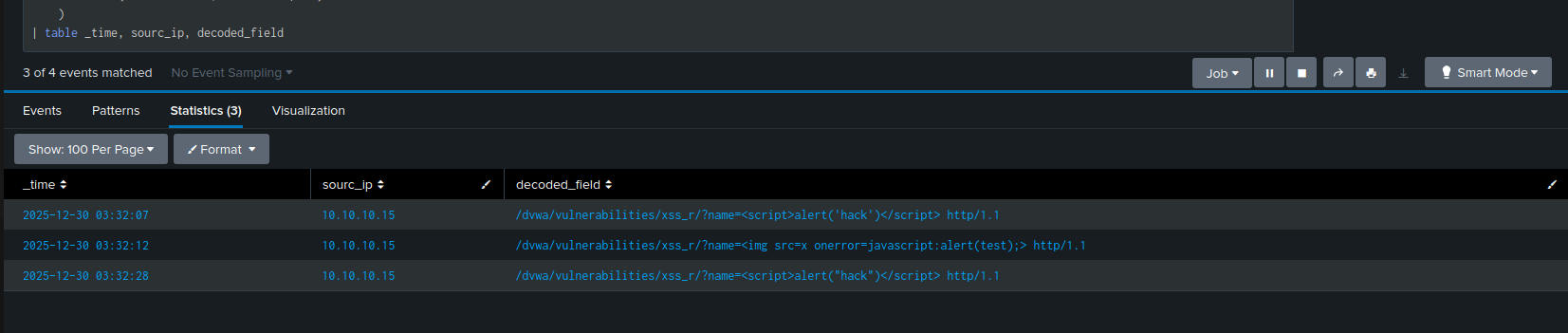
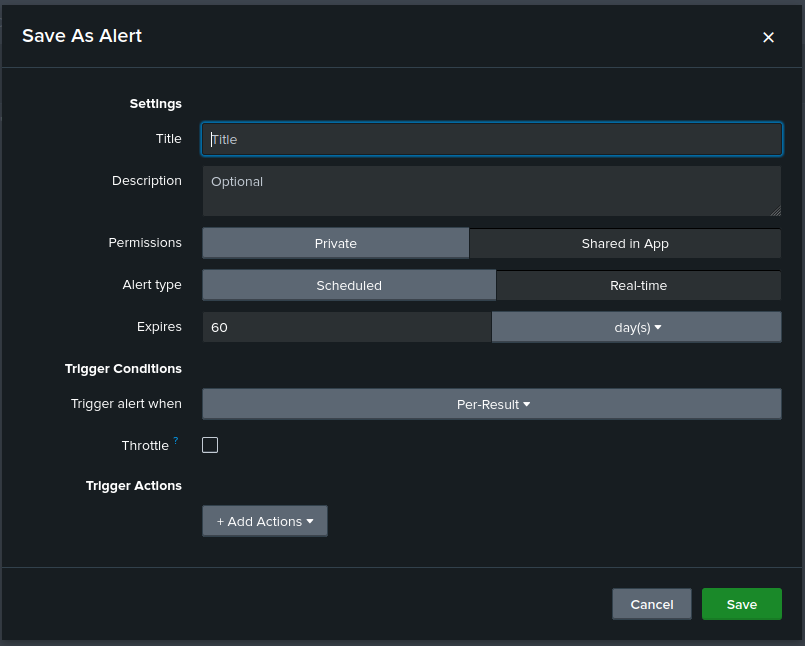
Now, we want to make sure that this rule triggers an alert. To do that, you can follow these steps:
- Click on Save As and select Alert
- In the alert settings, configure the following
- Title: XSS_Attack
- Description: This alert detects HTTP requests containing suspicious script-related keywords that indicate a potential Cross-Site Scripting (XSS) attack attempt. An attacker may be trying to inject JavaScript into the application to execute malicious code in a user’s browser.
- Permissions: Shared in App
- Alert type: Real-time
- Expires: 60 days
- Trigger alert when: Pre-result
- Trigger Actions: Add To Triggered Alert
- Click Save to apply the alert
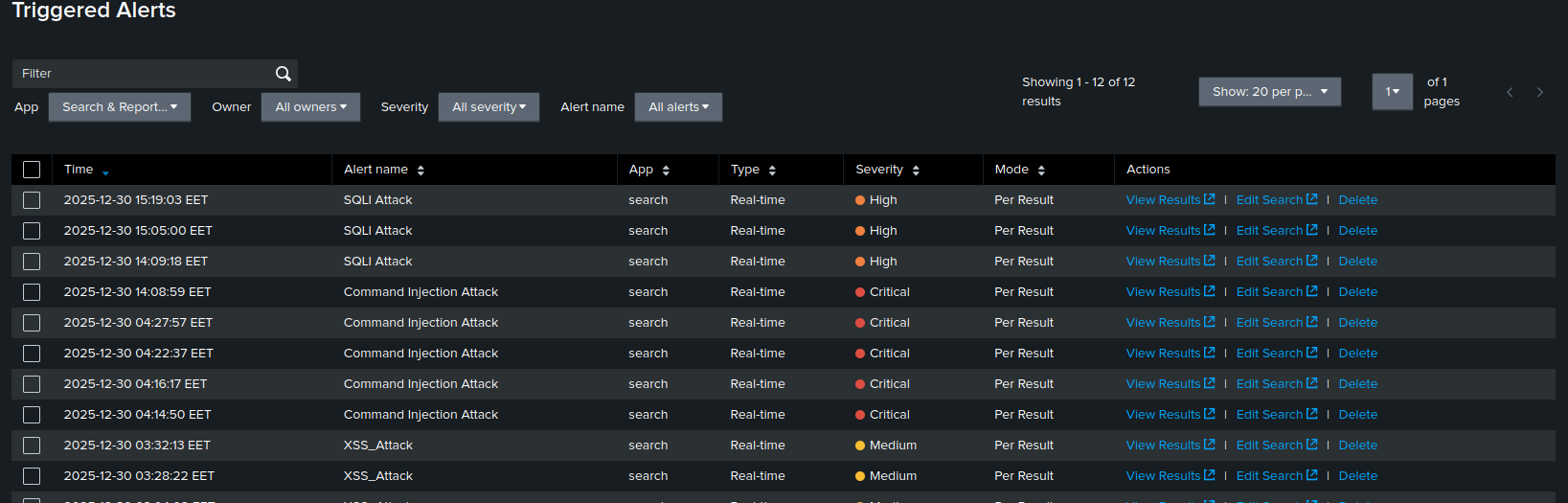
Now, from the top menu, go to Activity and then Triggered Alerts. You will see that a new alert has been created.

Command Injection
Let’s take a look at Command Injection. Here, we’ll focus on the WAF logs instead of the web app logs. The execution of the command and its parameter will be sent in the body of the request, unlike XSS, where the data is sent in the URL.
To solve this, you need to install the WAF so we can view the body of the request and detect any potential command injection attacks.
Open your lab in Command Injection and try to ping any IP. This will generate a request that looks like the following, where the command injection occurs in the request body
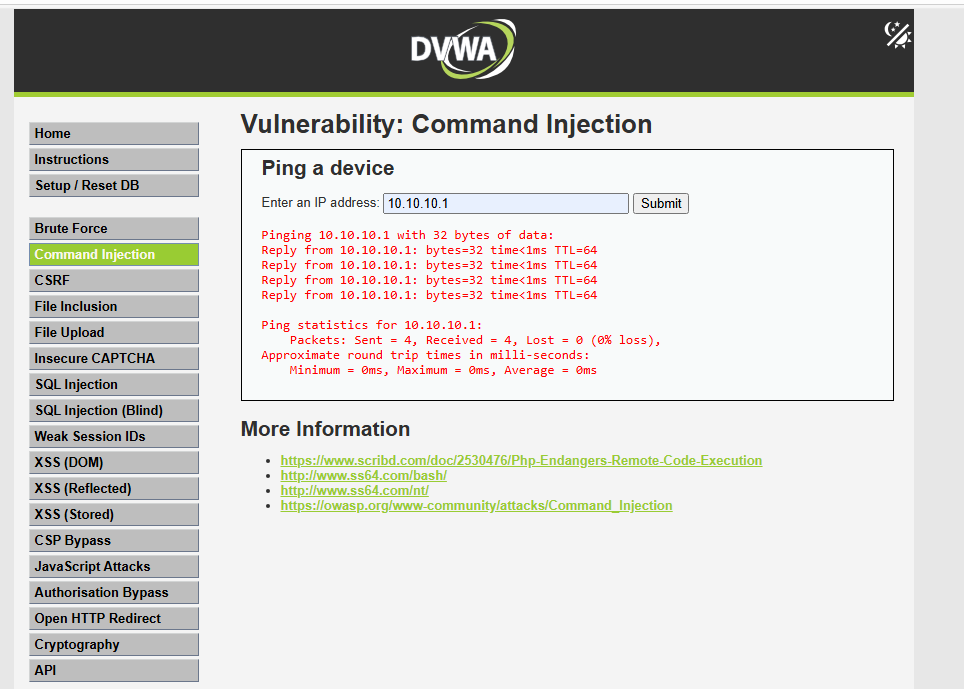
Request
[29/Dec/2025:18:01:11.562151 --0800] aVMyZKxI6_q8kKNX9_trFQAAAJA 10.10.10.15 61989 10.10.10.150 80
--bb410000-B--
POST /dvwa/vulnerabilities/exec/ HTTP/1.1
Host: 10.10.10.150
Connection: keep-alive
Content-Length: 27
Cache-Control: max-age=0
Origin: http://10.10.10.150
Content-Type: application/x-www-form-urlencoded
Upgrade-Insecure-Requests: 1
User-Agent: Mozilla/5.0 (Windows NT 10.0; Win64; x64) AppleWebKit/537.36 (KHTML, like Gecko) Chrome/143.0.0.0 Safari/537.36 Edg/143.0.0.0
Accept: text/html,application/xhtml+xml,application/xml;q=0.9,image/avif,image/webp,image/apng,*/*;q=0.8,application/signed-exchange;v=b3;q=0.7
Referer: http://10.10.10.150/dvwa/vulnerabilities/exec/
Accept-Encoding: gzip, deflate
Accept-Language: en-US,en;q=0.9
Cookie: PHPSESSID=mhrcs6uml7b9qcvj52819ebn6t; security=low
--bb410000-C--
ip=10.10.10.1&Submit=Submit
--bb410000-Z--
In this request, you can see that the command is being sent in a parameter called ip. We’ll mention a few methods that could be used to bypass the ip filter and execute commands on the system.
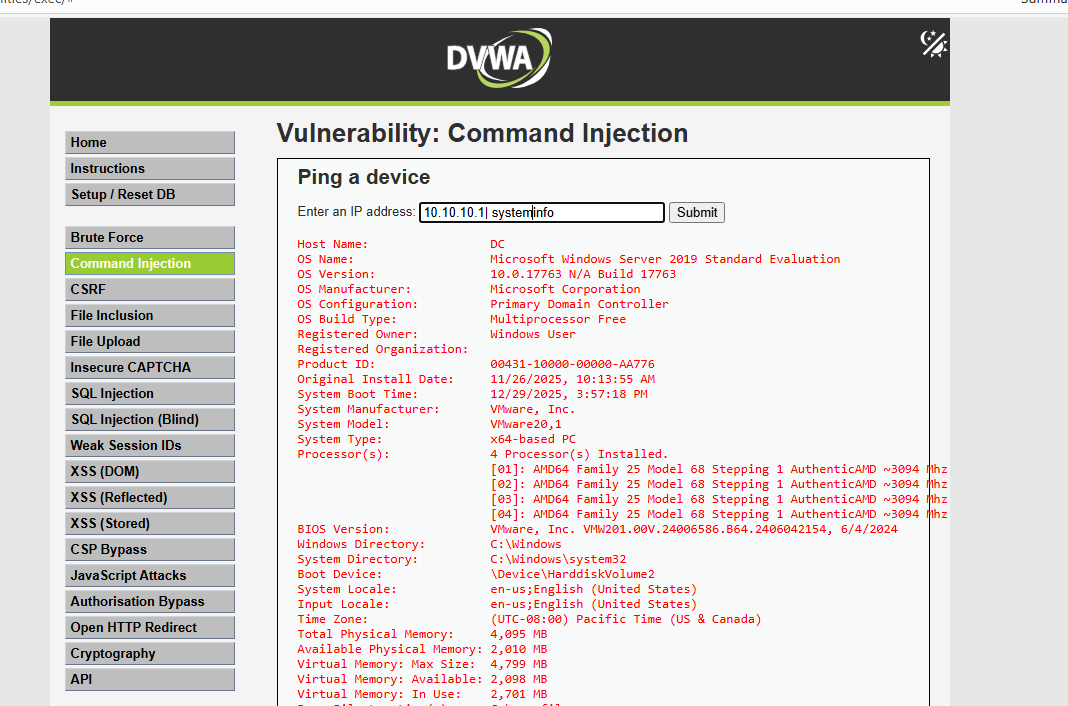
Bypass Methods | ; & && || - )
Rule
index=waf sourcetype=modsecurity:json | eval decoded_field = urldecode(ip) | where like (decoded_field, "%|%") OR like (decoded_field, "%;%") OR like (decoded_field, "%&&%") OR like (decoded_field, "%-%")OR like (decoded_field, "%$%")OR like (decoded_field, "%(%") OR like (decoded_field, "%)%")OR like (decoded_field, "%||%") | rex field=_raw "POST\s(?<source_ip>\d+\.\d+\.\d+\.\d+)" | table _time, decoded_field, ip
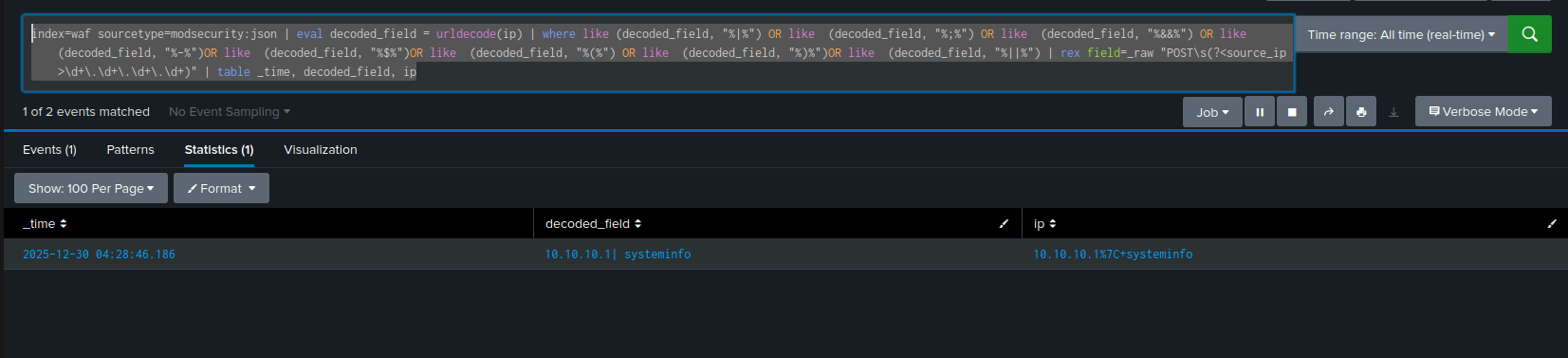
Now, we want to make sure that this rule triggers an alert. To do that, you can follow these steps:
- Click on Save As and select Alert
- In the alert settings, configure the following
- Title: Command_Injection_Attack
- Description: This alert detects HTTP requests containing suspicious command chaining characters (e.g., |, ;, &&, ||, backticks, $()) and common OS command keywords that may indicate a command injection attempt. An attacker may be attempting to execute system commands through user-controlled input
- Permissions: Shared in App
- Alert type: Real-time
- Expires: 60 days
- Trigger alert when: Pre-result
- Trigger Actions: Add To Triggered Alert
- Click Save to apply the alert
go to Activity and then Triggered Alerts. You will see that a new alert has been created.

SQLI
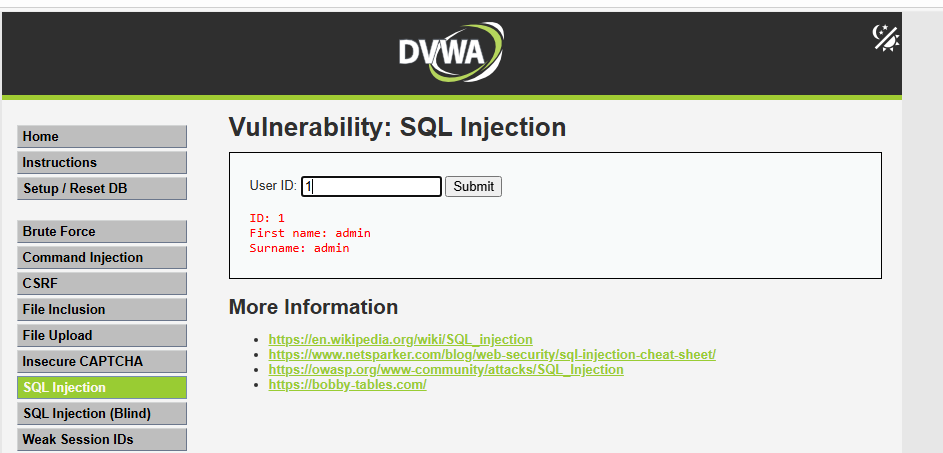
Now we will execute SQLi attacks. Go to the SQL page, where you will find a search field that looks up the user ID. This will be the place where we execute the payload.
payload
1 ' OR 1=1#
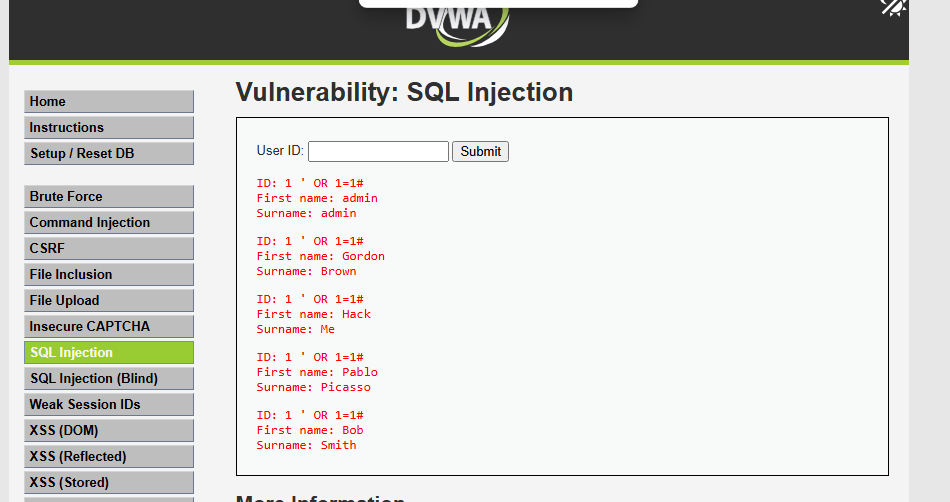
Now let’s look at the different payloads used in the attack so we can add them to the rule. The payloads include:
- select
- union
- 1=1
- #
- ’
- from
- where
-
- and
- table
Rule
This rule will detect both automated tools (Sqlmap) and manual attacks.
index=webapp source="C:\\xampp\\apache\\logs\\access.log" user_agent="*sqlmap*" OR user_agent=* | eval decoded_field = urldecode(request) | where like (decoded_field,"%#%") OR like (decoded_field,"%--%")OR like (decoded_field,"%1=1%") OR like (decoded_field,"%AND%") OR like (decoded_field,"%UNION%") OR like (decoded_field,"%SELECT%")OR like (decoded_field,"%FROM%")OR like (decoded_field,"%WHERE%") | table _time,sourc_ip,decoded_field
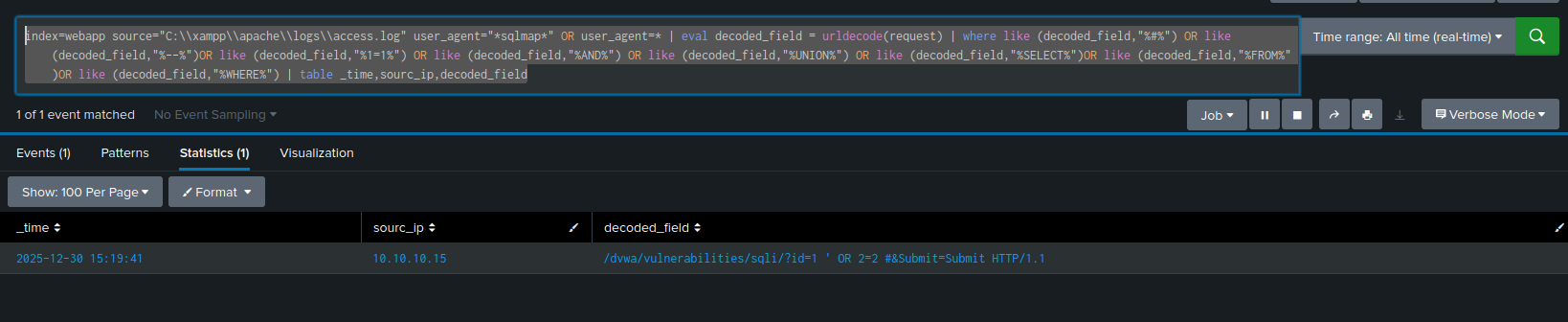
Now, we want to make sure that this rule triggers an alert. To do that, you can follow the same steps used in the previous attacks.
Thanks For Reading
LET'S DISCUSS
Keep the investigation open.
Have another interpretation, a correction, or a useful trace? Reach out on Discord.
Continue on Discord