The Art of Memory Forensics Chapter-06
Brief notes summarizing Chapter 6 of The Art of Memory Forensics, focusing on process enumeration, tokens, SIDs, privileges, handles, DKOM, and process behavior analysis.
ON THIS PAGE / 17 SECTIONS
- Processes && Handles && Tokens
- Process
- _EPROCESS Data Structures
- Important Field
- Process Organization
- Critical Windows Processes
- Analyzing Process Activity — Volatility Plugins
- Detecting DKOM Attacks
- Alternate Process Listings
- Process Tokens
- Extracting and Translating SIDs in Memory
- Detecting Lateral Movement
- Detecting Token Manipulation
- Process Handles
- Handle Analysis Objectives
- Enumerating Handles in Memory
- At the end of this chapter, we learned how Windows processes are represented and analyzed in memory, how tokens reveal SIDs and privileges, and how handles help identify the resources accessed by a process. We also covered DKOM, lateral movement, and token manipulation. If you notice any issues or incorrect concepts, please feel free to contact me. Thank you.
Processes && Handles && Tokens
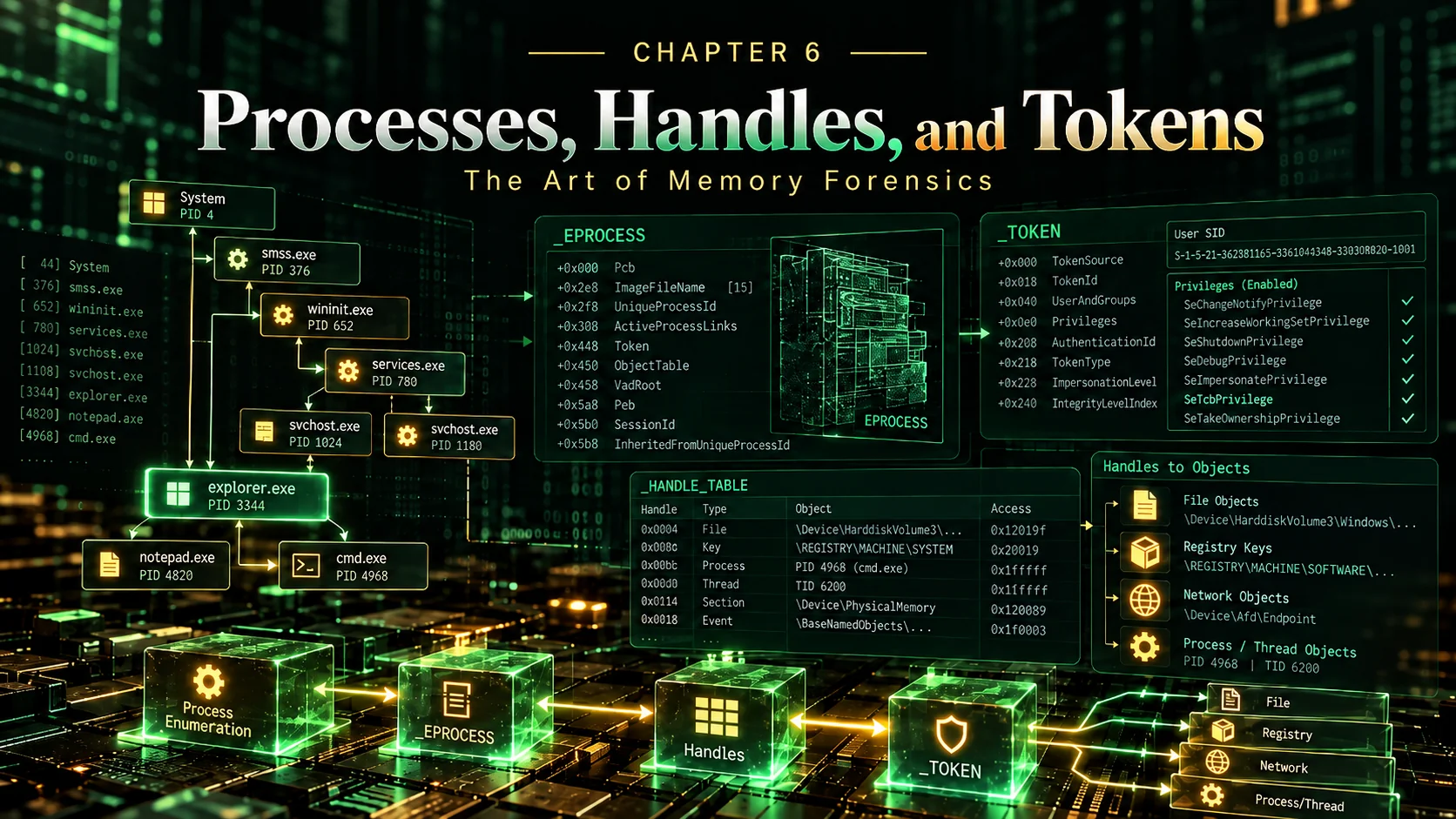
In this chapter, we will focus on active processes in memory, the handles associated with them, their security context and privileges, how to recognize a normal process tree, and the different plugins used to enumerate and analyze processes.
Process
Each running process is represented in memory by an _EPROCESS structure. It also has threads, which are responsible for executing code, handles that reference objects the process interacts with such as network resources, files, registry keys, and other objects, and VADs, which describe the process’s virtual address space.
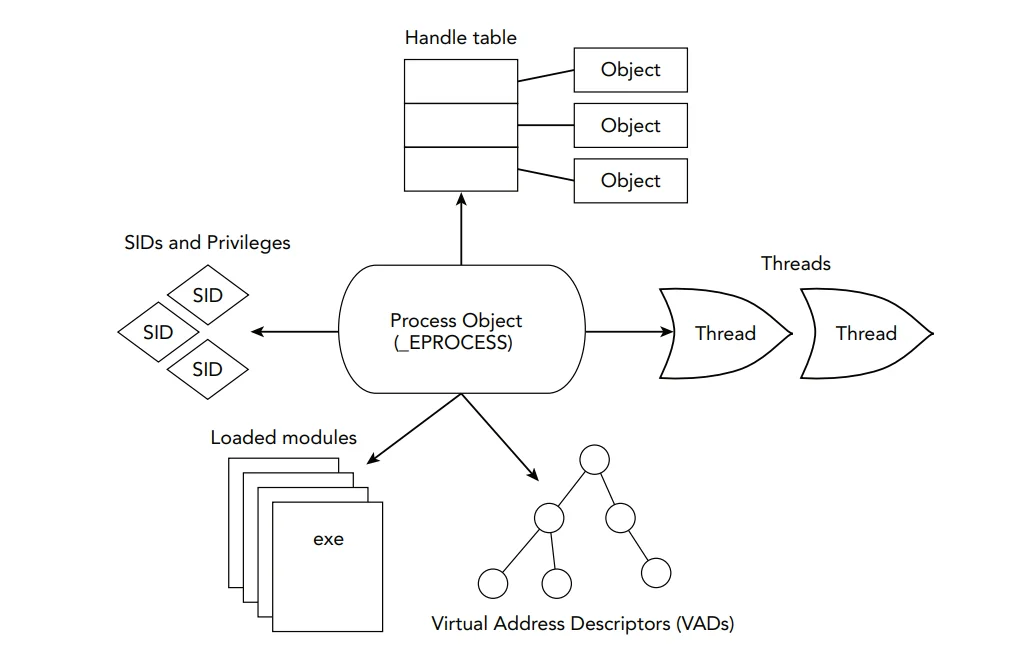
_EPROCESS Data Structures
To view the _EPROCESS data structure in the memory dump you are analyzing, open the dump with VolShell and use the following command:
 vol2 -f MemoryDump_Lab4.raw --profile Win7SP1x64 volshell
Volatility Foundation Volatility Framework 2.6.1
Current context: System @ 0xfffffa8000ca0040, pid=4, ppid=0 DTB=0x187000
Welcome to volshell! Current memory image is:
file:///mnt/d/the%20art%20of%20memory%20forensics/MemoryDump_Lab4.raw
To get help, type 'hh()'
>>> dt("_EPROCESS")
 '_EPROCESS' (1232 bytes)
0x0   : Pcb                            ['_KPROCESS']
0x160 : ProcessLock                    ['_EX_PUSH_LOCK']
0x168 : CreateTime                     ['WinTimeStamp', {'is_utc': True}]
0x170 : ExitTime                       ['WinTimeStamp', {'is_utc': True}]
0x178 : RundownProtect                 ['_EX_RUNDOWN_REF']
Important Field
| Field | Description |
|---|---|
| Pcb | Contains the _KPROCESS structure and important information such as the DirectoryTableBase. |
| CreateTime | The time when the process was created. |
| ExitTime | The time when the process exited. It is usually 0 for a running process. |
| UniqueProcessId | The PID of the process. |
| ActiveProcessLinks | A doubly linked list that connects active processes. |
| SessionProcessLinks | Connects processes that belong to the same session. |
| ObjectTable | Points to the process _HANDLE_TABLE. |
| Token | Contains the security context of the process, including SIDs and privileges. |
| InheritedFromUniqueProcessId | Stores the PID of the parent process. |
| ImageFileName | Stores the process executable name. |
| ThreadListHead | Points to the list of threads associated with the process. |
| ActiveThreads | Indicates the number of active threads in the process. |
| Peb | Points to the Process Environment Block containing information such as DLLs, command line, environment variables, and heaps. |
| VadRoot | Points to the root of the VAD tree that describes the process virtual memory regions. |
Process Organization
Each _EPROCESS contains an ActiveProcessLinks field of type _LIST_ENTRY.
The _LIST_ENTRY contains:
Flinkpoints to theActiveProcessLinksof the next process.Blinkpoints to theActiveProcessLinksof the previous process.
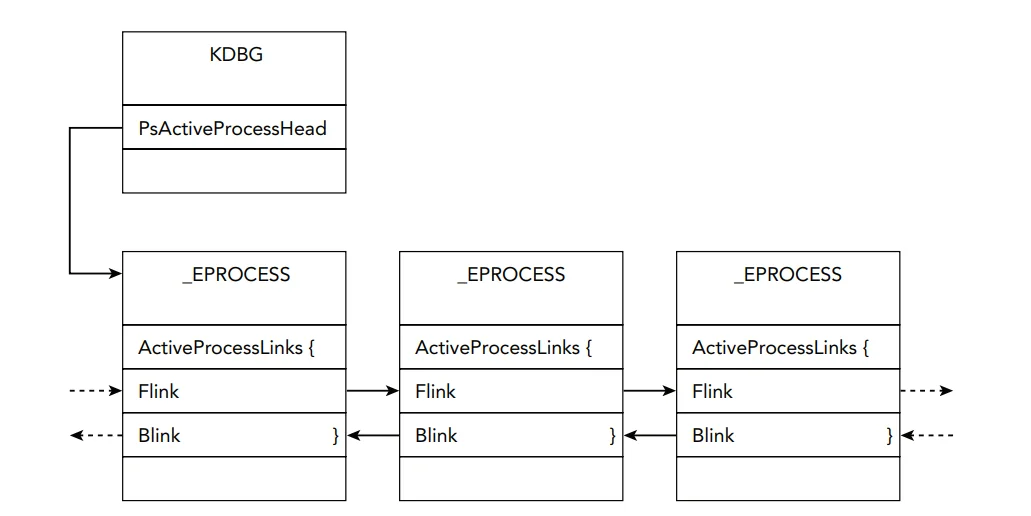
Tools such as Task Manager and Process Explorer rely on Windows APIs, such as NtQuerySystemInformation, to enumerate active processes. Because these methods depend on the active process list, DKOM attacks can hide processes by unlinking them from the list.
Critical Windows Processes
Before identifying suspicious processes, investigators should understand how normal Windows system processes are organized.
| Process | Description | Expected Parent | Important Forensic Notes |
|---|---|---|---|
| Idle | Not a real process with an executable on disk. It is used by the kernel to account for CPU time consumed by idle threads. | Not specified | It represents unused CPU time rather than a normal running application. |
| System | Not a normal disk-backed process. It acts as the default home for threads running in kernel mode. Kernel modules may therefore appear to open files, sockets, or handles through the System process. | Not specified | Normally uses PID 4. Handles or sockets owned by System may actually originate from kernel modules or drivers. |
| csrss.exe | Client/Server Runtime Subsystem. It participates in creating and deleting processes and threads and maintains its own private list of objects. | Not specified | Multiple instances are normal because each session receives its own copy. The legitimate executable should be located in System32. Look for look-alike names such as csrsss.exe or cssrs.exe. |
| services.exe | Hosts the Service Control Manager (SCM), which manages Windows services and maintains service information in its private memory. | Not specified | Normally there should be one instance running from System32. It should act as the parent of service-related processes such as svchost.exe, spoolsv.exe, and SearchIndexer.exe. |
| svchost.exe | Shared Service Host process used as a container for DLL-based Windows services. | services.exe | Multiple instances are normal. The executable should normally be located in System32. Look for misleading names such as scvhost.exe or svch0st.exe. |
| lsass.exe | Local Security Authority Subsystem. It enforces security policy, verifies passwords, and creates access tokens. | winlogon.exe on pre-Vista systems; wininit.exe on Vista and later | Normally there should be one instance running from System32. It is an important forensic target because of its role in authentication and access-token creation. |
| winlogon.exe | Handles interactive logon, user-profile loading, screen saver initiation, and Secure Attention Sequence operations such as CTRL+ALT+DEL. | Not specified | The legitimate executable is normally located in System32. |
| explorer.exe | Windows shell responsible for user interaction such as folder navigation and the Start menu. | Not specified | Normally one instance is expected for each logged-on user. It may contain evidence related to files, documents, and other user activity. |
| smss.exe | Session Manager. It is the first real user-mode process started during boot and is responsible for creating sessions that separate OS services and logged-on users. | Not specified | Important for understanding session creation, including console and RDP sessions. |
Analyzing Process Activity — Volatility Plugins
| Plugin | Description |
|---|---|
pslist | Walks the active process doubly linked list and lists processes referenced by PsActiveProcessHead. It may miss hidden or terminated processes. |
pstree | Displays the pslist results as a parent-child process tree, making process relationships easier to analyze. |
psscan | Scans memory for _EPROCESS objects instead of relying on the active process linked list. It can find terminated and unlinked processes. |
psxview | Locates processes using multiple enumeration methods and compares the results to reveal suspicious discrepancies or possible hidden processes. |
You can use the available options with psscan to display processes in a graphical view by running the following command:
$ vol2 -f MemoryDump_Lab4.raw --profile Win7SP1x64 psscan --output=dot --output-file=process.dot

$  dot -Tpng process.dot -o process.webp
Detecting DKOM Attacks
DKOM hides a process by unlinking its _EPROCESS from the active process doubly linked list while leaving the process object in memory. Therefore, list-based tools such as pslist may miss it, while scanning methods such as psscan may still detect it.
Note: To do this, the attacker must have access to kernel memory and be able to write to it in order to unlink a process from the doubly linked list.
Case - Prolaco
Prolaco is a malware sample that performs DKOM from user mode without loading a kernel driver.
Its process-hiding technique works as follows:
- It enables
SeDebugPrivilege. - It uses
NtQuerySystemInformationwithSystemModuleInformationto locate the kernel base address. - It locates
PsInitialSystemProcess, which points to the first_EPROCESS. - It walks the
_EPROCESSlinked list until it finds the PID it wants to hide. - It gets its own PID using
GetCurrentProcessId, meaning the malware tries to hide itself. - It uses
ZwSystemDebugControlthrough a helper function to modify kernel memory. - It overwrites the surrounding
FlinkandBlinkpointers so its_EPROCESSis unlinked from the active process list.
After this manipulation, list-based tools such as pslist and many live system APIs may fail to detect the malware, while scanning methods such as psscan can still find its _EPROCESS in memory.
Alternate Process Listings
Because process lists can be manipulated, investigators should not rely on a single process-enumeration method.
| Method | Volatility Plugin / psxview View | Description |
|---|---|---|
| Active process list | pslist | Walks PsActiveProcessHead and follows the _EPROCESS.ActiveProcessLinks doubly linked list. |
| Process object scanning | psscan | Scans memory for _EPROCESS objects instead of relying on the active process linked list. |
| Thread scanning | thrdproc in psxview | Scans for _ETHREAD objects and maps them back to their owning processes. |
| CSRSS handle table | csrss in psxview | Uses process handles stored by csrss.exe to identify _EPROCESS objects. |
PspCidTable | pspcid in psxview | Uses the kernel PspCidTable, which contains references to active process and thread objects. |
| Session process list | session in psxview | Uses _EPROCESS.SessionProcessLinks to locate processes belonging to a logon session. |
| Desktop threads | deskthrd in psxview | Uses desktop thread lists and maps _ETHREAD objects back to their owning processes. |
psxview compares all seven views to identify discrepancies that may indicate hidden processes or DKOM manipulation.

It is normal to see several False values when using psxview. This does not always mean that a process is hidden. The process may no longer be running, or it may have started before a particular identification method became available.
For example, System, smss.exe, and csrss.exe may legitimately appear as False in views such as csrss or session because they start very early in the boot process, before some of these tracking mechanisms are available.
To reduce these normal false positives, you can use the --apply-rules option with psxview. When this option is enabled, valid exceptions are marked as Okay instead of False, making suspicious discrepancies easier to identify.

Process Tokens
A process token describes the security context under which a process runs. It contains the user and group Security Identifiers (SIDs) associated with the process, as well as the privileges that define the specific tasks the process is allowed to perform. The Windows kernel uses this token when making access-control and security-related decisions.
Volatility provides plugins privs that allow you to analyze a process token and inspect its privileges. The privilege information is divided into three categories: Present, Enabled, and EnabledByDefault.During analysis, Enabled privileges are particularly important because they indicate privileges that are currently active and available for use by the process. However, an enabled privilege does not necessarily prove that the process actually used it.
vol2 -f MemoryDump_Lab4.raw --profile=Win7SP1x64 privs -p 2624
Volatility Foundation Volatility Framework 2.6.1
Pid      Process          Value  Privilege                            Attributes               Description
-------- ---------------- ------ ------------------------------------ ------------------------ -----------
    2624 DumpIt.exe            5 SeIncreaseQuotaPrivilege             Present                  Increase quotas
    2624 DumpIt.exe            6 SeMachineAccountPrivilege                                     Add workstations to the domain
    2624 DumpIt.exe            7 SeTcbPrivilege                                                Act as part of the operating system
    2624 DumpIt.exe            8 SeSecurityPrivilege                  Present                  Manage auditing and security log
    2624 DumpIt.exe            9 SeTakeOwnershipPrivilege             Present                  Take ownership of files/objects
    2624 DumpIt.exe           10 SeLoadDriverPrivilege                Present,Enabled          Load and unload device drivers
    2624 DumpIt.exe           23 SeChangeNotifyPrivilege              Present,Enabled,Default  Receive notifications of changes to files or directories
    2624 DumpIt.exe           24 SeRemoteShutdownPrivilege            Present                  Force shutdown from a remote system
    2624 DumpIt.exe           25 SeUndockPrivilege                    Present                  Remove computer from docking station
    2624 DumpIt.exe           26 SeSyncAgentPrivilege                                          Synch directory service data
    2624 DumpIt.exe           27 SeEnableDelegationPrivilege                                   Enable user accounts to be trusted for delegation
    2624 DumpIt.exe           28 SeManageVolumePrivilege              Present                  Manage the files on a volume
    2624 DumpIt.exe           29 SeImpersonatePrivilege               Present,Enabled,Default  Impersonate a client after authentication
    2624 DumpIt.exe           30 SeCreateGlobalPrivilege              Present,Enabled,Default  Create global objects
    2624 DumpIt.exe           33 SeIncreaseWorkingSetPrivilege        Present                  Allocate more memory for user applications
    2624 DumpIt.exe           34 SeTimeZonePrivilege                  Present                  Adjust the time zone of the computer's internal clock
    2624 DumpIt.exe           35 SeCreateSymbolicLinkPrivilege        Present                  Required to create a symbolic link
Extracting and Translating SIDs in Memory
A process token also contains SID information. Volatility provides the getsids plugin to extract and translate the SIDs associated with a process. These may include user, group, well-known, service, logon-session. When possible, the plugin also maps SID values to their corresponding account, group, or service names.
$ vol2 -f MemoryDump_Lab4_tagpatch.raw --profile=Win7SP1x64 getsids -p 1824
Volatility Foundation Volatility Framework 2.6.1
taskeng.exe (1824): S-1-5-18 (Local System)
taskeng.exe (1824): S-1-16-16384 (System Mandatory Level)
taskeng.exe (1824): S-1-1-0 (Everyone)
taskeng.exe (1824): S-1-5-32-545 (Users)
taskeng.exe (1824): S-1-5-80-1954729425-4294152082-187165618-318331177-3831297489 (RemoteAccess)
taskeng.exe (1824): S-1-5-80-4125092361-1567024937-842823819-2091237918-836075745 (Schedule)
taskeng.exe (1824): S-1-5-80-1691538513-4084330536-1620899472-1113280783-3554754292 (SCPolicySvc)
taskeng.exe (1824): S-1-5-80-4259241309-1822918763-1176128033-1339750638-3428293995 (SENS)
taskeng.exe (1824): S-1-5-80-4022436659-1090538466-1613889075-870485073-3428993833 (SessionEnv)
taskeng.exe (1824): S-1-5-80-2009329905-444645132-2728249442-922493431-93864177 (SharedAccess)
taskeng.exe (1824): S-1-5-80-1690854464-3758363787-3981977099-3843555589-1401248062 (ShellHWDetection)
taskeng.exe (1824): S-1-5-80-3594706986-2537596223-181334840-1741483385-1351671666 (wercplsupport)
taskeng.exe (1824): S-1-5-80-3750560858-172214265-3889451188-1914796615-4100997547 (Winmgmt)
taskeng.exe (1824): S-1-5-80-1014140700-3308905587-3330345912-272242898-93311788 (wuauserv)
taskeng.exe (1824): S-1-5-5-0-46789 (Logon Session)
taskeng.exe (1824): S-1-2-0 (Local (Users with the ability to log in locally))
taskeng.exe (1824): S-1-5-32-544 (Administrators)
Detecting Lateral Movement
The book gives an example of how getsids can help detect evidence of lateral movement. In this case, the attacker used a Poison Ivy RAT together with a Pass-the-Hash attack. The investigators used getsids to examine the SIDs associated with explorer.exe because it was running under the interactive logged-on user’s security context. Most of the SIDs were successfully resolved to user or group names, while one domain SID could not be resolved because Volatility did not have access to the domain controller or Active Directory information required for name resolution. More importantly, the token showed membership in highly privileged groups such as Domain Admins and Enterprise Admins, indicating that the attacker had obtained elevated domain access that could enable lateral movement across the network.
$ python vol.py -f grrcon.img --profile=WinXPSP3x86 getsids -p 1096

Volatility Foundation Volatility Framework 2.4
explorer.exe: S-1-5-21-2682149276-1333600406-3352121115-500 (administrator)
explorer.exe: S-1-5-21-2682149276-1333600406-3352121115-513 (Domain Users)
explorer.exe: S-1-1-0 (Everyone)
explorer.exe: S-1-5-32-545 (Users)
explorer.exe: S-1-5-32-544 (Administrators)
explorer.exe: S-1-5-4 (Interactive)
explorer.exe: S-1-5-11 (Authenticated Users)
explorer.exe: S-1-5-5-0-206541 (Logon Session)
explorer.exe: S-1-2-0 (Local (Users with the ability to log in locally))
explorer.exe: S-1-5-21-2682149276-1333600406-3352121115-519 (Enterprise Admins)
explorer.exe: S-1-5-21-2682149276-1333600406-3352121115-1115
explorer.exe: S-1-5-21-2682149276-1333600406-3352121115-518 (Schema Admins)
explorer.exe: S-1-5-21-2682149276-1333600406-3352121115-512 (Domain Admins)
Detecting Token Manipulation
Normally, a privilege must be Present in the token before it can be Enabled. So, when analyzing a memory dump, seeing an attribute such as Present,Enabled is normal. However, if you see a privilege marked only as Enabled without being Present, this may indicate DKOM-based token manipulation, where an attacker directly modifies the token so that the privilege is enabled while remaining hidden from some live tools.
Note: The attack requires kernel-level access because _SEP_TOKEN_PRIVILEGES must be modified directly in kernel memory. Therefore, the purpose of this technique is not to gain kernel access initially, but to manipulate process capabilities and deceive live-response tools after kernel-level access has already been obtained.
Process Handles
A process handle is a reference to an open kernel object, such as a file, process, thread, or registry key, that the process is interacting with. By examining a process’s handles, you can identify the resources it was accessing and determine activities such as whether it was reading or writing files or interacting with other system objects.
Handle Analysis Objectives
- Attribute objects to processes: Trace files, registry keys, mutexes, or other objects back to the process that created or accessed them.
- Investigate unknown processes: Analyze a processes handle table to understand its behavior even when no specific IOC is available.
- Detect registry persistence: Identify registry keys a process may use for configuration or persistence.
- Identify remote mapped drives: Find evidence of remote systems, shared paths, or mapped resources accessed by a process.
Enumerating Handles in Memory
The handles plugin walks process handle-table structures and displays the objects referenced by each process.
Note: Running it without filters shows all handles for all object types in all processes, so filtering is often necessary.
| Filter | Option | Purpose |
|---|---|---|
| Process ID | -p / --pid | Show handles belonging to one or more specific processes. |
| Process offset | -o / --offset | Analyze the process located at a specific physical _EPROCESS offset. |
| Object type | -t / --object-type | Show only specific object types such as File, Key, Process, or Thread. |
| Named objects only | --silent | Suppress unnamed objects to reduce noise. |
$ vol2 -f MemoryDump_Lab4.raw --profile Win7SP1x64 handles -p 2624 -t key
Volatility Foundation Volatility Framework 2.6.1
Offset(V)             Pid             Handle             Access Type             Details
------------------ ------ ------------------ ------------------ ---------------- -------
0xfffff8a001fe4530   2624                0x4                0x9 Key              MACHINE\SOFTWARE\MICROSOFT\WINDOWS NT\CURRENTVERSION\IMAGE FILE EXECUTION OPTIONS
0xfffff8a001f60470   2624               0x14                0x9 Key              MACHINE\SOFTWARE\MICROSOFT\WINDOWS NT\CURRENTVERSION\IMAGE FILE EXECUTION OPTIONS
0xfffff8a001fd2fa0   2624               0x24            0x20019 Key              MACHINE\SYSTEM\CONTROLSET001\CONTROL\NLS\SORTING\VERSIONS
0xfffff8a001fd3bb0   2624               0x3c            0xf003f Key              MACHINE
0xfffff8a001fd59f0   2624               0x44                0x1 Key              MACHINE\SYSTEM\CONTROLSET001\CONTROL\SESSION MANAGER
0xfffff8a00224dfa0   2624               0xb0                0x1 Key              MACHINE\SYSTEM\CONTROLSET001\CONTROL\NLS\CUSTOMLOCALE
At the end of this chapter, we learned how Windows processes are represented and analyzed in memory, how tokens reveal SIDs and privileges, and how handles help identify the resources accessed by a process. We also covered DKOM, lateral movement, and token manipulation. If you notice any issues or incorrect concepts, please feel free to contact me. Thank you.
Keep the investigation open.
Have another interpretation, a correction, or a useful trace? Reach out on Discord.
Continue on Discord