The Art of Memory Forensics Chapter-13
Explores Windows kernel forensics and rootkit detection using Volatility, covering hidden drivers, IRP and SSDT hooking, device trees, kernel callbacks, timers, and memory-based malware analysis.
ON THIS PAGE / 21 SECTIONS
- Kerenl Forensics and RootKits
- Kernel Modules
- How to Identify Malicious Kernel Modules
- How Kernel Modules Are Loaded
- Modules Plugins
- modules
- modscan
- unloadedmodules
- moddump
- Threads in Kernel Memory
- Detecting Orphan Kernel Threads
- Driver Objects and IRPs
- driverscan
- Hooking
- IRP Hooking Techniques
- Device Trees and Rootkit Detection
- SSDT
- Kernel Callbacks
- Timers
- At The End of This Chapter
- If you notice any issues or incorrect concepts, please feel free to contact me. Thank you.
Kerenl Forensics and RootKits
In this chapter, we will explore different techniques for detecting kernel-mode malware, which can operate in kernel space by loading malicious drivers or through other mechanisms.
Kernel-mode malware and rootkits can employ various stealth techniques to hide their presence, including function hooking, manipulating system call tables, and modifying kernel data structures.
Kernel Modules
When hunting for suspicious kernel modules, there are several detection techniques:
PsLoadedModuleList: A doubly linked list of_KLDR_DATA_TABLE_ENTRYstructures containing metadata about loaded kernel modules. However, rootkits can hide their modules by unlinking their entries from this list.modscan: A Volatility plugin that uses pool scanning to locate module metadata structures through theMmLdpool tag, even if they have been unlinked.
More advanced rootkits may overwrite their metadata structures with zeros, including the pool tag, making both detection methods ineffective.
However, the actual PE image and its executable code may still remain in memory, allowing further investigation using other techniques.
See the following diagram.
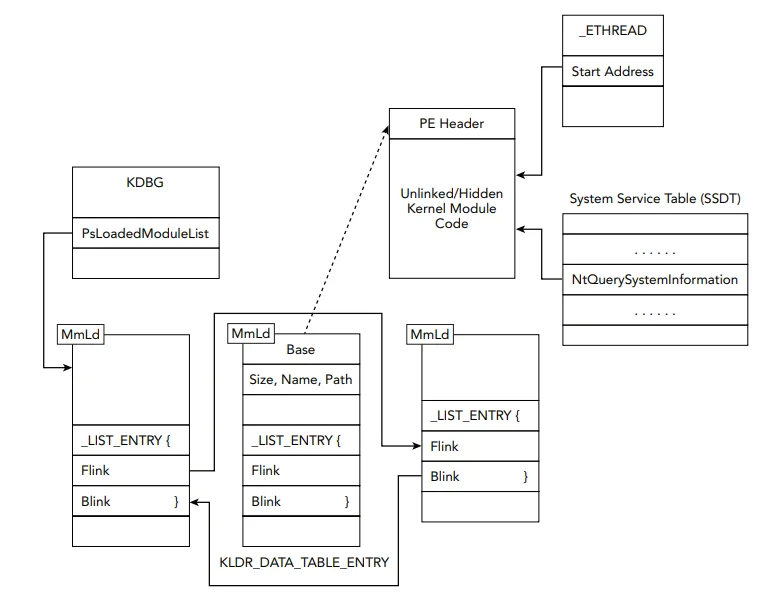
More advanced rootkits may erase their PE headers and module metadata to evade detection. However, their executable code must remain in memory for them to function.
They may leave indirect artifacts, such as kernel threads, function hooks, or driver and device objects used to communicate with user-mode processes.
Therefore, even if the rootkit hides its module information, investigators can still potentially detect it by analyzing these memory artifacts.
How to Identify Malicious Kernel Modules
Identifying malicious kernel modules among hundreds of legitimate Windows drivers requires a good understanding of normal and suspicious kernel behavior.
The following questions can help narrow down the scope of an investigation:
- Is the module hidden or unlinked? Has it been removed from
PsLoadedModuleList? - Does it handle critical interrupts or exceptions? Does it suspiciously modify or redirect entries in the
IDT? - Does it register callbacks? Does it monitor system events, such as process creation?
- Is the driver digitally signed? Is the signature valid, and is the signer trustworthy?
- Are its name and path legitimate? Do they match expected Windows driver names and locations?
- Does it intercept system calls? Does it modify entries in the
SSDTor redirect execution to its own code? - Does it create device objects? Does it use them to communicate with user-mode processes or interact with other driver stacks?
These questions help analysts reduce the scope of their investigation, prioritize suspicious modules, and focus on the most relevant evidence.
How Kernel Modules Are Loaded
Kernel modules can be loaded using different methods, each leaving different forensic artifacts:
- SCM (
CreateService/StartService): Loads a driver as a Windows Service, creating registry entries, SCM records, and potentially event logs. The driver can be unloaded by stopping the service. NtLoadDriver: Loads a driver directly using existing registry configuration, bypassing some SCM-related artifacts. It can be unloaded usingNtUnloadDriver.NtSetSystemInformation(SystemLoadAndCallImage): A historical loading technique that does not require service registry entries but makes unloading difficult.
Modules Plugins
modules
The modules plugin enumerates loaded kernel modules by walking the doubly linked list referenced by PsLoadedModuleList. However, modules that have been unlinked from this list will not appear in its output.
When analyzing the results, it is important to understand the difference between:
Offset(V): The virtual address of the_KLDR_DATA_TABLE_ENTRYstructure containing the module’s metadata.Base: The virtual address where the module’s PE image begins, typically containing theMZsignature.
The plugin also displays modules in their relative loading order, with earlier-loaded modules appearing at the top and more recently loaded modules appearing toward the bottom.
$ python vol.py -f memory.vmem --profile=Win7SP1x64 modules
Volatility Foundation Volatility Framework 2.4
Offset(V) Name Base Size File
------------------ --------------- ------------------ --------- ----
0xfffffa8000c32890 ntoskrnl.exe 0xfffff80002852000 0x5ea000
\SystemRoot\system32\ntoskrnl.exe
0xfffffa8000c327a0 hal.dll 0xfffff80002809000 0x49000
 \SystemRoot\system32\hal.dll
0xfffffa8000c326c0 kdcom.dll 0xfffff80000b9a000 0xa000
 \SystemRoot\system32\kdcom.dll
0xfffffa8000c2cf20 mcupdate.dll 0xfffff88000cdd000 0x4f000
 \SystemRoot\system32\mcupdate_GenuineIntel.dll
[snip]
0xfffffa8001515e20 bthport.sys 0xfffff880022e7000 0x8c000
 \SystemRoot\System32\Drivers\bthport.sys
0xfffffa80014383f0 rfcomm.sys 0xfffff88003238000 0x2c000
 \SystemRoot\system32\DRIVERS\rfcomm.sys
0xfffffa80023d3570 BthEnum.sys 0xfffff88003264000 0x10000
 \SystemRoot\system32\DRIVERS\BthEnum.sys
0xfffffa80020461e0 bthpan.sys 0xfffff8800339d000 0x20000
 \SystemRoot\system32\DRIVERS\bthpan.sys
0xfffffa80029958a0 PROCEXP152.SYS 0xfffff880033bd000 0xd000
 \??\C:\Windows\system32\Drivers\PROCEXP152.SYS
modscan
The modscan plugin scans the physical memory address space for kernel module metadata structures using the MmLd pool tag.
Unlike modules, it can detect unlinked kernel modules and remnants of previously unloaded modules, as long as their metadata structures and pool tags remain intact in memory.
$ python vol.py -f memory.vmem --profile=Win7SP1x64 modscan
Volatility Foundation Volatility Framework 2.4
Offset(P) Name Base Size File
------------------ --------------- ------------------ --------- ----
0x000000000038ae90 mouclass.sys 0xfffff88003bd9000 0xf000
 \SystemRoot\system32\DRIVERS\mouclass.sys
0x000000002c78c590 serenum.sys 0xfffff88003a1d000 0xc000
 \SystemRoot\system32\DRIVERS\serenum.sys
0x000000003e0edde0 spsys.sys 0xfffff88003321000 0x71000
 \SystemRoot\system32\drivers\spsys.sys
0x000000003e3958a0 PROCEXP152.SYS 0xfffff880033bd000 0xd000
 \??\C:\Windows\system32\Drivers\PROCEXP152.SYS
0x000000003e422360 lltdio.sys 0xfffff880023d2000 0x15000
 \SystemRoot\system32\DRIVERS\lltdio.sys
0x000000003e424a00 rspndr.sys 0xfffff880023e7000 0x18000
 \SystemRoot\system32\DRIVERS\rspndr.sys
 [snip]
unloadedmodules
The unloadedmodules plugin identifies recently unloaded kernel modules by examining records maintained by the Windows kernel for debugging purposes.
These records are useful for investigating issues such as dangling pointers, which can occur when a driver unloads without canceling pending DPCs or timers that reference its code.
Unloaded modules may no longer appear in modules or modscan because their memory allocations have been freed or overwritten. However, Windows may still retain metadata about them, including their names, previous memory addresses, and unload timestamps.
This makes unloadedmodules useful for detecting traces of previously loaded malicious drivers.
$ python vol.py -f rustock-c.vmem --profile=WinXPSP3x86 unloadedmodules
Volatility Foundation Volatility Framework 2.4
Name StartAddress EndAddress Time
-------------------- ------------ ---------- ----
Sfloppy.SYS 0x00f8b92000 0xf8b95000 2010-12-31 18:46:04
Cdaudio.SYS 0x00f89d2000 0xf89d7000 2010-12-31 18:46:04
splitter.sys 0x00f8c1c000 0xf8c1e000 2010-12-31 18:46:40
swmidi.sys 0x00f871a000 0xf8728000 2010-12-31 18:46:41
aec.sys 0x00f75d8000 0xf75fb000 2010-12-31 18:46:41
DMusic.sys 0x00f78d0000 0xf78dd000 2010-12-31 18:46:41
drmkaud.sys 0x00f8d9c000 0xf8d9d000 2010-12-31 18:46:41
kmixer.sys 0x00f75ae000 0xf75d8000 2010-12-31 18:46:46
xxx.sys 0x00f6f88000 0xf6fc2000 2010-12-31 18:47:57

$ python vol.py -f rustock-c.vmem --profile=WinXPSP3x86 modules | grep xxx

$ python vol.py -f rustock-c.vmem --profile=WinXPSP3x86 modscan | grep xxx
moddump
The moddump plugin is used to extract kernel modules from memory using their base addresses, provided that their PE headers are intact.
However, if a rootkit has erased its PE header, moddump may fail. In this case, investigators need to identify the memory region containing the module’s executable code and extract it as raw memory for further analysis.
n vol.py –f memory.dmp
 --profile=Win7SP1x64 moddump
 --base=0xfffff88003800000
 --dump-dir=OUTDIR/
Volatility Foundation Volatility Framework 2.4
Module Base Module Name Result
------------------ -------------------- ------
0xfffff88003800000 UNKNOWN OK: driver.fffff88003800000.sys
Threads in Kernel Memory
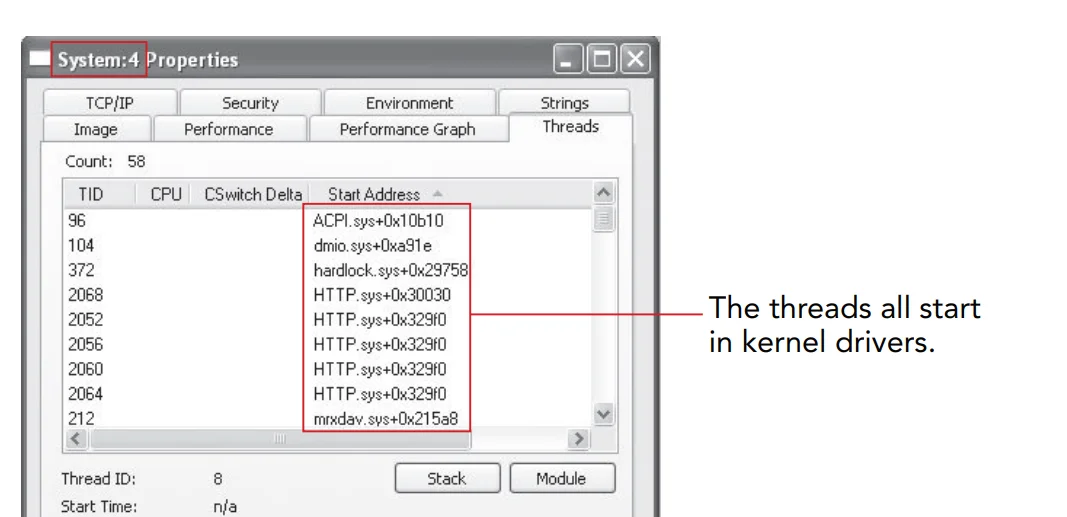
Kernel drivers can create System Threads using the PsCreateSystemThread API to execute tasks independently. These threads are typically associated with the System process (PID 4), and their start addresses usually point to code within known kernel modules.
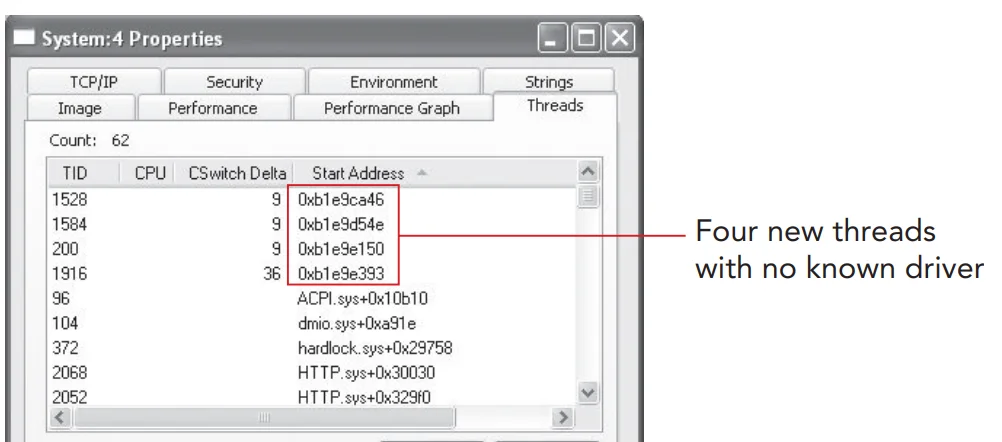
However, rootkits may allocate executable kernel memory, copy their code into it, and create threads that execute from these memory regions. The original driver can then unload while the copied code continues running.
Detecting Orphan Kernel Threads
Rootkits may copy executable code into a separate kernel memory region and create a system thread to execute it, allowing the original driver to unload.
To detect this behavior, investigators can use Volatility 2’s threads plugin or Volatility 3’s windows.orphan_kernel_threads plugin.
These plugins identify orphan threads by checking whether their StartAddress falls outside the memory ranges of known loaded kernel modules.
Once a suspicious thread is identified, analysts can examine its start address and scan backward through memory to locate a valid PE header (MZ) and potentially recover the hidden module.
However, if the rootkit has erased its PE header, investigators may need to analyze and extract the remaining executable code directly from memory.
Driver Objects and IRPs
The _DRIVER_OBJECT structure contains operational information about a kernel driver, including its base address (DriverStart), size (DriverSize), and pointers to its initialization, unload, and I/O dispatch routines.
IRPs (I/O Request Packets) are data structures used by the Windows I/O Manager to represent and deliver I/O requests, such as read, write, and device control operations, to drivers for processing.
driverscan
The driverscan plugin uses pool tag scanning to locate _DRIVER_OBJECT structures through the Driv pool tag.
Unlike modscan, which searches for kernel module metadata (_KLDR_DATA_TABLE_ENTRY) using the MmLd pool tag, driverscan focuses on driver objects and their associated information.
$ python vol.py -f memory.dmp --profile=Win7SP1x64 driverscan
Volatility Foundation Volatility Framework 2.4
Offset(P) Start Size Service Key Driver Name
------------------ ------------------ -------- ------------ -----------
0x000000000038ac80 0xfffff88003bd9000 0xf000 mouclass \Driver\mouclass
0x00000000254eaa80 0xfffff88000e00000 0x15000 volmgr \Driver\volmgr
0x00000000254eae40 0xfffff88000fba000 0xd000 vdrvroot \Driver\vdrvroot
0x000000003e0f1060 0xfffff8800323c000 0x20000 BthPan \Driver\BthPan
0x000000003e416060 0xfffff880023e7000 0x18000 rspndr \Driver\rspndr
0x000000003e474e70 0xfffff8800364c000 0x2d000 mrxsmb \FileSystem\mrxsmb
0x000000003e4765d0 0xfffff8800284d000 0x24000 mrxsmb20 \FileSystem\mrxsmb2
Hooking
IRP Hooking Techniques
IRP Hooking occurs when malware modifies a function pointer in a driver’s MajorFunction array to redirect I/O requests from a legitimate dispatch routine to malicious code.
There are two common techniques:
- Direct IRP Hooking: The attacker modifies a
MajorFunctionpointer to point directly to a malicious function, often located outside the original driver’s memory range.
$ python vol.py -f hooker.bin --profile=WinXPSP3x86 driverirp -r tcpip
Volatility Foundation Volatility Framework 2.4
--------------------------------------------------
DriverName: Tcpip
DriverStart: 0xb2ef3000
DriverSize: 0x58480
DriverStartIo: 0x0
 0 IRP_MJ_CREATE 0xb2ef94f9 tcpip.sys
 1 IRP_MJ_CREATE_NAMED_PIPE 0xb2ef94f9 tcpip.sys
[snip]
 12 IRP_MJ_DIRECTORY_CONTROL 0xb2ef94f9 tcpip.sys
 13 IRP_MJ_FILE_SYSTEM_CONTROL 0xb2ef94f9 tcpip.sys
 14 IRP_MJ_DEVICE_CONTROL 0xf8b615d0 url.sys
 15 IRP_MJ_INTERNAL_DEVICE_CONTROL 0xb2ef9718 tcpip.sys
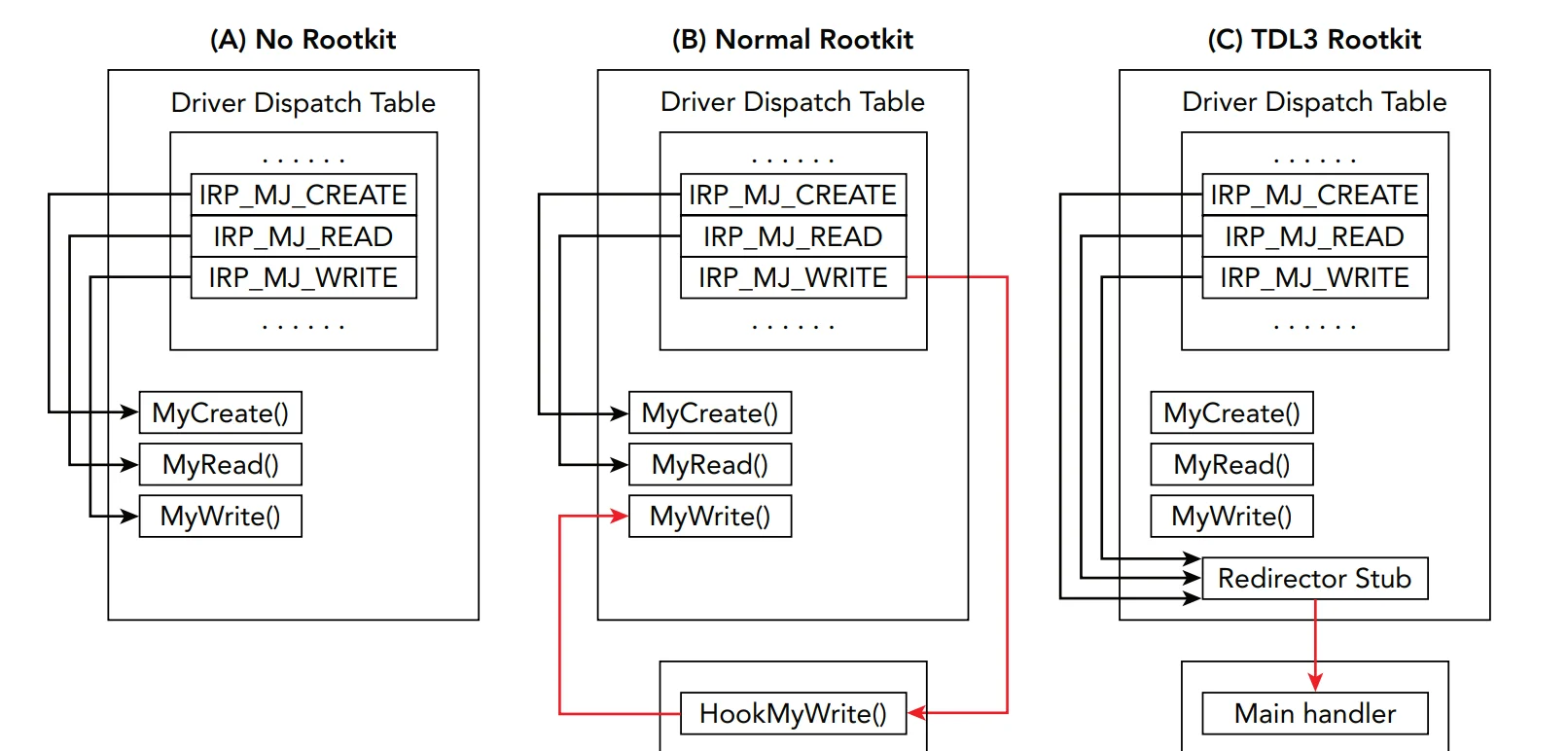
16 IRP_- Stealthy IRP Hooking: The attacker places a small piece of code called a redirector stub inside the legitimate driver’s memory. The
MajorFunctionpointer still points inside the legitimate driver, but the stub redirects execution to the malicious function elsewhere in memory.
$ python vol.py -f tdl3.vmem driverirp -r vmscsi
 --profile=WinXPSP3x86
Volatility Foundation Volatility Framework 2.4
--------------------------------------------------
DriverName: vmscsi
DriverStart: 0xf9db8000
DriverSize: 0x2c00
DriverStartIo: 0xf97ea40e
 0 IRP_MJ_CREATE 0xf9db9cbd vmscsi.sys
 1 IRP_MJ_CREATE_NAMED_PIPE 0xf9db9cbd vmscsi.sys
 2 IRP_MJ_CLOSE 0xf9db9cbd vmscsi.sys
 3 IRP_MJ_READ 0xf9db9cbd vmscsi.sys
 4 IRP_MJ_WRITE 0xf9db9cbd vmscsi.sys
 5 IRP_MJ_QUERY_INFORMATION 0xf9db9cbd vmscsi.sys
 6 IRP_MJ_SET_INFORMATION 0xf9db9cbd vmscs
0xf9db9cbd a10803dfff MOV EAX, [0xffdf0308]
0xf9db9cc2 ffa0fc000000 JMP DWORD [EAX+0xfc]
0xf9db9cc8 0000 ADD [EAX], AL
0xf9db9cca 0000 ADD [EAX], AL
0xf9db9ccc 0000 ADD [EAX], AL
0xf9db9cce 0000 ADD [EAX], AL
>>> dd(0xffdf0308, length=4)
ffdf0308 817ef908
>>> dd(0x817ef908 + 0xFC, length=4)
817efa04 81926e31
>>> dis(0x81926e31)
0x81926e31 55 PUSH EBP
0x81926e32 8bec MOV EBP, ESP
0x81926e34 8b450c MOV EAX, [EBP+0xc]
0x81926e37 8b4d08 MOV ECX, [EBP+0x8]
0x81926e3a 83ec0c SUB ESP, 0xc
0x81926e3d 53 PUSH EBX
0x81926e3e 8b5860 MOV EBX, [EAX+0x60]
0x81926e41 a10803dfff MOV EAX, [0xffdf0308]
0x81926e46 3b4808 CMP ECX, [EAX+0x8]
[snip]As shown in the previous example, all IRP handlers in vmscsi.sys point to the same address within the legitimate driver’s memory.
However, when we examine that address using volshell, we discover a redirector stub that indirectly redirects execution to another memory address containing the rootkit’s actual executable code.
Device Trees and Rootkit Detection
Windows uses a layered driver architecture to handle I/O requests, allowing a single IRP to pass through multiple drivers in a device stack.
Rootkits can abuse this architecture by attaching a malicious filter device to an existing device stack, allowing them to intercept, monitor, modify, or block I/O requests.
The Volatility devicetree plugin helps investigators examine these relationships by displaying:
DRV: Driver Object.DEV: Device Object created by the driver.ATT: Attached Device Object within the device stack.
By examining these relationships, investigators can identify suspicious filter drivers and unusual device attachments that may indicate rootkit activity.
$ python vol.py -f stuxnet.mem devicetree
DRV 0x0205e5a8 \FileSystem\vmhgfs
---| DEV 0x820f0030 hgfsInternal UNKNOWN
---| DEV 0x821a1030 HGFS FILE_DEVICE_NETWORK_FILE_SYSTEM
------| ATT 0x81f5d020 (?) - \FileSystem\FltMgr FILE_DEVICE_NETWORK_FILE_SYSTEM
---------| ATT 0x821354b8 (?) - \Driver\MRxNet FILE_DEVICE_NETWORK_FILE_SYSTEM
DRV 0x023ae880 \FileSystem\MRxSmb
---| DEV 0x81da95d0 LanmanDatagramReceiver FILE_DEVICE_NETWORK_BROWSER
---| DEV 0x81ee5030 LanmanRedirector FILE_DEVICE_NETWORK_FILE_SYSTEM
------| ATT 0x81bf1020 (?) - \FileSystem\FltMgr FILE_DEVICE_NETWORK_FILE_SYSTEM
---------| ATT 0x81f0fc58 (?) - \Driver\MRxNet FILE_DEVICE_NETWORK_FILE_SYSTEM
DRV 0x02476da0 \FileSystem\Cdfs
---| DEV 0x81e636c8 Cdfs FILE_DEVICE_CD_ROM_FILE_SYSTEM
------| ATT 0x81fac548 (?) - \FileSystem\FltMgr FILE_DEVICE_CD_ROM_FILE_SYSTEM
---------| ATT 0x8226ef10 (?) - \Driver\MRxNet FILE_DEVICE_CD_ROM_FILE_SYSTEM
DRV 0x0253d180 \FileSystem\Ntfs
---| DEV 0x82166020 FILE_DEVICE_DISK_FILE_SYSTEM
------| ATT 0x8228c6b0 (?) - \FileSystem\sr FILE_DEVICE_DISK_FILE_SYSTEM
---------| ATT 0x81f47020 (?) - \FileSystem\FltMgr FILE_DEVICE_DISK_FILE_SYSTEM
------------| ATT 0x81fb9680 (?) - \Driver\MRxNet FILE_DEVICE_DISK_FILE_SYSTEM
As shown in the example, the Stuxnet rootkit attached malicious device objects belonging to \Driver\MRxNet to several file system device stacks, including Ntfs, Cdfs, vmhgfs, and MRxSmb.
This allowed the rootkit to intercept and filter I/O requests, potentially hiding specific files and directories from antivirus software and other applications.
SSDT
The System Service Descriptor Table (SSDT) is a kernel structure that helps Windows locate the appropriate kernel-mode functions for executing system calls.
For example, when an executable calls a Windows API to create a file, the request may eventually reach the NtCreateFile stub in ntdll.dll, which initiates a system call. The kernel uses the system call’s index to locate the corresponding kernel function through the service table referenced by the SSDT.
The ssdt plugin can enumerate these entries and display their function names, addresses, and owning kernel modules.
Rootkits can abuse this mechanism using three techniques:
- Pointer Replacement: The rootkit modifies an SSDT entry to redirect execution to a malicious function.
$ python vol.py -f laqma.vmem ssdt --profile=WinXPSP3x86
 | egrep -v '(ntoskrnl\.exe|win32k\.sys)'
Volatility Foundation Volatility Framework 2.4
[x86] Gathering all referenced SSDTs from KTHREADs...
Finding appropriate address space for tables...
SSDT[0] at 805011fc with 284 entries
 Entry 0x0049: 0xf8c52884 (NtEnumerateValueKey) owned by lanmandrv.sys
 Entry 0x007a: 0xf8c5253e (NtOpenProcess) owned by lanmandrv.sys
 Entry 0x0091: 0xf8c52654 (NtQueryDirectoryFile) owned by lanmandrv.sys
 Entry 0x00ad: 0xf8c52544 (NtQuerySystemInformation) owned by lanmandrv.sys
As shown in the example, four SSDT entries that should point to kernel functions within ntoskrnl.exe have been modified to point to functions inside another driver named lanmandrv.sys.
- Inline Hooking: The rootkit leaves the SSDT entry unchanged but modifies the instructions at the beginning of the legitimate function, typically inserting a
JMPinstruction that redirects execution to malicious code.
$ python vol.py -f skynet.bin --profile=WinXPSP3x86 ssdt --verbose
[snip]
SSDT[0] at 804e26a8 with 284 entries
 Entry 0x0047: 0x80570d64 (NtEnumerateKey) owned by ntoskrnl.exe
 ** INLINE HOOK? => 0x820f1b3c (UNKNOWN)
 Entry 0x0048: 0x80648aeb (NtEnumerateSystem[snip]) owned by ntoskrnl.exe
 Entry 0x0049: 0x80590677 (NtEnumerateValueKey) owned by ntoskrnl.exe
 Entry 0x004a: 0x80625738 (NtExtendSection) owned by ntoskrnl.exe
 Entry 0x004b: 0x805b0b4e (NtFilterToken) owned by ntoskrnl.exe
 Entry 0x004c: 0x805899b4 (NtFindAtom) owned by ntoskrnl.exe
In this example, the --verbose option instructs the ssdt plugin to examine the instructions at the beginning of the kernel functions to detect potential inline hooks.
As shown in entry 0x0047, the NtEnumerateKey function still points to its legitimate address (0x80570d64) within ntoskrnl.exe.
However, the plugin reports a potential inline hook redirecting execution to 0x820f1b3c, which is not associated with a recognized kernel module.
- Table Duplication: The rootkit creates a modified copy of the original service table and changes a thread’s
ServiceTablepointer to reference the malicious copy. As a result, multiple service tables may exist, with different threads using different versions.
$ python vol.py -f blackenergy.vmem --profile=WinXPSP3x86 ssdt
SSDT[0] at 814561b0 with 284 entries
 Entry 0x0115: 0x817315c1 (NtWriteVirtualMemory) owned by 00000B9D
SSDT[0] at 81882980 with 284 entries
 Entry 0x0115: 0x817315c1 (NtWriteVirtualMemory) owned by 00000B9D
SSDT[0] at 80501030 with 284 entries
 Entry 0x0115: 0x805a82f6 (NtWriteVirtualMemory) owned by ntoskrnl.exe
In this example, the ssdt plugin detects three different instances of SSDT[0], all containing 284 entries.The first two tables appear to be malicious copies because their NtWriteVirtualMemory entries (0x0115) point to the address 0x817315c1, which is associated with an unexpected owner (00000B9D).
However, the third table appears to be the original, legitimate SSDT because its NtWriteVirtualMemory entry points to 0x805a82f6, a function address within ntoskrnl.exe.
Kernel Callbacks
Kernel callbacks are officially supported Windows mechanisms that allow kernel drivers to register notification routines for specific system events.
Instead of continuously scanning the system for changes, such as checking whether a new process has been created, a driver can register a callback that Windows automatically invokes when the relevant event occurs.
Windows supports several types of kernel callbacks, including:
- Process Creation: Notifications when a process is created or terminated.
- Thread Creation: Notifications when a thread is created or terminated.
- Image Loading: Notifications when an executable image, such as an EXE, DLL, or kernel module, is mapped into memory.
- Registry Operations: Notifications when registry operations are performed.
- System Shutdown: Notifications when the system is shutting down.
- File System Registration: Notifications when a new file system becomes available.
- Plug and Play (PnP): Notifications when devices are added, removed, or changed.
- Debug Messages: Notifications for kernel debug messages.
- Bugchecks: Callbacks invoked during system crashes.
Rootkits can abuse kernel callbacks to monitor system activity and automatically execute malicious actions when specific events occur.
For example, a rootkit might use a process creation callback to detect security tools, a registry callback to protect its persistence mechanisms, or a thread creation callback to modify newly created threads.
$ python vol.py -f stuxnet.vmem --profile=WinXPSP3x86 callbacks
Volatility Foundation Volatility Framework 2.4
Type Callback Module Details
------------------------------------ ---------- -------------------- -------
IoRegisterFsRegistrationChange 0xf84be876 sr.sys -
IoRegisterFsRegistrationChange 0xb21d89ec mrxnet.sys -
IoRegisterFsRegistrationChange 0xf84d54b8 fltMgr.sys -
[snip]
KeRegisterBugCheckReasonCallback 0xf8b7aab8 mssmbios.sys SMBiosDa
KeRegisterBugCheckReasonCallback 0xf8b7aa28 mssmbios.sys SMBiosDa
KeRegisterBugCheckReasonCallback 0xf82e01be USBPORT.SYS USBPORT
KeRegisterBugCheckReasonCallback 0xf82f7522 VIDEOPRT.SYS Videoprt
PsSetLoadImageNotifyRoutine 0xb240ce4c PROCMON20.SYS -
PsSetLoadImageNotifyRoutine 0x805f81a6 ntoskrnl.exe -
PsSetLoadImageNotifyRoutine 0xf895ad06 mrxcls.sys -
PsSetCreateThreadNotifyRoutine 0xb240cc9a PROCMON20.SYS -
PsSetCreateProcessNotifyRoutine 0xf87ad194 vmci.sys -
PsSetCreateProcessNotifyRoutine 0xb240cb94 PROCMON20.SYS -
In this example, Stuxnet uses two kernel callbacks through its malicious drivers:
-
IoRegisterFsRegistrationChange(mrxnet.sys): Notifies the rootkit when a new file system is registered, allowing it to interact with newly available file systems and potentially hide specific files or directories. -
PsSetLoadImageNotifyRoutine(mrxcls.sys): Notifies the rootkit when an executable image, such as an EXE or DLL, is mapped into memory. Stuxnet uses these notifications to help inject malicious code into processes during DLL loading.
Timers
Kernel timers allow drivers to schedule one-time or periodic operations without blocking the executing thread. A timer can be associated with a Deferred Procedure Call (DPC), which executes a specified routine when the timer expires.
Rootkits may use timers to perform malicious activities periodically while hiding their kernel modules.
The Volatility timers plugin helps detect these rootkits by identifying timer objects and their associated DPC routine addresses.
If a timer’s routine points to an UNKNOWN kernel memory region, it may indicate a hidden rootkit. Investigators can then disassemble the routine using volshell to analyze the suspicious code.
$ python volatility.py timers -f rustock-c.vmem
Volatility Foundation Volatility Framework 1.4_rc1
Offset DueTime Period(ms) Signaled Routine Module
0xf730a790 0x00000000:0x6db0f0b4 0 - 0xf72fb385 srv.sys
0x80558a40 0x00000000:0x68f10168 1000 Yes 0x80523026 ntoskrnl.exe
0x80559160 0x00000000:0x695c4b3a 0 - 0x80526bac ntoskrnl.exe
0x820822e4 0x00000000:0xa2a56bb0 150000 Yes 0x81c1642f UNKNOWN
0xf842f150 0x00000000:0xb5cb4e80 0 - 0xf841473e Ntfs.sys
0xf70d00e0 0x00000000:0x81eb644c 0 - 0xf70c18de HTTP.sys
0xf70cd808 0x00000000:0x81eb644c 60000 Yes 0xf70b6202 HTTP.sys
0x81e57fb0 0x00000000:0x6a4f7b16 30000 Yes 0xf7b62385 afd.sys
0x81f5f8d4 0x00000000:0x6a517bc8 3435 Yes 0x81c1642f UNKNOWN
[snip]
At The End of This Chapter
Kernel rootkits can hide malicious code, manipulate operating system behavior, and evade traditional detection methods. However, they often leave valuable memory artifacts, such as hidden drivers, hooked functions, callbacks, timers, and kernel threads.
By analyzing and correlating these artifacts, investigators can locate hidden malicious code, extract it from memory, and perform further analysis to understand the rootkit’s behavior.
If you notice any issues or incorrect concepts, please feel free to contact me. Thank you.
Keep the investigation open.
Have another interpretation, a correction, or a useful trace? Reach out on Discord.
Continue on Discord