Recovering Clipboard Data from Windows 10 Memory Dumps
How can we recover clipboard data from a Windows 10 memory dump
ON THIS PAGE / 3 SECTIONS
How Windows Stores Clipboard Data
Before we get into how to recover clipboard data from a memory dump, we need to understand how Windows stores that data and why it isn’t tied only to the application we copied it from.
When you press Ctrl+C, the application handling the copy operation typically uses several Windows Clipboard API functions. The usual sequence starts with OpenClipboard, which takes a window handle (HWND) and opens the clipboard for that application to work with:
BOOL OpenClipboard(HWND hWndNewOwner);Next, the application calls EmptyClipboard to clear the current clipboard contents and transfer clipboard ownership to the window associated with the open clipboard:
BOOL EmptyClipboard(void);It then calls SetClipboardData to place the copied data on the clipboard in a specified format:
HANDLE SetClipboardData(UINT uFormat, HANDLE hMem);Finally, it calls CloseClipboard to close the clipboard after finishing the operation:
BOOL CloseClipboard(void);Now, the important part is that the clipboard isn’t associated with just the application that performed the copy. In Windows, the clipboard belongs to a window station, such as WinSta0. A window station is associated with a session and can contain one or more desktops. So, the clipboard is not a separate object for every desktop; the window station is what defines the clipboard that applications with access to that station can use to copy and paste data.
This explains why the copied data can be pasted into another application, instead of being accessible only to the application we originally copied it from.
Investigation
In this experiment, I used .vmem and .vmss files from a VMware virtual machine and converted them into a .dmp file using vmss2core, so I could load the memory dump into WinDbg for analysis.
After opening the dump in WinDbg, the first thing we need to do is identify the available sessions and determine which session we’re interested in.
0: kd> !session
Sessions on machine: 2
Valid Sessions: 0 1
After identifying the target session, we need to enumerate the available Window Stations, since there can be more than one Window Station within the same session.
According to Microsoft’s documentation, WinSta0 is the only interactive Window Station, meaning it can display a user interface and receive user input. Other Window Stations are non-interactive and may be used by services or other processes.
We can enumerate the Window Stations associated with our target session using:
0: kd> !object \Sessions\1\Windows\WindowStations
Object: ffffc8002e5a32a0  Type: (ffffa58dd228ce80) Directory
    ObjectHeader: ffffc8002e5a3270 (new version)
    HandleCount: 1  PointerCount: 3
    Directory Object: ffffc8002bf93c00  Name: WindowStations

    Hash Address          Type                      Name
    ---- -------          ----                      ----
     25  ffffa58dd60f1b00 WindowStation             WinSta0
Once we’ve identified the relevant session, we need to enumerate the processes that belong to it.
0: kd> !sprocess 1 0
Dumping Session 1

_MM_SESSION_SPACE ffffb680a7d0b000
PROCESS ffffa58dd618c140
    SessionId: 1  Cid: 01e8    Peb: 431a02000  ParentCid: 01e0
    DirBase: 132191000  ObjectTable: ffffc8002e0385c0  HandleCount: 331.
    Image: csrss.exe

PROCESS ffffa58dd61ca080
    SessionId: 1  Cid: 022c    Peb: 6c12158000  ParentCid: 01e0
    DirBase: 130ed4000  ObjectTable: ffffc8002e03ae00  HandleCount: 272.
    Image: winlogon.exe

PROCESS ffffa58dd82f1080
    SessionId: 1  Cid: 1b34    Peb: 844bbaf000  ParentCid: 11e0
    DirBase: 0d5cf000  ObjectTable: ffffc80030af04c0  HandleCount: 237.
    Image: notepad.exe
Next, we select a process from that session and switch the debugger’s process context to it using its EPROCESS address.
0: kd> .process ffffa58dd82f1080
Implicit process is now ffffa58d`d82f1080
.reload /userThis allows WinDbg to interpret the selected process’s user-mode virtual address space, so we can inspect its memory and examine the relevant user-mode functions, as long as their memory pages are available in the dump.
After setting the appropriate user-mode process context, we’ll start with the first function, OpenClipboard.
First, we need to check whether the function is available in the loaded symbols using:
x user32!OpenClipboardIf the function is found, we can examine its instructions using:
uf user32!OpenClipboardIf the symbol is not found, we should check that the correct symbols are loaded.
The disassembly looks like this:
0: kd> uf user32!OpenClipboard
user32!OpenClipboard:
00007ff9`2fc7b880 4053            push    rbx
00007ff9`2fc7b882 4883ec20        sub     rsp,20h
00007ff9`2fc7b886 488d542438      lea     rdx,[rsp+38h]
00007ff9`2fc7b88b 48ff154e550600  call    qword ptr [user32!_imp_NtUserOpenClipboard (00007ff9`2fce0de0)]
00007ff9`2fc7b892 0f1f440000      nop     dword ptr [rax+rax]
00007ff9`2fc7b897 837c243800      cmp     dword ptr [rsp+38h],0
00007ff9`2fc7b89c 8bd8            mov     ebx,eax
00007ff9`2fc7b89e 7405            je      user32!OpenClipboard+0x25 (00007ff9`2fc7b8a5)

user32!OpenClipboard+0x20:
00007ff9`2fc7b8a0 e80f000000      call    user32!ClientEmptyClipboard (00007ff9`2fc7b8b4)

user32!OpenClipboard+0x25:
00007ff9`2fc7b8a5 8bc3            mov     eax,ebx
00007ff9`2fc7b8a7 4883c420        add     rsp,20h
00007ff9`2fc7b8ab 5b              pop     rbx
00007ff9`2fc7b8ac c3              ret
Here, we can see that the function starts by preparing the stack and then calls NtUserOpenClipboard through its import pointer.
Before making the call, it uses the LEA instruction to place the address of a local stack variable into RDX.
After the call returns, the function checks the value stored at [rsp+38h] using the CMP instruction.
If the value stored at [rsp+38h] is zero, execution jumps to user32!OpenClipboard+0x25, skipping the cleanup routine and returning the result of NtUserOpenClipboard.
Otherwise, execution continues at user32!OpenClipboard+0x20, where it calls ClientEmptyClipboard to clean up the old client-side clipboard handles. Once the cleanup is complete, the function returns the result of NtUserOpenClipboard to the caller.
After examining the instructions of OpenClipboard and EmptyClipboard, it’s time to move on to SetClipboardData.
First, we’ll check whether the function exists in the loaded symbols:
0: kd> x user32!*SetClipboardData*
00007ff9`2fc7ff90 user32!SetClipboardData (void)
00007ff9`2fce0bc0 user32!_imp_NtUserSetClipboardData = <no type information>0: kd> uf user32!SetClipboardData
user32!SetClipboardData:
00007ff9`2fc7ff90 4055 push rbp
00007ff9`2fc7ff92 53 push rbx
00007ff9`2fc7ff93 56 push rsi
00007ff9`2fc7ff94 57 push rdi
00007ff9`2fc7ff95 4155 push r13
00007ff9`2fc7ff97 4156 push r14
00007ff9`2fc7ff99 4157 push r15
00007ff9`2fc7ff9b 488bec mov rbp,rsp
00007ff9`2fc7ff9e 4883ec20 sub rsp,20h
00007ff9`2fc7ffa2 33ff xor edi,edi
00007ff9`2fc7ffa4 4533ff xor r15d,r15d
00007ff9`2fc7ffa7 488bf2 mov rsi,rdx
00007ff9`2fc7ffaa 448bf1 mov r14d,ecx
00007ff9`2fc7ffad 448d6f01 lea r13d,[rdi+1]
00007ff9`2fc7ffb1 4885d2 test rdx,rdx
00007ff9`2fc7ffb4 0f85fb000000 jne user32!SetClipboardData+0x125 (00007ff9`2fc800b5)
user32!SetClipboardData+0x2a:
00007ff9`2fc7ffba 488d0d2f1a0800 lea rcx,[user32!gcsClipboard (00007ff9`2fd019f0)]
00007ff9`2fc7ffc1 48ff15f0090600 call qword ptr [user32!_imp_RtlEnterCriticalSection (00007ff9`2fce09b8)]
00007ff9`2fc7ffc8 0f1f440000 nop dword ptr [rax+rax]
00007ff9`2fc7ffcd 4c8d4558 lea r8,[rbp+58h]
00007ff9`2fc7ffd1 44897d58 mov dword ptr [rbp+58h],r15d
00007ff9`2fc7ffd5 488bd7 mov rdx,rdi
00007ff9`2fc7ffd8 44896d5c mov dword ptr [rbp+5Ch],r13d
00007ff9`2fc7ffdc 418bce mov ecx,r14d
00007ff9`2fc7ffdf 48ff15da0b0600 call qword ptr [user32!_imp_NtUserSetClipboardData (00007ff9`2fce0bc0)]
00007ff9`2fc7ffe6 0f1f440000 nop dword ptr [rax+rax]
00007ff9`2fc7ffeb 85c0 test eax,eax
00007ff9`2fc7ffed 0f84c19c0100 je user32!SetClipboardData+0x19d24 (00007ff9`2fc99cb4)At the beginning of the function, several registers are saved on the stack, and some registers are initialized.
The instructions we’re interested in are:
mov  rsi,rdx
mov  r14d,ecx
test rdx,rdx
jne  user32!SetClipboardData+0x125
To understand these instructions, let’s first look at the function’s parameters according to Microsoft’s documentation:
HANDLE SetClipboardData(
  [in]           UINT   uFormat,
  [in, optional] HANDLE hMem
);
Based on the Windows x64 calling convention:
ECXcontainsuFormat, which specifies the clipboard data format.RDXcontainshMem, which is the handle to the data being placed on the clipboard.
The function then saves these values:
mov rsi,rdx
mov r14d,ecx
After that, it performs a test on RDX:
test rdx,rdx
jne user32!SetClipboardData+0x125- If
RDXis zero, theJNEinstruction is not taken, and execution continues with the next instruction. - If
RDXis not zero, execution jumps touser32!SetClipboardData+0x125.
Now, what we’re interested in is identifying the actual clipboard formats and their corresponding data handles stored in the Window Station (WinSta0).
To do that, we need to inspect the clipboard entries in the memory dump, rather than assuming that the original hMem passed by the application is the same handle stored internally.
After the JNE, we can see two important calls: _imp_RtlEnterCriticalSection and _imp_NtUserSetClipboardData.
The first one, _imp_RtlEnterCriticalSection, is related to synchronization, making sure that access to the shared clipboard-related resources is properly controlled.
As for _imp_NtUserSetClipboardData, this is an imported function pointer that leads us toward the kernel implementation of SetClipboardData, where the clipboard data is processed and stored.
So we’ll run this command to see what _imp_NtUserSetClipboardData actually points to:
 kd> dps user32!_imp_NtUserSetClipboardData L1
00007ff9`2fce0bc0  00007ff9`2ef928b0 win32u!NtUserSetClipboardData
Then we’ll examine win32u!NtUserSetClipboardData:
0: kd> uf win32u!NtUserSetClipboardData
win32u!NtUserSetClipboardData:
00007ff9`2ef928b0 4c8bd1          mov     r10,rcx
00007ff9`2ef928b3 b8c4100000      mov     eax,10C4h
00007ff9`2ef928b8 f604250803fe7f01 test    byte ptr [SharedUserData+0x308 (00000000`7ffe0308)],1
00007ff9`2ef928c0 7503            jne     win32u!NtUserSetClipboardData+0x15 (00007ff9`2ef928c5)
This is a system call stub, which prepares the system service number and provides the transition from user mode to kernel mode.
Eventually, the request reaches the kernel implementation, win32kfull!NtUserSetClipboardData.
So let’s examine its instructions.
win32kfull!NtUserSetClipboardData+0x4b3:
ffff8a0b`d70f5993 488b05bee43400  mov     rax,qword ptr [win32kfull!MmUserProbeAddress (ffff8a0b`d7443e58)]
ffff8a0b`d70f599a 488b08          mov     rcx,qword ptr [rax]
ffff8a0b`d70f599d 4c3bf1          cmp     r14,rcx
ffff8a0b`d70f59a0 4c0f43f1        cmovae  r14,rcx
ffff8a0b`d70f59a4 498b06          mov     rax,qword ptr [r14]
ffff8a0b`d70f59a7 4889842400010000 mov     qword ptr [rsp+100h],rax
ffff8a0b`d70f59af 488bc8          mov     rcx,rax
ffff8a0b`d70f59b2 48c1e920        shr     rcx,20h
ffff8a0b`d70f59b6 4533c9          xor     r9d,r9d
ffff8a0b`d70f59b9 85c9            test    ecx,ecx
ffff8a0b`d70f59bb 410f95c1        setne   r9b
ffff8a0b`d70f59bf 4533c0          xor     r8d,r8d
ffff8a0b`d70f59c2 85c0            test    eax,eax
ffff8a0b`d70f59c4 410f95c0        setne   r8b
ffff8a0b`d70f59c8 498bd4          mov     rdx,r12
ffff8a0b`d70f59cb 418bcf          mov     ecx,r15d
ffff8a0b`d70f59ce e8d1020000      call    win32kfull!_SetClipboardData (ffff8a0b`d70f5ca4)
ffff8a0b`d70f59d3 8bf8            mov     edi,eax
ffff8a0b`d70f59d5 833d6448310005  cmp     dword ptr [win32kfull!gListAffectedThreadsForQueueRecalc+0x10 (ffff8a0b`d740a240)],5
ffff8a0b`d70f59dc 0f86a6000000    jbe     win32kfull!NtUserSetClipboardData+0x5a8 (ffff8a0b`d70f5a88)
Here, we’ll notice that the same clipboard format and data handle are still being passed through ECX and RDX before the call.
After that, the function calls _SetClipboardData.
So let’s examine that function.
0: kd> uf win32kfull!_SetClipboardData
win32kfull!_SetClipboardData:
ffff8a0b`d70f5ca4 48895c2408      mov     qword ptr [rsp+8],rbx
ffff8a0b`d70f5ca9 48896c2410      mov     qword ptr [rsp+10h],rbp
ffff8a0b`d70f5cae 4889742418      mov     qword ptr [rsp+18h],rsi
ffff8a0b`d70f5cb3 57              push    rdi
ffff8a0b`d70f5cb4 4883ec30        sub     rsp,30h
ffff8a0b`d70f5cb8 418bf1          mov     esi,r9d
ffff8a0b`d70f5cbb 418be8          mov     ebp,r8d
ffff8a0b`d70f5cbe 488bda          mov     rbx,rdx
ffff8a0b`d70f5cc1 8bf9            mov     edi,ecx
ffff8a0b`d70f5cc3 e8b00f0000      call    win32kfull!CheckClipboardAccess (ffff8a0b`d70f6c78)
ffff8a0b`d70f5cc8 488bc8          mov     rcx,rax
ffff8a0b`d70f5ccb 4885c0          test    rax,rax
ffff8a0b`d70f5cce 0f84a0271500    je      win32kfull!_SetClipboardData+0x1527d0 (ffff8a0b`d7248474)

win32kfull!_SetClipboardData+0x30:
ffff8a0b`d70f5cd4 488d43ff        lea     rax,[rbx-1]
ffff8a0b`d70f5cd8 4883f803        cmp     rax,3
ffff8a0b`d70f5cdc 0f8688271500    jbe     win32kfull!_SetClipboardData+0x1527c6 (ffff8a0b`d724846a)

win32kfull!_SetClipboardData+0x3e:
ffff8a0b`d70f5ce2 448bcd          mov     r9d,ebp
ffff8a0b`d70f5ce5 89742420        mov     dword ptr [rsp+20h],esi
ffff8a0b`d70f5ce9 4c8bc3          mov     r8,rbx
ffff8a0b`d70f5cec 8bd7            mov     edx,edi
ffff8a0b`d70f5cee e845000000      call    win32kfull!InternalSetClipboardData (ffff8a0b`d70f5d38)
ffff8a0b`d70f5cf3 8bf0            mov     esi,eax
ffff8a0b`d70f5cf5 85c0            test    eax,eax
ffff8a0b`d70f5cf7 740e            je      win32kfull!_SetClipboardData+0x63 (ffff8a0b`d70f5d07)
The first thing we’ll notice is that the clipboard format and the handle are still there.
After that, there’s a call to CheckClipboardAccess.
If there’s a problem and the returned value in RAX is zero, the JE instruction will be taken.
If everything is fine, execution continues until it reaches the next important call, which is InternalSetClipboardData.
But before moving to that function, let’s examine CheckClipboardAccess to understand where the pointer being passed to it comes from.
0: kd> uf win32kfull!CheckClipboardAccess
win32kfull!CheckClipboardAccess:
ffff8a0b`d70f6c78 4883ec38        sub     rsp,38h
ffff8a0b`d70f6c7c 65488b0c2588010000 mov   rcx,qword ptr gs:[188h]
ffff8a0b`d70f6c85 488364244000    and     qword ptr [rsp+40h],0
ffff8a0b`d70f6c8b e830e30900      call    win32kfull!W32GetThreadWin32Thread (ffff8a0b`d7194fc0)
ffff8a0b`d70f6c90 65488b0c2588010000 mov   rcx,qword ptr gs:[188h]
ffff8a0b`d70f6c99 4c8d4c2440      lea     r9,[rsp+40h]
ffff8a0b`d70f6c9e 8b90e8010000    mov     edx,dword ptr [rax+1E8h]
ffff8a0b`d70f6ca4 c1ea03          shr     edx,3
ffff8a0b`d70f6ca7 83e201          and     edx,1
ffff8a0b`d70f6caa 89542420        mov     dword ptr [rsp+20h],edx
ffff8a0b`d70f6cae 33d2            xor     edx,edx
ffff8a0b`d70f6cb0 448d4204        lea     r8d,[rdx+4]
ffff8a0b`d70f6cb4 e827000000      call    win32kfull!ReferenceWindowStation (ffff8a0b`d70f6ce0)
ffff8a0b`d70f6cb9 85c0            test    eax,eax
ffff8a0b`d70f6cbb 0f881f211500    js      win32kfull!CheckClipboardAccess+0x152168 (ffff8a0b`d7248de0)

win32kfull!CheckClipboardAccess+0x49:
ffff8a0b`d70f6cc1 488b442440      mov     rax,qword ptr [rsp+40h]
Here, the first thing we’ll notice is that the function gets the current thread and then calls ReferenceWindowStation to obtain a reference to its Window Station.
It passes the address of a local variable through R9, so ReferenceWindowStation can write the Window Station pointer there.
If the operation fails, CheckClipboardAccess returns NULL.
If it succeeds, it returns the pointer obtained from ReferenceWindowStation to the caller.
The caller then continues execution and passes this pointer through RCX to:
mov r9d,ebp
mov r8,rbx
mov edx,edi
call win32kfull!InternalSetClipboardData
Now let’s examine ReferenceWindowStation itself to understand where that pointer comes from.
0: kd> uf win32kfull!ReferenceWindowStation
win32kfull!ReferenceWindowStation:
ffff8a0b`d70f6ce0 48895c2418      mov     qword ptr [rsp+18h],rbx
ffff8a0b`d70f6ce5 55              push    rbp
ffff8a0b`d70f6ce6 56              push    rsi
ffff8a0b`d70f6ce7 4154            push    r12
ffff8a0b`d70f6ce9 4155            push    r13
ffff8a0b`d70f6ceb 4157            push    r15
ffff8a0b`d70f6ced 4883ec40        sub     rsp,40h
ffff8a0b`d70f6cf1 4c89742478      mov     qword ptr [rsp+78h],r14
ffff8a0b`d70f6cf6 4d8bf9          mov     r15,r9
ffff8a0b`d70f6cf9 4c8bf1          mov     r14,rcx
ffff8a0b`d70f6cfc 458be0          mov     r12d,r8d
ffff8a0b`d70f6cff 4c8bea          mov     r13,rdx
ffff8a0b`d70f6d02 33f6            xor     esi,esi
ffff8a0b`d70f6d04 4c8b15cdcf3400  mov     r10,qword ptr [win32kfull!_imp_PsGetThreadProcess (ffff8a0b`d7443cd8)]
ffff8a0b`d70f6d0b e810e73900      call    ffff8a0b`d7495420
ffff8a0b`d70f6d10 488bc8          mov     rcx,rax
ffff8a0b`d70f6d13 4c8b1586c43400  mov     r10,qword ptr [win32kfull!_imp_PsGetProcessWin32Process (ffff8a0b`d74431a0)]
ffff8a0b`d70f6d1a e801e73900      call    ffff8a0b`d7495420
ffff8a0b`d70f6d1f 488bd8          mov     rbx,rax
ffff8a0b`d70f6d22 33ed            xor     ebp,ebp
ffff8a0b`d70f6d24 4c8b158dc43400  mov     r10,qword ptr [win32kfull!_imp_KeIsAttachedProcess (ffff8a0b`d74431b8)]
ffff8a0b`d70f6d2b e8f0e63900      call    ffff8a0b`d7495420
ffff8a0b`d70f6d30 84c0            test    al,al
ffff8a0b`d70f6d32 0f85c4201500    jne     win32kfull!ReferenceWindowStation+0x15211c (ffff8a0b`d7248dfc)
Here, we’ll find something important.
The function first gets the process associated with the thread by calling PsGetThreadProcess.
Then it gets the Win32 Process Structure through PsGetProcessWin32Process.
After that, execution continues until it reaches this part:
win32kfull!ReferenceWindowStation+0xa8:
ffff8a0b`d70f6d88 488bb398020000  mov     rsi,qword ptr [rbx+298h]
ffff8a0b`d70f6d8f 4885f6          test    rsi,rsi
ffff8a0b`d70f6d92 0f84bf201500    je      win32kfull!ReferenceWindowStation+0x152177 (ffff8a0b`d7248e57)
Here, the function gets the Window Station pointer from the Win32 Process Structure at offset +0x298.
Window Station Pointer = *(Win32Process + 0x298)So if we try reading this field from a process that uses the same Window Station, we should get the same address we found earlier.
Let’s verify that using the Window Station address we already discovered:
0: kd> !object \Sessions\1\Windows\WindowStations
 Object: ffffc8002e5a32a0  Type: (ffffa58dd228ce80) Directory
 ObjectHeader: ffffc8002e5a3270 (new version)
 HandleCount: 1  PointerCount: 3
 Directory Object: ffffc8002bf93c00  Name: WindowStations

Hash Address          Type                      Name
---- -------          ----                      ----
 25  ffffa58dd60f1b00 WindowStation             WinSta0
Now let’s get the Win32Process pointer for one of the processes in Session 1:
0: kd> dt nt!_EPROCESS ffffa58dd6e58080 Win32Process
   +0x508 Win32Process : 0xffff8a3a`c2f2c010 Void
Now we’ll add 0x298 to the Win32Process address and examine the value stored there:
0: kd> dq 0xffff8a3a`c2f2c010+298 L1
ffff8a3a`c2f2c2a8  ffffa58d`d60f1b00
And here we’ll find that the returned pointer is:
ffffa58d`d60f1b00Which is exactly the same address we found earlier for WinSta0.
So now we know where the Window Station pointer comes from, and we’ve verified that it points to the correct object in our memory dump.
With that confirmed, we’ll go back to InternalSetClipboardData to see what happens next and how it uses this pointer to access the clipboard data.
Now let’s examine InternalSetClipboardData to see how it accesses the clipboard data inside the Window Station.
mov ebp,r9d
mov r14,r8
mov esi,edx
mov rbx,rcx
Here, we’ll notice that RBX contains the Window Station pointer, ESI contains the clipboard format, and R14 contains the data handle.
After that, we’ll find these instructions:
mov rcx,qword ptr [rbx+80h]
mov eax,dword ptr [rbx+88h]
shl rax,5
From these instructions, we can identify that WinSta0+0x80 contains the pointer to the clipboard entries array, while WinSta0+0x88 contains the number of entries.
The shl rax,5 instruction multiplies the number of entries by 0x20, so each entry is 0x20 bytes.
If we continue, we’ll find:
add rdi,rax
lea eax,[rcx+1]
mov dword ptr [rbx+88h],eax
mov dword ptr [rdi],esi
mov qword ptr [rdi+8],r14
Here, the function calculates the address of the new entry, increases the entry count, and stores the clipboard format at offset +0x00 and the data handle at offset +0x08.
Now that we know these offsets, let’s go back to our memory dump and read them using the WinSta0 address we found earlier.
Now that we know the offsets, let’s read the WinSta0 structure from our memory dump.
0: kd> dq ffffa58d`d60f1b00+80 L1
ffffa58d`d60f1b80  ffff8a3a`c2f722c0

0: kd> dd ffffa58d`d60f1b00+88 L1
ffffa58d`d60f1b88  00000004
Now we’ve identified the clipboard array and found that it contains four entries. Since each entry is 0x20 bytes, the total size is 0x80 bytes.
So let’s read the array:
0: kd> dq ffff8a3a`c2f722c0 L10
ffff8a3a`c2f722c0  00000000`0000000d 00000000`000300cb
ffff8a3a`c2f722d0  00002000`00000001 00000000`00000000
ffff8a3a`c2f722e0  00000008`00000010 00000000`000702e9
ffff8a3a`c2f722f0  00002000`00000000 00000000`00000000
ffff8a3a`c2f72300  00650067`00000001 00000000`00000001
ffff8a3a`c2f72310  00002000`00000000 ffffe807`00000000
ffff8a3a`c2f72320  00000000`00000007 00000000`00000001
ffff8a3a`c2f72330  00002000`00000000 ffffffff`00000000
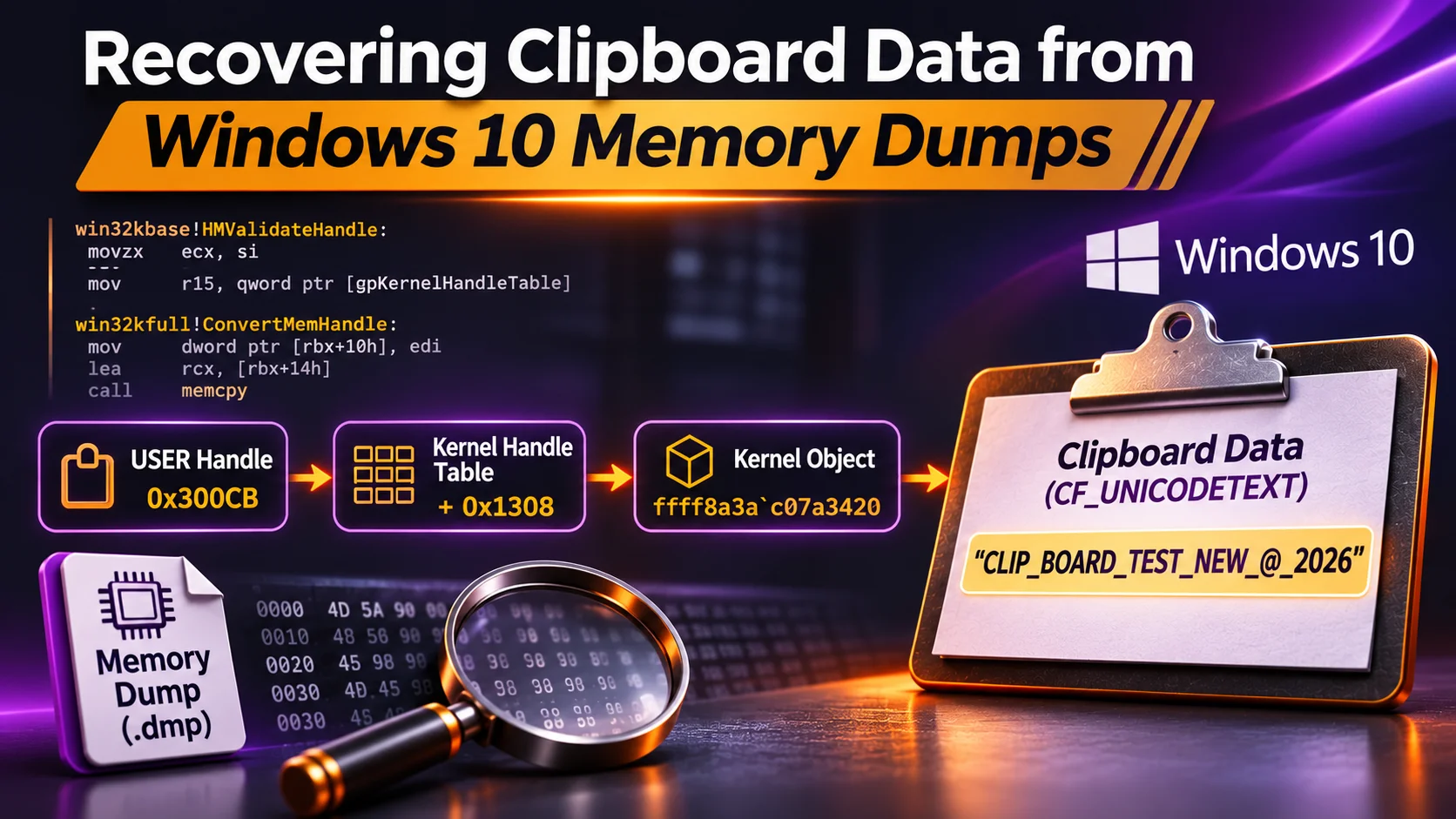
We’ll focus on the first entry, which tells us that the clipboard format is 0x0D (CF_UNICODETEXT) and its handle is 0x300CB.
But this is a USER Handle, not a direct memory address. What we want now is to find the actual Kernel Object address associated with this handle by examining the internal USER Handle Table.
After searching for a function that handles USER Handle validation, we found HMValidateHandle.
So let’s examine its instructions to understand how Windows resolves the handle to its corresponding object in memory.
Now let’s examine the instructions of HMValidateHandle to understand how Windows resolves the USER Handle to its corresponding Kernel Object.
0: kd> uf win32kbase!HMValidateHandle
win32kbase!HMValidateHandle:
ffff8a0b`d6e54db0 488bc4          mov     rax,rsp
ffff8a0b`d6e54db3 48895808        mov     qword ptr [rax+8],rbx
ffff8a0b`d6e54db7 48896810        mov     qword ptr [rax+10h],rbp
ffff8a0b`d6e54dbb 48897018        mov     qword ptr [rax+18h],rsi
ffff8a0b`d6e54dbf 48897820        mov     qword ptr [rax+20h],rdi
ffff8a0b`d6e54dc3 4154            push    r12
ffff8a0b`d6e54dc5 4156            push    r14
ffff8a0b`d6e54dc7 4157            push    r15
ffff8a0b`d6e54dc9 4883ec30        sub     rsp,30h
ffff8a0b`d6e54dcd 488bf1          mov     rsi,rcx
ffff8a0b`d6e54dd0 0fb6ea          movzx   ebp,dl
ffff8a0b`d6e54dd3 65488b0c2588010000 mov rcx,qword ptr gs:[188h]
ffff8a0b`d6e54ddc 4533e4          xor     r12d,r12d
ffff8a0b`d6e54ddf 418bdc          mov     ebx,r12d
ffff8a0b`d6e54de2 e8c9edfeff      call    win32kbase!W32GetThreadWin32Thread
ffff8a0b`d6e54de7 488b05423f1f00  mov     rax,qword ptr [win32kbase!gpsi]
ffff8a0b`d6e54dee 0fb7ce          movzx   ecx,si
ffff8a0b`d6e54df1 483b4808        cmp     rcx,qword ptr [rax+8]
ffff8a0b`d6e54df5 7352            jae     win32kbase!HMValidateHandle+0x99

win32kbase!HMValidateHandle+0x47:
ffff8a0b`d6e54df7 8b3d533f1f00    mov     edi,dword ptr [win32kbase!gSharedInfo+0x10]
ffff8a0b`d6e54dfd 0faff9          imul    edi,ecx
ffff8a0b`d6e54e00 488d4c2420      lea     rcx,[rsp+20h]
ffff8a0b`d6e54e05 48033d3c3f1f00  add     rdi,qword ptr [win32kbase!gSharedInfo+0x8]
ffff8a0b`d6e54e0c e88bd3ffff      call    win32kbase!CLockDomainExclusive<DLT_HANDLEMANAGER>::CLockDomainExclusive<DLT_HANDLEMANAGER>
ffff8a0b`d6e54e11 4c8b3d203f1f00  mov     r15,qword ptr [win32kbase!gpKernelHandleTable]
ffff8a0b`d6e54e18 488bc7          mov     rax,rdi
ffff8a0b`d6e54e1b 482b05263f1f00  sub     rax,qword ptr [win32kbase!gSharedInfo+0x8]
ffff8a0b`d6e54e22 48c1f805        sar     rax,5
ffff8a0b`d6e54e26 8bc0            mov     eax,eax
ffff8a0b`d6e54e28 4c8d3440        lea     r14,[rax+rax*2]
ffff8a0b`d6e54e2c 488bc6          mov     rax,rsi
ffff8a0b`d6e54e2f 48c1e810        shr     rax,10h
ffff8a0b`d6e54e33 663b471a        cmp     ax,word ptr [rdi+1Ah]
ffff8a0b`d6e54e37 756b            jne     win32kbase!HMValidateHandle+0xf4

win32kbase!HMValidateHandle+0x89:
ffff8a0b`d6e54e39 f6471901        test    byte ptr [rdi+19h],1
ffff8a0b`d6e54e3d 750a            jne     win32kbase!HMValidateHandle+0x99

win32kbase!HMValidateHandle+0x8f:
ffff8a0b`d6e54e3f 40386f18        cmp     byte ptr [rdi+18h],bpl
ffff8a0b`d6e54e43 7504            jne     win32kbase!HMValidateHandle+0x99

win32kbase!HMValidateHandle+0x95:
ffff8a0b`d6e54e45 4b8b1cf7        mov     rbx,qword ptr [r15+r14*8]
We’ll focus on the important instructions.
First, we’ll find:
mov rsi,rcx
movzx ecx,si
Here, the function saves the USER Handle in RSI, then extracts its lower 16 bits to use them as the handle index.
So for our handle:
Handle = 0x300CB
Index  = 0xCB
After that, we’ll find:
mov edi,dword ptr [win32kbase!gSharedInfo+0x10]
imul edi,ecx
add rdi,qword ptr [win32kbase!gSharedInfo+0x8]
Here, the function multiplies the index by the shared handle entry size, then adds the shared handle table base address to locate the corresponding entry.
Then we’ll find these instructions:
mov r15,qword ptr [win32kbase!gpKernelHandleTable]
mov rax,rdi
sub rax,qword ptr [win32kbase!gSharedInfo+0x8]
sar rax,5
lea r14,[rax+rax*2]
Here, the function gets the Kernel USER Handle Table address, calculates the index again, and multiplies it by 3.
After that, we’ll find:
mov rax,rsi
shr rax,10h
cmp ax,word ptr [rdi+1Ah]

test byte ptr [rdi+19h],1
cmp byte ptr [rdi+18h],bpl
Here, the function checks the handle’s uniqueness value, flags, and object type before accessing the corresponding Kernel Object.
Finally, we’ll find:
mov rbx,qword ptr [r15+r14*8]Since R14 contains the index multiplied by 3, the function multiplies it by 8 to locate the corresponding slot in the Kernel Handle Table.
So the offset for our handle will be:
Index = 0xCB

0xCB * 3 * 8 = 0x1308
Now let’s get the Kernel Handle Table address:
0: kd> dq win32kbase!gpKernelHandleTable L1
ffff8a0b`d7048d38  ffff8a3a`c0e10000
Now we know that the table starts at:
ffff8a3a`c0e10000So we’ll add 0x1308 to this address and read the pointer stored there.
ffff8a3a`c0e10000 + 0x1308
= ffff8a3a`c0e113080: kd> dq ffff8a3a`c0e11308 L1
ffff8a3a`c0e11308 ffff8a3a`c07a3420Now we’ve found the Kernel Object address associated with our USER Handle:
ffff8a3a`c07a3420But we still need to know where the actual clipboard data is stored inside this object.
Now let’s go back to win32kfull!ConvertMemHandle, which we encountered earlier in SetClipboardData, where it was used to allocate an internal USER object and copy the clipboard data into it. After examining its instructions, we’ll find:
mov dword ptr [rbx+10h],edi
mov r8d,edi
lea rcx,[rbx+14h]
mov rdx,rsi
call win32kfull!memcpy
Here, we’ll notice that the function stores the data size at offset +0x10 and copies the actual data to offset +0x14.
So let’s read the data size first:
0: kd> dd ffff8a3a`c07a3420+10 L1
ffff8a3a`c07a3430  00000036
The data size is 0x36, which means 54 bytes.
Now let’s read the actual data from Object + 0x14. Since our clipboard format is CF_UNICODETEXT, we’ll use du.
0: kd> du ffff8a3a`c07a3420+14
ffff8a3a`c07a3434  "CLIP_BOARD_TEST_NEW_@_2026"
And here we’ve successfully recovered the clipboard text from the memory dump.
We started with the clipboard entry inside WinSta0, extracted its USER Handle, used the Kernel USER Handle Table to find the corresponding object, and finally read the clipboard data directly from memory.
Why did I do all of this?
While studying The Art of Memory Forensics, I came across a plugin that can recover clipboard data, but it was designed for older Windows versions, like Windows XP and Windows 7.
The plugin relies on the tagWINDOWSTATION structure, which I couldn’t find in the Windows 10 symbols. It seems that the structure or its layout has changed, and there isn’t enough public documentation about it.
So I just wanted to find a way to recover clipboard data from Windows 10. That’s all. Finally, I’d be really happy if you have any corrections, suggestions, or a better approach to doing this.
Enjoy your time!
Keep the investigation open.
Have another interpretation, a correction, or a useful trace? Reach out on Discord.
Continue on Discord